Who this is for

Colour-conscious lesson makers

If you intend to adjust footage after filming, look for recording and picture controls that suit your editing workflow. Keep lighting and white balance consistent between takes; a recording format alone cannot make pigment colours look accurate.

Solo workshop instructors

If you teach while operating the camera, you need to see the shot and keep hands and materials in frame. Check screen movement, focus options and where a stable support can stand before settling on a camera.

Instructors sharing a busy space

A compact camera can be quicker to position around other workshop activity, but nearby voices and tools may compete with your explanation. Check compatible microphone options and test speech at the intended teaching position.

What matters when choosing

APS-C interchangeable-lens camera

Choose when: You need to select a lens for a fixed overhead position and alternate between a full palette and close details.

Allow for: The lens, support and audio setup are separate decisions; Canon's UK EOS R50 V body-only listing also says a USB-C charger is not included.

Compact gimbal camera

Choose when: You need to move quickly between a presenter shot and supplementary workshop details.

Allow for: DJI's Osmo Pocket 3 has a fixed lens and no built-in storage, so check the tabletop framing and prepare a compatible microSD card.

Micro Four Thirds interchangeable-lens camera

Choose when: A compact lens-changing setup appeals more than recording at 4K/50p or 4K/60p.

Allow for: Panasonic lists the LUMIX G100D kit at 4K/30p; its onboard audio modes do not establish how clearly speech will record in your workshop.

Concern What to check Who this matters to
Colour control Check the exact recording mode for 10-bit capture or a log or custom picture profile, and decide whether you will edit the footage. If I'm comparing pigment mixtures across takes, I want room to adjust the footage while keeping my lighting and white balance repeatable. Around 31% of consumers put colour control first.
Spoken instruction Check compatible microphone connections and test a short recording from the intended teaching position. When other people are talking or using tools, I need viewers to hear my explanation of the mixing steps. Roughly 25% of consumers make clear instruction audio their primary concern.
Overhead framing Measure the camera-to-palette distance; check the lens field of view and where a stable overhead support can fit. I need the whole palette in one shot but also want viewers to see what my hands are doing up close. Around 25% of consumers prioritise framing flexibility.
Quick setup Check the camera's size, recording media and how safely its support can be positioned without obstructing the workspace. If I have to clear the work surface between activities, I want to position and pack away the camera quickly. About 19% of consumers put a low-footprint setup first.

Buying pitfalls

  • Choosing by resolution alone

    4K recording does not tell you whether the palette fits in frame, moving hands remain in focus or speech is clear. Lens flexibility and recording controls also differ between the cameras considered here.

    Plan the teaching shot and camera position before comparing recording formats. Check whether a fixed lens covers the work surface or whether you need to choose a lens for a repeatable overhead view.

  • Assuming a camera body is ready to film

    Canon's UK EOS R50 V body-only listing does not include a lens or USB-C charger. DJI says the Osmo Pocket 3 has no built-in storage.

    Check the exact bundle, then account for the lens, compatible recording media, charging method and support your setup requires.

    An overhead mount and an external microphone may also be needed for your chosen framing and audio arrangement.

  • Expecting built-in audio to handle a busy room

    Onboard audio features do not establish whether speech will remain intelligible over nearby conversation, tools or room reflections.

    Record a short test at the intended teaching position. If the explanation is hard to follow, check microphone compatibility and test the proposed audio setup before filming the lesson.

  • Including other workshop users in the shot without a plan

    Filming identifiable people can raise privacy questions beyond the choice of camera. The Information Commissioner's Office advises organisations using video systems to consider lawful, fair and transparent handling of personal data.

    Frame out incidental participants where practical. If an organisation is recording identifiable people, establish its purpose and appropriate information for those affected before filming.

Camera brands to consider

Sony

Sony's ZV-E10 II is an APS-C interchangeable-lens option for an instructor planning an edited lesson and a chosen overhead lens.

  • Sony lists E-mount lenses and recording up to 4K 60p in 10-bit 4:2:2 for the ZV-E10 II.
  • Check the selected lens, camera support and microphone arrangement; those recording specifications do not establish colour accuracy or clear speech in the workshop.

Canon

Canon's EOS R50 V offers another APS-C lens-changing route for a fixed teaching setup.

  • Canon lists RF/RF-S lens options, 4K 60p, Canon Log 3 and custom colour profiles for the EOS R50 V.
  • Canon's UK body-only listing calls for a separate lens decision and says a USB-C charger is not included.

DJI

DJI's Osmo Pocket 3 is a compact gimbal option when changing position quickly matters more than changing lenses.

  • DJI lists a 20 mm-equivalent fixed lens, three-axis mechanical stabilisation, a rotatable screen and 4K recording up to 60 fps.
  • Check whether the fixed view fits the palette from your available position; the camera has no built-in storage.

Panasonic

Panasonic's LUMIX G100D kit offers a compact Micro Four Thirds lens-changing route with onboard audio modes.

  • Panasonic lists a 12–32 mm kit lens, 4K/30p recording and OZO Audio modes for the G100D kit.
  • The listed 4K mode is 30p, not 50p or 60p; test audio in the shared room rather than assuming the onboard modes will isolate speech.

Joybuy camera choices

These choices include interchangeable-lens cameras for a planned tabletop setup and compact gimbal bundles for quicker changes of position. Check the exact bundle and your camera-to-palette distance before choosing between them.

Sony Alpha ZV-E10 II K camera with 16–50 mm power-zoom lens

Sony Alpha ZV-E10 II K with 16–50 mm power-zoom lens

Consider this kit if you want to plan an overhead view around a supplied zoom lens and edit the lesson's colour afterwards.

The named kit includes a 16–50 mm f/3.5–5.6 lens and specifies 4K60p and 10-bit 4:2:2 recording. Check the recording media, overhead support and microphone setup needed for your workshop.

View on Joybuy

DJI Osmo Pocket 3 Creator Combo camera

DJI Osmo Pocket 3 Creator Combo

Consider this compact gimbal camera if you need to move between a presenter view and supplementary detail shots without changing lenses.

DJI lists a fixed 20 mm-equivalent lens and three-axis mechanical stabilisation for the Osmo Pocket 3. Check how that view fits the palette: the camera has no built-in storage, so prepare a compatible microSD card. Test the bundle's audio arrangement in the room.

View on Joybuy

Sony A6700 APS-C camera with 16–50 mm lens

Sony A6700 APS-C with 16–50 mm lens

This lens kit is an option if you want an interchangeable-lens camera for a planned tabletop position.

The product name specifies a 16–50 mm lens. Confirm that its view suits your camera-to-palette distance, and check the recording mode, microphone connection and media needed for your lesson.

View on Joybuy

Sony ZV-E10K camera with 16–50 mm power-zoom lens

Sony ZV-E10K with 16–50 mm power-zoom lens

Consider this interchangeable-lens kit if the supplied zoom range suits your planned presenter and tabletop views.

The named kit includes a 16–50 mm power-zoom lens. If you expect to grade pigment colours, confirm the exact recording formats and picture controls; also check media, support and microphone compatibility for your setup.

View on Joybuy
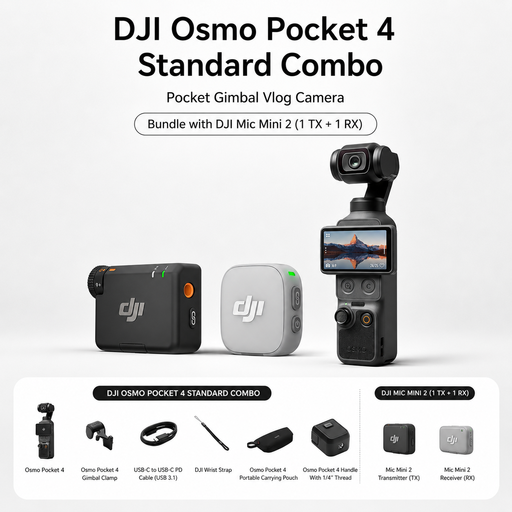
DJI Osmo Pocket 4 Travel Vlog Set with Mic Mini 2

DJI Osmo Pocket 4 Travel Vlog Set with Mic Mini 2

Consider this compact camera bundle if quick repositioning and a separate microphone transmitter are priorities.

The product name identifies a Standard Combo with Mic Mini 2. Before choosing it for palette close-ups, confirm the camera's field of view, its microphone connection, recording options and a suitable overhead support.

View on Joybuy

Common questions

Do I need an interchangeable-lens camera for a colour-mixing lesson?

Not necessarily: choose one when you need to match the lens to a fixed camera-to-palette distance or switch between wide and close views. Sony's ZV-E10 II and Canon's EOS R50 V accept interchangeable lenses; DJI's Osmo Pocket 3 is quicker to reposition but has a fixed 20 mm-equivalent lens.

Will a built-in microphone capture clear instruction in a shared workshop?

It might, but onboard audio features cannot establish how clearly your voice will record over activity in that room. Test from the intended teaching position and, if speech is hard to follow, confirm a compatible external-microphone arrangement before filming a full lesson.

What should I check beyond the camera body?

Check the lens or fixed-lens view, recording media, charging method, stable support and audio equipment required for your shot. Canon's UK EOS R50 V body-only listing says a USB-C charger is not included, while DJI states that the Osmo Pocket 3 needs a microSD card because it has no built-in storage.

What if other workshop users appear in the video?

Plan the framing and recording arrangements before filming identifiable people. For organisations using video systems, the Information Commissioner's Office emphasises lawful, fair and transparent handling of personal data; establish the organisation's purpose and what information those affected should receive.