Choose the camera and lens as a system rather than judging the body by resolution alone: controllable lighting, stable support and sufficient close focus matter for home-studio accessory photographs. If tiny engravings or textures must fill the frame, prioritise a suitable macro lens; for whole-accessory catalogue shots, start with a manageable stills setup and give video features priority only if you also make product clips.
Who is this for?
Close-detail accessory sellers
If engravings, stones, textures or fastenings need to remain legible in close-ups, lens magnification and a stable setup matter more to your choice than action-focused features. Focus stacking is worth considering when a still accessory extends across several focus planes.
Repeatable catalogue photographers
If you regularly photograph complete accessories, flat lays or styled sets, look for a camera you can position consistently and a lens that frames those compositions. A movable screen or a supported remote-control method may make tripod-based work easier.
Stills-and-video creators
If you also make short demonstrations, consider screen positioning and product-focused video features alongside still-image needs. The lens must still focus closely enough for the details you intend to show.
What matters when choosing?
For costume accessories in a home studio, establish how closely the smallest detail must be framed, then consider the controls that make repeated shots or product clips practical.
| Concern |
What to check |
Who this matters to |
| Close-up detail |
Check the exact lens’s maximum magnification and working distance. For a still subject with depth, consider whether focus stacking fits your workflow. |
If tiny stones or engravings must occupy much of my image, I need the lens to frame them closely without crowding my lights; around 46% of consumers put close-up detail first. |
| Repeatable studio shots |
Check screen positioning and the camera’s supported remote-control method; plan for stable support and controllable lighting. |
When I photograph a series of complete accessories, I want to keep composition and handling consistent between shots. Around 36% of consumers primarily value that repeatable workflow. |
| Stills and video |
Check the video modes you intend to use, screen position and product-focusing features, while confirming the lens’s close-focus suitability. |
If my listings also need short demonstrations, I want one setup that can make both photographs and clips; around 18% of consumers make that combination their primary concern. |
Mistakes to avoid
-
Assuming every lens labelled macro reaches life-size magnification
Canon UK specifies up to 1:2 magnification for the RF 35mm F1.8 Macro, while Nikon UK specifies 1:1 for the NIKKOR Z MC 50mm f/2.8 and Sony UK specifies 1:1 for the E 30mm F3.5 Macro. Those differences matter when a very small detail must fill the frame.
Decide how large your smallest detail needs to appear, then check the exact lens’s magnification and working distance.
A separate true-macro lens may be needed if the lens in your initial setup cannot frame that detail closely enough.
-
Choosing by camera resolution alone
For a stationary accessory, lighting, styling and a repeatable setup also shape the photograph. Adobe UK includes those elements in its product-photography guidance.
Plan stable camera support and controllable lighting, and test how reflective finishes look under the arrangement you intend to use.
A tripod, diffusion and backgrounds may also be needed for the studio setup.
-
Overlooking space for lights around a macro lens
Sony UK specifies a 2.4 cm minimum working distance for the E 30mm F3.5 Macro. At that distance, the lens can leave little room to position lighting around a reflective accessory.
Check working distance as well as magnification, and make sure your planned lighting arrangement fits around the subject.
Brands to consider for this setup
Canon
Canon’s EOS R50 is an APS-C interchangeable-lens option for repeatable accessory stills and a remotely controlled setup.
- Canon UK specifies a 24.2 MP APS-C sensor for the EOS R50, and Canon Camera Connect can be used to control it remotely.
- Canon UK specifies up to 1:2 magnification for the RF 35mm F1.8 Macro. If life-size detail is required, compare a lens that reaches 1:1.
Nikon
Nikon’s Z50II route is relevant if you want an APS-C body with a movable screen and a lens option for very small details.
- Nikon UK specifies a vari-angle touchscreen for the Z50II and 1:1 magnification for the NIKKOR Z MC 50mm f/2.8.
- The cited macro lens is a separate lens choice; check what comes with the camera and whether the resulting setup suits your compositions.
Sony
Sony’s APS-C E-mount options are relevant if the same camera setup needs to cover accessory stills and product clips.
- Sony UK specifies approximately 26.0 MP for α6700 still images and 1:1 magnification for the separate E 30mm F3.5 Macro lens.
- Sony UK specifies a 2.4 cm minimum working distance for that macro lens; check whether your lights and reflectors can be positioned around the subject.
Joybuy camera options
These Sony camera options include APS-C kits for accessory stills and clips, alongside Alpha 7 III full-frame configurations. For tiny details, check the close-focus capability of the lens you intend to use rather than relying on the camera body alone.
 No image available
Sony A6700 APS-C with 16–50mm lens
A camera-and-zoom option to consider if you make both accessory stills and short clips. Confirm the included lens’s close-focus magnification before relying on it for tiny details.
Sony UK specifies approximately 26.0 MP for α6700 still images.
View on Joybuy
 No image available
Sony Alpha ZV-E10 II K with 16–50mm f/3.5–5.6 Power Zoom lens
Consider this kit if product demonstrations are part of the same workflow as still photographs. Check whether its included zoom can frame your smallest accessory details closely enough.
The product name identifies an APS-C camera and a 16–50mm f/3.5–5.6 Power Zoom kit lens.
View on Joybuy
 No image available
Sony Alpha 7 III full-frame with 28–70mm zoom lens
This camera-and-zoom configuration is an option for whole-accessory compositions. Check the 28–70mm lens’s close-focus magnification if small details must fill the frame.
The product name identifies a full-frame Alpha 7 III with a 28–70mm zoom lens.
View on Joybuy
 No image available
Sony A6400 APS-C with 16–50mm Power Zoom lens
Consider this kit for complete-accessory shots, then check whether its zoom provides the magnification required for close detail. If remote operation or wireless transfer matters to your studio routine, confirm the methods available for this configuration.
The product name identifies an APS-C A6400 and a 16–50mm Power Zoom lens.
View on Joybuy
 No image available
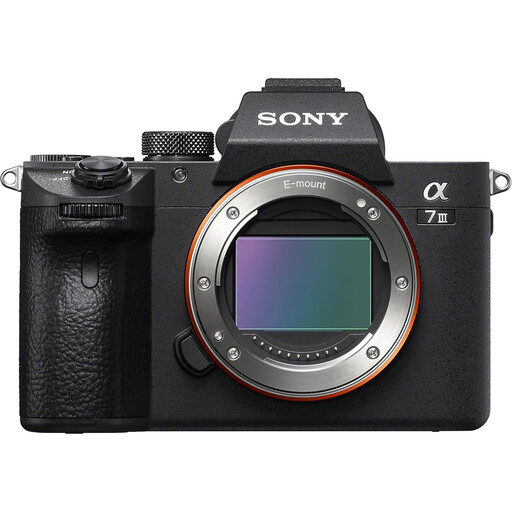
Sony Alpha 7 III full-frame camera body only
Consider this configuration if you plan to select a lens for your accessory compositions. Confirm what comes in the box before ordering: the body-only designation conflicts with a 28–70mm lens mentioned elsewhere in the product information.
If it is body only, you will need a compatible lens; check that lens’s close-focus capability for small details.
View on Joybuy
Common questions
Do I need a macro lens to photograph costume accessories?
Not for every shot: a lens that frames complete accessories or flat lays may meet that need, while very small details can call for greater magnification. Canon UK specifies up to 1:2 for the RF 35mm F1.8 Macro; Nikon UK and Sony UK specify 1:1 for the NIKKOR Z MC 50mm f/2.8 and E 30mm F3.5 Macro respectively. Check the lens you would actually use.
How can I keep a curved accessory sharp from front to back?
Use stable support and consider focus stacking if one focused image does not show all the required surfaces sharply. Adobe describes focus stacking as combining images focused at different distances and identifies product and macro photography as uses.
Which matters more for stationary accessory shots: the camera body or the lighting and lens?
Start by ensuring the lens frames the detail you need and the lighting can be controlled around the accessory. Adobe UK identifies lighting, styling and workflow as important parts of product photography; a body specification alone does not settle those setup choices.
What should I do with an old camera when replacing it?
Check your local council’s or retailer’s current electrical-equipment collection instructions before disposing of it. Collection arrangements can differ by area.


