What matters when choosing?
Check whether a lens can frame the workspace and the smallest object you photograph, then decide which screen, autofocus and recording features your workflow calls for.
| Concern |
What to check |
Who this matters to |
| Framing in limited space |
Check the bundled lens’s focal-length range and whether you can position the camera far enough from the workbench for the composition you want. |
When I cannot step back, I need to fit the maker and workstation into the shot without losing the working context. Around 36% of consumers put limited-space framing first. |
| Close craft details |
Compare the exact lens’s minimum focus distance and maximum magnification, then test the framing with your smallest item. |
If stitches or small finished pieces are the subject, I need them to fill enough of the photograph to show the detail. For around 29% of consumers, close-detail framing is the primary concern. |
| Solo process recording |
Check the screen’s movement, autofocus behaviour for the intended subject and audio connections if you plan to film. |
When I work and record alone, I need to see the composition and keep attention on the maker or the item being shown. That is the leading need for around 21% of consumers. |
| A complete, compatible kit |
Confirm body-versus-kit contents, lens compatibility, charging items and the memory-card requirements for your chosen recording mode. |
Before arranging a shoot, I need to know that the lens and essential accessories match the camera and what I intend to record. Around 14% of consumers prioritise kit completeness and compatibility. |
Joybuy camera kits
These Sony camera-and-zoom kits are options for photographing a maker and their workbench. Check each kit’s exact lens and screen arrangement against the close details and camera positions your studio requires.
 No image available
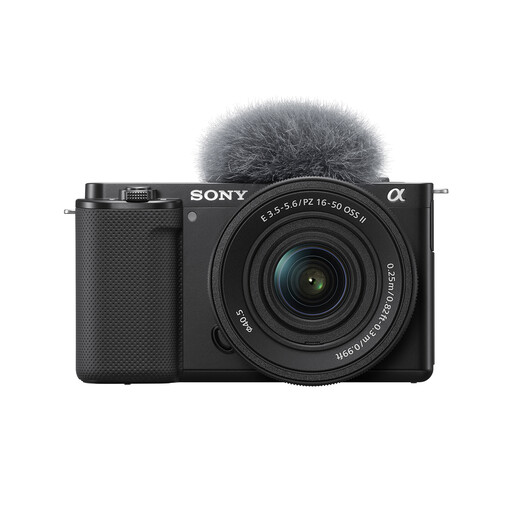
Sony Alpha ZV-E10 II K with 16–50 mm f/3.5–5.6 Power Zoom
For maker demonstrations and wider workspace shots, this APS-C kit pairs the camera with a 16–50 mm zoom.
The listed camera has 26 megapixels and supports 4K60p recording. Check whether the supplied lens frames your smallest craft detail closely enough.
View on Joybuy
 No image available
Sony ZV-E10K with 16–50 mm Power Zoom Lens
This camera-and-zoom kit offers different focal lengths for composing shots of a maker and the workbench.
Check the supplied lens’s close-focus specifications against your smallest item, and confirm the screen and audio arrangement if you will record demonstrations alone.
View on Joybuy
 No image available
Sony A6700 APS-C with 16–50 mm Lens
The supplied zoom gives this APS-C camera different focal lengths for composing maker and workspace shots.
The product name identifies AI-powered autofocus. Check the exact lens’s close-focus framing and the camera’s audio connections if small objects or recorded demonstrations are central to your work.
View on Joybuy
 No image available
Sony A6400 APS-C with 16–50 mm Power Zoom Lens
Consider this kit if you photograph a moving maker as well as wider scenes around the workbench.
Sony specifies Real-time Tracking and a 180-degree tilting screen for the Alpha 6400 body. Check that the screen reaches your shooting position and that the exact bundled lens can frame your smallest detail.
View on Joybuy
Common questions
Do I need a macro lens for craft details?
Not necessarily: whether a kit zoom is sufficient depends on how tightly it frames your smallest item. Canon quotes 15 cm close focusing and 0.25x magnification for its RF-S 18-45mm, while Sony quotes 0.25–0.30 m and 0.215x for the E PZ 16-50mm OSS II; Nikon quotes 0.2 m minimum focus distance for its Z DX 16-50mm. Test the exact lens and consider a compatible closer-focusing lens if the result falls short.
Is a vari-angle screen useful in a small studio?
A vari-angle screen is useful when your camera position makes the viewfinder awkward to use, particularly for solo, low-angle or side-on shots. Canon specifies one for the EOS R50 and Nikon for the Z50II; Sony specifies a 180-degree tilting screen for the Alpha 6400 instead. Check how each screen moves relative to your workbench and intended camera position.
What should I check before filming a craft demonstration?
Check the framing and autofocus behaviour for both the maker and the item being shown, then confirm audio connections and storage requirements. Nikon specifies microphone and headphone sockets plus Product Review Mode for the Z50II, while Canon specifies a microphone input for the EOS R50. For Alpha 6400 XAVC S recording, Sony specifies card requirements that vary with the selected recording setting.
What if a new camera bought in the UK is not of satisfactory quality?
The UK Consumer Rights Act 2015 requires goods supplied under a contract to be of satisfactory quality. Keep the product listing, order confirmation and relevant specification claims so you can explain the problem to the retailer; a change-of-mind return policy is a separate matter from an issue with faulty or misdescribed goods.


