For a fixed flower-arranging lesson, choose a camera setup that lets you frame the worktable, monitor recording and keep hands and flowers in focus. Plan the lighting and sound alongside the camera: a dark backdrop does not remove the need to light the subject. Stabilisation becomes a more important consideration if you will also film handheld around the workshop.
Who is filming?
Solo flower-arranging instructors
If you demonstrate techniques without a camera operator, you need to see the framing and manage recording while your hands are occupied. Screen position, accessible controls, focus behaviour and voice pickup deserve attention.
Creators filming against a dark backdrop
If the flowers and hands must stand out against black, you need control over subject lighting, exposure and framing. Check the result with the actual backdrop and flowers rather than relying on a camera’s low-light claims.
Mobile workshop filmmakers
If you move between worktables or add handheld detail shots, stabilisation and focus behaviour matter more than they do for a lesson recorded entirely from a fixed support.
What matters when choosing?
For a fixed lesson, settle the lighting and camera position before choosing features for handheld filming. The three camera routes below address different ways of working, not a single measure of image quality.
Sony ZV-E10 II
Consider it when: You want an interchangeable-lens APS-C camera for a tripod-based lesson and may use USB streaming.
Bear in mind: The lens and lighting must suit the worktable; Sony says a USB 2.0 connection limits actual streaming output to HD (720p).
Canon EOS R50 V
Consider it when: Front-facing recording controls and a vari-angle screen would help you operate the camera while teaching.
Bear in mind: Those controls do not replace a suitable lens, clear sound or lighting for the flowers and hands.
Panasonic LUMIX G9II
Consider it when: Your lessons also include handheld workshop angles or recording formats for more involved editing.
Bear in mind: Its stabilisation addresses camera movement, not the exposure of flowers against a dark backdrop.
| Concern |
What to check |
Who this matters to |
| Flower detail and exposure |
Test exposure with the intended flowers and backdrop; plan a key light and, where useful, fill or backlight. |
If petals and hands disappear into the backdrop, the lesson is hard to follow even when the background looks dark enough. Around 36% of consumers put controlled subject detail first. |
| Close-up framing and focus |
Check the view at your available camera distance and test focus as hands, tools and flowers move through it. |
I need viewers to see precisely where I cut a stem or place a bloom, without losing the action at the edge of the frame. For around 29% of consumers, clear demonstration framing is the primary concern. |
| Solo operation and audio |
Check screen visibility from the teaching position, record controls and the sound setup; for live lessons, check the computer connection too. |
When I teach alone, I need to know recording has started and that my explanation can be heard. Around 21% of consumers chiefly prioritise a manageable solo workflow. |
| Handheld filming |
Decide whether you will move with the camera; if so, assess stabilisation and the recording format your editing setup can handle. |
Moving around a workshop calls for steadier handheld footage, while a fixed lesson has a different priority. Handheld or more involved production is the main concern for around 14% of consumers. |
Common buying mistakes
-
Raising ISO instead of lighting the flowers
More sensitivity does not determine where light falls. Against a dark backdrop, unlit petals and hands can lose the separation needed to show the technique.
Try a key light on the work area, modest fill for the shadows and backlight if the subject needs a clearer outline. Canon Europe describes key, fill and backlight as a starting point for shaping a video scene.
This setup may also call for diffusion, reflectors or light mounts.
-
Choosing a camera body without planning the full setup
An interchangeable-lens body still needs a lens that frames the work area. Camera features alone do not establish which teaching accessories come in a particular kit.
Check the exact contents and plan the lens, stable support, lighting and sound equipment needed for your camera position.
A tripod or overhead mount, memory card and microphone may be separate parts of the setup.
-
Assuming a selected USB setting is the final stream resolution
For the Sony ZV-E10 II, Sony United Kingdom says a USB 2.0 connection produces actual HD (720p) output even when a higher streaming resolution is selected.
Before a live lesson, check Sony’s connection instructions against your computer, cable and teaching platform, then test the complete stream.
-
Confusing a retailer return policy with fault remedies
For UK purchases, a seller’s voluntary change-of-mind terms are distinct from statutory remedies for faulty goods. Coventry City Council Trading Standards notes that a refund is available for a faulty item in most cases within its stated 30-day period.
Read the retailer’s return terms separately, keep your order record and contact the seller promptly if the camera is faulty or differs from its description.
Relevant brands to consider
Sony
The ZV-E10 II is a reference point for a tripod-based, interchangeable-lens creator setup that may also be used for USB streaming.
- Sony United Kingdom specifies a 26.0-megapixel APS-C back-illuminated sensor, E-mount lenses and 4K recording up to 60p for this model.
- For USB streaming, Sony says a USB 2.0 connection limits actual output to HD (720p). Lighting and lens choice still need to suit the lesson.
Canon
The EOS R50 V is relevant when an instructor needs to operate a video-focused camera from the teaching position.
- Canon UK describes a vari-angle touchscreen, front record button, tally lamp, autofocus and microphone support on the EOS R50 V.
- Test the chosen lens and focus behaviour with moving hands and flowers; front-facing controls do not light a dark-background set.
Panasonic LUMIX
The G9II is relevant to a lesson that also calls for handheld workshop footage or more involved video editing.
- Panasonic UK & Ireland specifies phase-hybrid autofocus and 8.0-stop body image stabilisation for the G9II.
- For a lesson recorded entirely from a fixed support, stabilisation does not take the place of lighting the subject.
Joybuy camera options
These Sony camera options cover interchangeable-lens and compact approaches to filming the lesson. Check framing, focus and sound at your own worktable, especially if you plan to teach without a camera operator.
 No image available
Sony Alpha ZV-E10 II K with 16–50 mm kit lens
Consider this interchangeable-lens kit if you want to adjust framing for a fixed teaching position.
The listed variant includes a 16–50 mm f/3.5–5.6 power zoom lens and specifies a 26-megapixel APS-C camera with 4K60p, 4:2:2 10-bit recording and real-time Eye Autofocus.
Test focus on flowers and moving hands, and light the work area rather than relying on the dark-scene camera specifications alone.
View on Joybuy
 No image available
Sony ZV-E10K with 16–50 mm power zoom lens
Consider this interchangeable-lens kit if you need to assess both a teaching view and closer tabletop framing from your available camera position.
The product name identifies a 16–50 mm power zoom lens. This is the ZV-E10K, not the ZV-E10 II; do not assume the two models share recording or streaming capabilities.
Check the screen and sound arrangement for solo teaching, then test focus and lighting with the actual flowers and backdrop.
View on Joybuy
 No image available
Sony ZV-1F compact camera, 1-inch sensor
Consider the compact ZV-1F if you can position its fixed wide-angle lens to show the work area you need.
The product name specifies a 1-inch sensor and an ultra-wide lens. A fixed wide view offers less framing flexibility than an interchangeable-lens setup, so check whether small flower-arranging steps will appear clearly from your planned position.
Test focus on the arrangement and moving hands, and plan lighting for the dark backdrop.
View on Joybuy
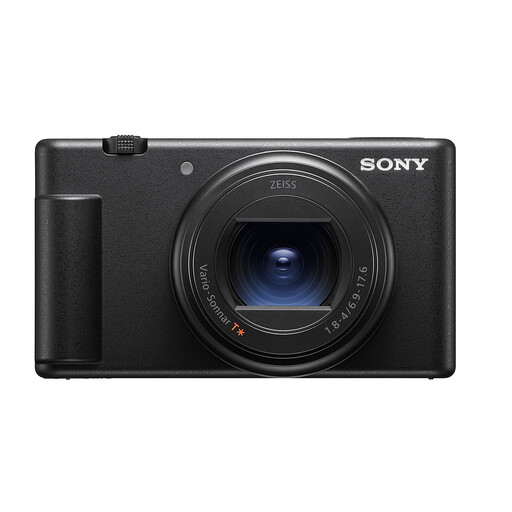 No image available
Sony ZV-1 II compact zoom camera
Consider this compact zoom camera if you want to change between wider and tighter views without changing lenses.
The product name specifies a 1-inch stacked sensor, 20-megapixel stills and 4K video. Check that its zoom range frames the flowers and hands from your working distance.
Before relying on it for a solo lesson, confirm that the screen position and microphone connection suit your setup, and test focus under the intended lighting.
View on Joybuy
Frequently asked questions
Can a camera alone make a dark-background flower lesson look clear?
No: the flowers and hands still need deliberate lighting to remain visible against the backdrop. Canon Europe describes key, fill and backlight as a starting point; try them with your actual arrangement and adjust the balance for the detail you need to show.
Do flower-arranging tutorials require interchangeable lenses?
Not always. An interchangeable-lens system gives you a choice of framing for the room and worktable, while a compact camera can work if its fixed lens shows the necessary steps from your available position. Check both a wider teaching view and close-up detail before deciding.
Will the Sony ZV-E10 II stream in 4K over any USB connection?
No. Sony United Kingdom says USB 2.0 limits the ZV-E10 II’s actual streaming output to HD (720p), even if a higher resolution is selected. Check the computer and cable requirements for the streaming mode you intend to use.
What if a camera bought in the UK is faulty?
A faulty camera may qualify for a statutory remedy, which is separate from a seller’s voluntary change-of-mind policy. Coventry City Council Trading Standards says a refund is available in most cases for a faulty item within its stated 30-day period; keep your order record and contact the seller promptly about the fault.


