Choose the lens and lighting controls around the smallest stitch detail you need to show, rather than choosing a camera by megapixels alone. A compatible close-focusing lens gives you a clearer path to frame individual stitches; for thread colour and exposure under artificial light, check white-balance, RAW and flicker controls, then test the camera with the lights you will use.
Who is this setup for?
Stitch-detail documenters
If you photograph individual stitches, texture or finishing quality for instructions and records, start with the lens’s close-focus capability. Canon UK documents its RF 35mm F1.8 MACRO IS STM at up to 1:2 magnification, a lens-specific figure that a camera body alone cannot provide.
Colour-conscious makers and sellers
If thread colour needs to remain consistent across listings or teaching material, repeatable lighting and deliberate white-balance settings matter. Canon Europe notes that RAW files allow white-balance adjustments after capture.
Hybrid tutorial creators
If you make still photographs alongside demonstrations, consider an interchangeable-lens camera that fits your video workflow. Check the supplied lens separately: video features do not establish whether it can frame a small stitch closely enough.
What matters when choosing?
For embroidery photographed under artificial light, decide what must take priority: stitch-sized framing, consistent colour and exposure, or a manageable stills-and-video setup. Check the exact lens and camera controls against that need.
| Concern |
What to check |
Who this matters to |
| Stitch-level framing |
Check the exact lens’s maximum magnification, minimum focusing distance and body compatibility. Canon UK specifies up to 1:2, not 1:1, for its RF 35mm F1.8 MACRO IS STM. |
If individual stitches must fill much of the photograph, I need a lens that focuses closely enough without depending on a heavy crop. Around 40% of consumers put stitch-level framing first. |
| Colour and even exposure |
Check for manual or custom white balance and RAW capture; test flicker controls and shutter settings with your lights. Nikon Imaging Support cautions that flicker reduction may not work in every setup. |
When thread shades need to look consistent across photographs, I want control over colour and any bands caused by the lighting. For around 30% of consumers, that consistency is the primary concern. |
| Stills and video workflow |
Check the supplied lens, screen arrangement and any accessories needed for your intended photographs and demonstrations. |
If I photograph finished work and record occasional tutorials, I need a setup I can use for both while retaining a route to a closer-focusing lens. That mixed-use need comes first for around 30% of consumers. |
Mistakes to avoid
-
Assuming the camera body or kit lens guarantees close-ups
Stitch-sized framing depends on the lens you use. Canon UK specifies up to 1:2 magnification for the RF 35mm F1.8 MACRO IS STM; that figure does not apply to every lens fitted to a compatible body.
Decide how small an area you need to fill the frame, then check the exact lens’s magnification, minimum focusing distance and compatibility.
A separate close-focusing lens may be needed for the framing you want.
-
Leaving thread colour entirely to auto white balance
Artificial light can change how thread colours appear between shots. Canon Europe explains that RAW capture leaves room to adjust white balance afterwards, though it adds an editing step.
Keep the lighting repeatable and check whether the camera offers a custom or manual white-balance setting if colour consistency matters to your work.
-
Expecting anti-flicker settings to fix every light
Bands or uneven brightness can remain under some lighting and shooting conditions. Nikon Imaging Support cautions that flicker detection or correction is not effective in every setup.
Try the intended light, camera mode and shutter settings before photographing a full collection of work.
-
Treating every camera kit as a complete setup
Kit contents differ. Nikon UK’s Z50II with 16-50mm f/2.8 VR kit specifies that a charger is not included; its zoom specification also does not establish the close-up magnification your stitches may require.
Read the contents for the exact kit and check the lens and accessories needed for your shooting arrangement.
Camera brands to consider
These brands offer documented camera-and-lens routes relevant to embroidery photography; suitability depends on the particular body, lens and lighting setup.
Canon
Canon UK lists the EOS R50 as compatible with RF and RF-S lenses and specifies up to 1:2 magnification for the separate RF 35mm F1.8 MACRO IS STM lens.
- A documented body-and-lens route lets you assess close-up framing using the named lens’s magnification.
- The RF 35mm lens is separate from the body, and its 1:2 magnification is not 1:1 reproduction.
Nikon
Nikon UK offers a Z50II kit with a 16-50mm f/2.8 VR zoom, a route to consider if photographs of larger pieces are also part of your work.
- The cited kit pairs a mirrorless body with a constant f/2.8 standard zoom.
- The zoom’s aperture does not establish macro magnification. Check close-focus specifications and the exact kit contents; Nikon UK specifies no charger for the cited kit.
Sony
Sony UK documents the ZV-E10 II as a 26.0-megapixel APS-C camera compatible with E-mount lenses, making the lens choice important for stitch-detail work.
- An interchangeable-lens route can accommodate a lens chosen for closer framing as well as a mixed photography-and-video workflow.
- Do not assume a supplied standard zoom will frame individual stitches closely enough; check its exact close-focus specification.
Joybuy cameras for embroidery
These interchangeable-lens Sony cameras are options for embroidery stills and occasional tutorial video. Their supplied zooms should be assessed for close-up framing before you rely on them for individual stitches; also check the controls you need under your own lights.
 No image available
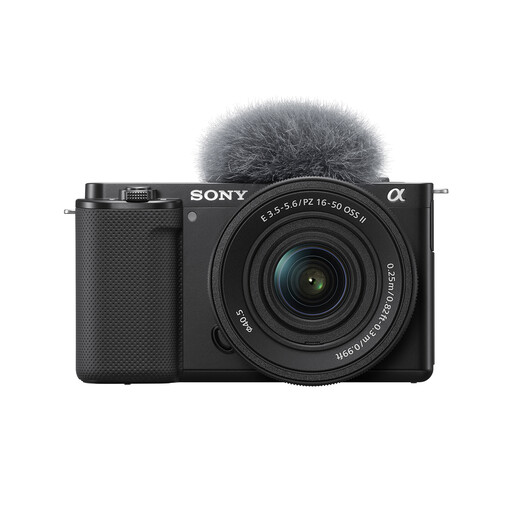
Sony Alpha ZV-E10 II K with 16–50 mm f/3.5–5.6 power zoom
Consider this kit if you photograph embroidery and also record tutorials. Its stated features include a 26-megapixel APS-C sensor and 4K60p video; the lens’s stitch-level magnification needs checking.
The product information describes manual white balance and RAW capture. Check flicker controls and test the camera with your artificial lighting.
View on Joybuy
 No image available
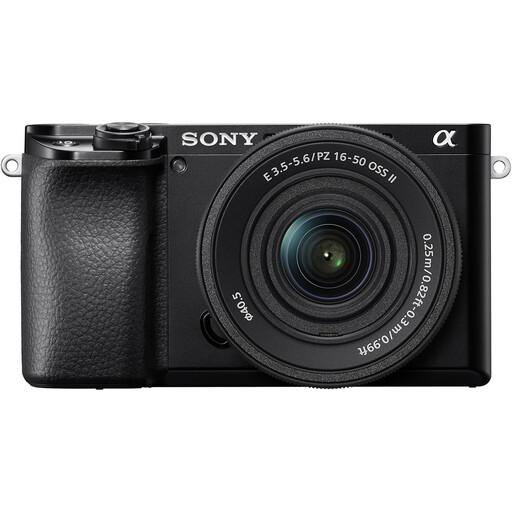
Sony A6400 with 16–50mm power zoom
This camera-and-zoom kit is relevant if you photograph larger embroidered pieces and also make occasional tutorials. Check the supplied lens’s magnification and minimum focusing distance before choosing it for individual stitches.
If consistent thread colour or banding control is important, confirm the camera settings you need and try them with your lights.
View on Joybuy
 No image available
Sony A6700 with 16–50mm lens
Consider this APS-C camera kit for a mix of embroidery photographs and tutorial video. The named 16–50mm lens is a starting point for checking framing, not evidence that individual stitches will fill the image.
Confirm the lens’s close-focus figures and the white-balance, RAW and flicker controls needed for your lighting.
View on Joybuy
 No image available
Sony ZV-E10K with 16–50mm power zoom
The supplied zoom and vari-angle screen make this kit relevant to photographs of embroidery pieces alongside video demonstrations. Check whether the lens can focus closely enough for your smallest motif.
Confirm the available colour and flicker settings if you will photograph under artificial light.
View on Joybuy
 No image available
Sony A6100 with 16–55mm zoom lens
This APS-C camera is an option for photographing larger embroidery pieces and recording occasional tutorials. Confirm the exact zoom lens supplied, then check its magnification and minimum focusing distance for stitch-detail shots.
Check the camera’s white-balance, RAW and flicker settings against the artificial lights you intend to use.
View on Joybuy
Frequently asked questions
Do I need a macro lens to photograph embroidery stitches?
Not for every photograph: a standard zoom may meet your framing needs for a whole hoop or garment. If individual stitches must occupy much of the image, check the exact lens’s maximum magnification and focusing distance. Canon UK specifies up to 1:2 for its RF 35mm F1.8 MACRO IS STM; the word “macro” alone does not tell you whether a lens reaches 1:1.
How can I keep thread colours consistent under artificial light?
Use repeatable lighting and set white balance deliberately rather than depending entirely on an automatic setting. If the camera supports RAW capture, Canon Europe notes that you can adjust white balance afterwards; check those controls on the particular camera you intend to buy.
Why do bands appear in photographs taken under some lights?
Flickering light can produce bands or uneven brightness in a photograph even when the effect is hard to see by eye. Nikon Imaging Support advises trying flicker reduction where available and testing suitable shutter settings, while cautioning that correction does not work in every lighting setup.
Would flash help with close embroidery photographs?
Flash can provide another way to light a close subject; Canon Europe describes macro ring and twin flash units designed to direct light onto nearby subjects. Before adding one, test how the light falls on your actual threads and texture, and check that the unit works with your chosen camera.


