For a flower-arranging lesson, choose the camera and lens together: they need to frame the work surface from your intended position, while letting you check the shot and focus as you work. A kit with a supplied zoom lens can simplify the purchase, whereas 4K 60p and advanced colour recording are worth prioritising when you plan to slow, crop or colour-grade footage. Test the flowers and white backdrop under your actual lighting before recording a full lesson.
Who is this for?
Solo tabletop instructors
If both hands are occupied arranging flowers, you need to see the frame from beside the work surface. Check screen visibility, the lens's view from your mounting position and how focus behaves when your hands enter the shot.
Colour-conscious flower demonstrators
When flower shades and a white backdrop need to look consistent across lessons, review colour and exposure using the actual set. Advanced recording formats are most relevant if you intend to adjust the footage afterwards.
Course creators who reuse footage
If you plan to make close crops, slow-motion technique inserts or shorter clips from a lesson, consider the recording modes alongside the extra storage and editing work they may bring.
What matters when choosing?
Start with the camera position and the area the lens must show. Then decide whether you need a simple repeatable recording setup or footage you will edit more extensively.
| Concern |
What to check |
Who this matters to |
| Flower detail and colour |
Check lens framing from the planned mount, then test exposure and colour with the actual flowers and white backdrop. |
If petal texture and flower shades are central to my demonstrations, I need to see how they look in a test recording rather than rely on a white set alone. Around 36% of consumers may put detail and colour control first. |
| Solo framing and focus |
Measure the table and camera distance; check screen visibility and focus with hands moving into the frame. |
Working without a camera operator, I need to know that the arrangement stays in shot while I use both hands. For around 29% of consumers, keeping track of framing and focus may be the primary need. |
| Spoken lessons and setup |
Check the exact package contents, microphone options, charging arrangements and required recording card. |
For regular spoken lessons, I want a setup I can prepare without overlooking sound or a needed accessory. A straightforward recording workflow may come first for around 21% of consumers. |
| Editing flexibility |
Confirm the exact frame-rate and colour modes, recording-media requirements and compatibility with your editing device. |
If I will slow a technique or crop several clips from one lesson, I need recording options that suit that editing plan. Around 14% of consumers may prioritise this flexibility above the other concerns. |
Buying pitfalls
-
Assuming a camera body is a complete lesson kit
Canon UK Store lists the EOS R50 V as body-only and says a USB-C charger is not included. Without a chosen lens, you cannot judge whether that purchase will show the whole table from your camera position.
Check the contents of the exact package and compare a compatible lens's framing with your measured camera-to-table distance.
Depending on the package and setup, a lens, support, microphone or charger may need to be obtained separately.
-
Choosing advanced recording modes without an editing plan
Canon UK Store lists 4K 60p for the EOS R50 V, Sony UK lists up to 4K 60p for the ZV-E10 II, and Panasonic UK & Ireland lists 4K up to 30p for the G100D. A higher frame rate does not by itself solve framing or lighting problems in a fixed lesson.
Decide whether you will actually make slow-motion inserts or colour-grade before making those modes a purchase priority.
More involved recording and editing can add storage needs and preparation time.
-
Overlooking the recording card
Panasonic UK & Ireland specifies UHS-I UHS Speed Class 3 compatible SD media for the G100D. A card you already own may not meet the requirement for the mode you intend to use.
Check the manufacturer's card requirements for your exact camera and recording mode before filming a full lesson.
-
Assuming a white backdrop will look neutral on camera
Adjustable colour settings cannot replace reviewing the flowers, backdrop and lighting together. An untested setup can leave the finished image looking different from what you intended.
Record a short sample with your main flower colours and final lighting, then review it on the device you will use to edit or publish.
Relevant brands to consider
Canon
Canon's EOS R50 V is a body-only APS-C option for lesson makers choosing a lens to suit their table and mounting distance.
- Canon UK Store lists 4K 60p, Canon Log 3, Dual Pixel CMOS AF and a vari-angle screen for the EOS R50 V.
- The lens is a separate decision, and Canon says a USB-C charger is not included with the body.
Sony
Sony's ZV-E10 II kit is an APS-C route with a supplied 16–50 mm power-zoom lens for creators planning to edit their lessons.
- Sony UK lists 4K recording up to 60p from 5.6K oversampling for the ZV-E10 II kit.
- The supplied lens still needs a framing check from your intended camera position; recording options do not replace a lighting and colour test.
Panasonic LUMIX
Panasonic's G100D kit offers a supplied 12–32 mm lens and a free-angle screen for straightforward lesson recording.
- Panasonic UK & Ireland lists 4K 25p and 30p modes and continuous autofocus options for the G100D.
- Its listed 4K modes do not reach 60p, which matters if 60p capture is part of your intended workflow.
Joybuy cameras for lesson filming
These camera choices include interchangeable-lens kits, compact cameras and two DJI Osmo Pocket 3 packages. For any of them, check the view from your planned table or overhead position before relying on it for a full lesson.
 No image available
Sony Alpha ZV-E10 II K with 16–50 mm power-zoom lens
Consider this kit if you want to monitor a solo lesson and plan to edit the footage afterwards.
The listed lens is 16–50 mm f/3.5–5.6; the camera title specifies 4K 60p and 4:2:2 10-bit recording.
Check whether the lens covers your whole work surface from the intended mounting position, and test focus with hands and flowers in frame.
Joybuy
 No image available
DJI Osmo Pocket 3 Creator Combo
Consider this package if you want a compact camera with a microphone included for spoken lessons.
The product title lists a 1-inch CMOS sensor, 4K/120fps video and three-axis stabilisation.
Check how you would mount it for your chosen angle and whether its view covers the table; the included mini tripod alone does not establish overhead suitability.
Joybuy
 No image available
Sony ZV-E10K with 16–50 mm power-zoom lens
The supplied lens makes this an option if you do not already own a compatible lens for filming lessons.
The product title specifies a 16–50 mm power-zoom lens; check the exact package contents if you also need a microphone.
Test the table framing from your mount and autofocus when hands move among the flowers.
Joybuy
 No image available
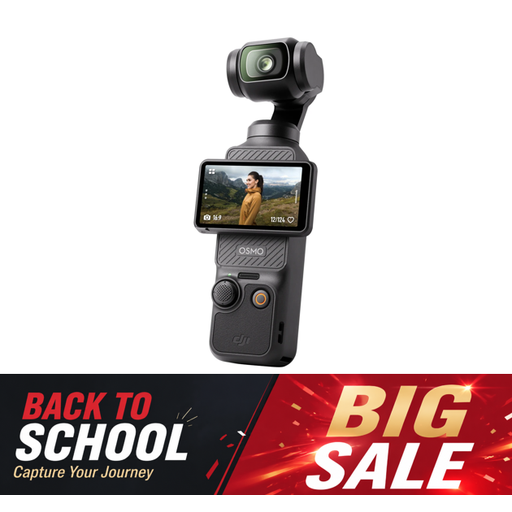
DJI Osmo Pocket 3
The rotatable screen is relevant if you need to check framing while setting up a lesson alone.
The product title lists 4K/120fps video, three-axis stabilisation and a 2-inch rotatable touchscreen.
Check mounting and table coverage for your chosen angle, and confirm any microphone or support you need in the exact package.
Joybuy
 No image available
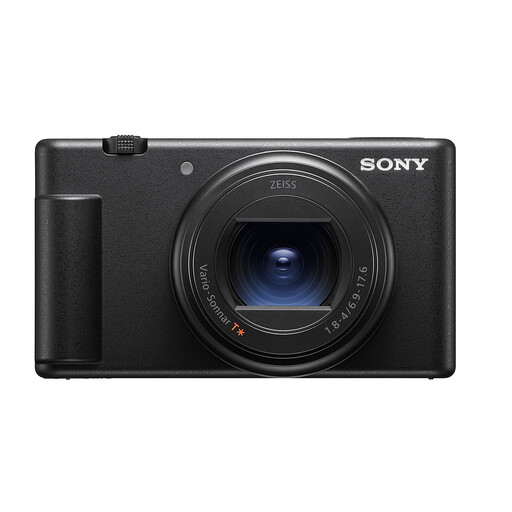
Sony ZV-1 II compact camera
Consider this compact camera if you prefer an integrated lens to choosing one separately.
The product title specifies a 1-inch stacked sensor and 4K video.
Check whether you can monitor its screen from your filming position and whether its lens frames the full arrangement area from your chosen distance.
Joybuy
Frequently asked questions
Do I need 4K 60p for a flower-arranging lesson?
No: a normally paced lesson need not make 60p its priority. Panasonic UK & Ireland lists 4K 25p and 30p for the G100D; Canon UK Store and Sony UK list 4K 60p for the EOS R50 V and ZV-E10 II respectively if your planned recording workflow calls for it.
Should I choose a body-only camera or a lens kit?
Choose a kit if you want a supplied lens, but check its view from your actual overhead or front-facing position. Canon UK Store lists the EOS R50 V as body-only, while the Sony UK ZV-E10 II kit includes a 16–50 mm lens and Panasonic's G100D kit includes a 12–32 mm lens; none of those lens descriptions alone establishes coverage of your table.
Which card should I check for the Panasonic LUMIX G100D?
Check for an SD, SDHC or SDXC card meeting Panasonic UK & Ireland's stated UHS-I UHS Speed Class 3 compatibility requirement for the G100D. Confirm the card and the contents of the exact package before your first full recording.
What should I do with an old camera or battery in the UK?
Use an appropriate electrical or battery recycling route rather than putting old electrical equipment or batteries in household rubbish, as GOV.UK advises. Check your local collection arrangements for the particular item.


