What matters when choosing?
For folded textiles by a window, start with the shot you need most often: a complete item or a close view of its fabric. Whichever lens you choose, make room in your workflow to check colour when the light changes.
APS-C body with a kit zoom
Choose it when: You mainly photograph complete folded items and want a zoom that can also cover moderate close-ups. Canon specifies 0.25x magnification and a 15cm minimum focus distance for its RF-S 18-45mm lens.
Trade-off: That Canon lens does not provide the 1:1 magnification specified for the dedicated macro lenses below.
Sony APS-C body with E 30mm Macro
Choose it when: Filling the frame with small fabric details is the priority; Sony specifies 1:1 maximum magnification for its E 30mm F3.5 Macro.
Trade-off: Its close-focus position puts the camera near the textile, so check whether your overhead arrangement leaves room for the lens without obstructing window light.
Nikon Z body with MC 50mm Macro
Choose it when: You need 1:1 fabric details and want the approximately 5cm lens-front-to-subject distance Nikon specifies at close focus.
Trade-off: On a DX-format Nikon Z body, its 75mm-equivalent view can make a complete folded item harder to fit into the frame on a cramped table.
| Concern |
What to check |
Who this matters to |
| Consistent textile colour |
Check white-balance controls and whether your intended colour-correction workflow is supported. Recheck the setting as window light changes. |
If I photograph the same fabric across sessions, I want whites and dyes to remain believable rather than shifting with the light. Around 40% of consumers put colour consistency first. |
| Fine fabric detail |
Compare the exact lens’s maximum magnification and its close-focus position; 1:1 and 0.25x lenses serve different detail needs. |
When stitching or a care label needs a close photograph, I want that small area to occupy enough of the image to inspect. Detail is the first concern for around 30% of consumers. |
| Whole-item framing |
Check the supplied lens’s field of view and whether you can see the screen from above the table. |
With limited room between the camera and a folded blanket or garment, I need to fit the entire item into the shot without an awkward setup. Around 30% of consumers prioritise straightforward overhead framing. |
Joybuy cameras for whole-item photos
These camera-and-zoom kits are choices to consider for framing complete folded textiles on a table. If fine weave, stitching or labels must fill the photograph, check the supplied lens’s magnification and whether a compatible macro lens is needed.
 No image available
Sony Alpha 7 III Full-Frame Camera with 28–70mm Zoom
Consider this zoom kit when your main shot is the whole folded item and you want framing options at a table. Check the supplied lens’s magnification before relying on it for small weave or label details.
View on Joybuy
 No image available
Sony Alpha ZV-E10 II K APS-C with 16–50mm f/3.5–5.6 Power Zoom
The supplied zoom gives you a way to adjust framing for differently sized folded items. If close texture shots matter, check the kit lens’s magnification rather than assuming it matches Sony’s separate E 30mm Macro.
View on Joybuy
 No image available
Sony A6400 APS-C with 16–50mm Power Zoom
This zoom kit is relevant when complete folded items are the main subject. Check its white-balance controls for your colour workflow and the lens’s close-up capability if you also need fine textile details.
View on Joybuy
 No image available
Sony A6700 APS-C with 16–50mm Lens
Use the zoom range as a starting point for whole-item framing in your available table space. Confirm the controls you need for repeatable colour and check the lens’s magnification before planning tight fabric shots.
View on Joybuy
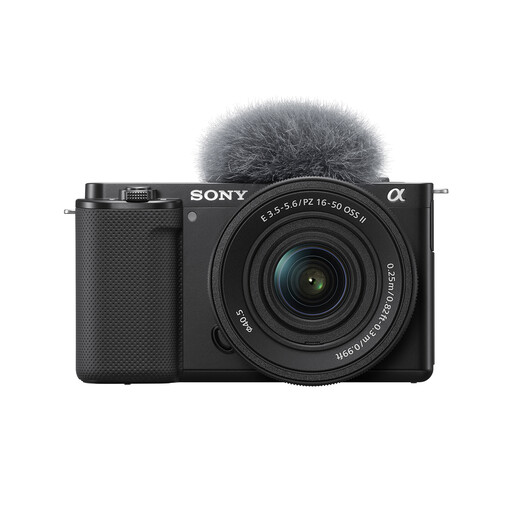 No image available
Sony ZV-E10K with 16–50mm Power Zoom
Consider this kit for framing complete folded textiles with its supplied zoom. If colour matching or small-detail photographs are central to your work, check the camera controls and the lens’s close-focus specifications before choosing it.
View on Joybuy
Frequently asked questions
Should I leave white balance on Auto for textile photographs by a window?
Auto can be a starting point, but use a deliberate setting when photographs from the same session need consistent colour. Nikon advises choosing white balance for stable lighting and revisiting it when the light changes; check it again if the window light shifts.
Is a kit lens enough to show fabric weave?
A kit lens may cover moderate details, but compare its magnification with your intended shot before depending on it for fine weave. Canon specifies 0.25x for the RF-S 18-45mm, whereas Sony’s E 30mm Macro and Nikon’s Z MC 50mm f/2.8 are specified at 1:1.
Do I need to check lens compatibility separately?
Yes: confirm the exact body mount, lens mount and format before buying a separate lens. Canon describes the RF-S 18-45mm as designed for APS-C EOS R cameras, while Sony identifies its E 30mm Macro as an APS-C E-mount lens; check the particular combination you intend to use.
What if a camera bought in the UK is faulty?
For qualifying faulty goods, UK statutory remedies are separate from a retailer’s change-of-mind returns policy. The explanatory notes to section 22 of the Consumer Rights Act 2015 describe a minimum 30-day period for the short-term right to reject, with its start depending on the applicable ownership, delivery and any required installation conditions. Keep your order record and contact the seller promptly about the fault.


