For routine ceramic-tile catalogue images, start with a camera that offers editable RAW files, a controllable white-balance workflow and a lens suited to your tile size and working distance. A higher-resolution full-frame model is worth considering if you regularly need substantial crops or larger files, but lighting, a matte white background and reflection control remain important for either camera route.
Who this is for
Tile sellers producing repeatable catalogue images
If successive batches need to look consistent online, prioritise a stable lighting setup, controllable white balance and files you can edit before upload. Action-focused features matter less to this static shooting task.
Makers photographing glazed samples
Bright reflections can hide the finish you want to show. Plan how you will position the lights and check whether your chosen lens can take a suitable polarising filter. Nikon describes these filters as a way to reduce reflections; Adobe recommends a neutral matte white background to limit stray reflections and colour casts.
Studios preparing detailed crops
If the same photograph must supply full-tile views and close crops, compare the resolution of the exact camera models and the lens you intend to use. Extra file detail may matter more in this workflow than it does for a standard web listing.
What to check when choosing
Set up the white background and lighting first, then choose camera and lens controls around the files you need to deliver.
| Concern |
What to check |
Who this matters to |
| Neutral whites and tile colour |
Check RAW recording and how the camera sets white balance under your planned lighting. |
When I photograph successive tile batches, I need the background and tile colours to remain consistent enough to edit together. Around 40% of consumers put colour consistency first. |
| Glare on glazed tiles |
Check the selected lens’s filter-thread size against a suitable polariser, and allow for controlled lighting and a matte white backdrop. |
On a glossy sample, I want the glaze and texture visible rather than obscured by bright reflections; for around 30% of consumers, glare control is the primary need. |
| Detail for crops |
Compare the exact models’ effective megapixel counts and choose a lens suited to the required framing and detail. |
If I regularly turn one tile photograph into close detail views, I need enough file detail left after cropping. This is the leading concern for around 20% of consumers. |
| A manageable shooting setup |
Check what the exact kit includes, particularly the lens and power accessories, alongside the support and lighting you will use. |
For straightforward catalogue shoots, I want a setup I can assemble and repeat without overlooking essential accessories; around 10% of consumers prioritise that practical workflow. |
Buying pitfalls
-
Upgrading the body before controlling reflections
A different camera body will not, by itself, remove highlights reflected in glazed tile. Nikon describes polarising filters as a way to reduce glare, while Adobe notes that a neutral matte white background can reduce stray reflections and colour casts.
Photograph an actual tile with a repeatable background and lighting arrangement before deciding whether camera resolution, RAW capture or lens choice is the remaining limitation.
-
Assuming a kit contains every accessory
Kit contents differ. Nikon lists a lens with its UK Z50II 16–50mm kit but states that a charger is not included.
Read the in-box list for the exact kit and check what you will need for stable support, lighting and any lens filter.
Obtaining a separate power accessory or filter can add another step before the setup is ready to use.
-
Leaving white balance to change between shoots
Changing light sources can leave white backgrounds and tile colours looking different across a catalogue. Adobe explains that white balance is used to make white objects appear white.
Keep the lighting consistent and set white balance for that light. If you plan to correct files afterwards, check that your camera records RAW.
Brands to consider for these camera routes
Canon
The EOS R50 is an APS-C interchangeable-lens option. Canon specifies a 24.2MP sensor and native support for RF and RF-S lenses; EF and EF-S lenses require an adapter.
- Canon specifies an approximately 328g body-only weight for the EOS R50.
- Canon specifies lens or digital image stabilisation rather than sensor-shift stabilisation. Check the chosen lens and support arrangement for static tile shots.
Nikon
The APS-C Z50II is available as a kit that Nikon lists with a NIKKOR Z DX 16–50mm f/3.5–6.3 VR lens.
- The listed kit pairs the camera with a zoom lens, giving you a defined starting point for checking tile framing.
- Nikon states that a charger is not included with that kit. Check the exact contents and the chosen lens’s filter size before planning a polariser.
Sony
Sony offers APS-C and full-frame models relevant to different file requirements. Sony UK specifies 14-bit uncompressed RAW for the α6400 and a 33.0MP full-frame sensor for the α7 IV.
- The α6400’s documented RAW recording provides an editable file option; the α7 IV’s stated resolution is relevant when larger files or substantial crops are required.
- Neither model specification replaces the need to choose a suitable lens and control lighting and reflections.
Joybuy camera options
These Sony options include cameras supplied with zoom lenses and a compact zoom model. Compare their stated file and lens options with your tile size, white-balance workflow and plans for controlling reflections.
 No image available
Sony Alpha ZV-E10 II K with 16–50mm power-zoom lens
A supplied zoom lens makes this an option to assess for repeatable tabletop framing.
The stated specifications include an APS-C format and 26MP stills. If glazed tiles need a polariser, check the included lens’s filter-thread size before choosing a filter.
View on Joybuy
 No image available
Sony Alpha 7 III with 28–70mm zoom lens
Consider this supplied-lens full-frame option if that camera format fits your wider shooting workflow; it is not the higher-resolution α7 IV discussed above.
The title specifies a 28–70mm zoom lens. Check its filter-thread size if reflection control requires a polariser.
View on Joybuy
 No image available
Sony A6400 with 16–50mm power-zoom lens
This APS-C kit is relevant to catalogue work that calls for an editable capture workflow.
Sony UK specifies 14-bit uncompressed RAW for the α6400, and the product title identifies a supplied 16–50mm lens. Confirm the white-balance controls you intend to use and the included lens’s filter-thread size.
View on Joybuy
 No image available
Sony ZV-E10K with 16–50mm power-zoom lens
The supplied zoom lens gives you a starting point for checking how the camera frames tile samples at your working distance.
This is an interchangeable-lens camera with a stated 16–50mm power-zoom lens. Check its white-balance workflow and the included lens’s filter-thread size for your setup.
View on Joybuy
 No image available
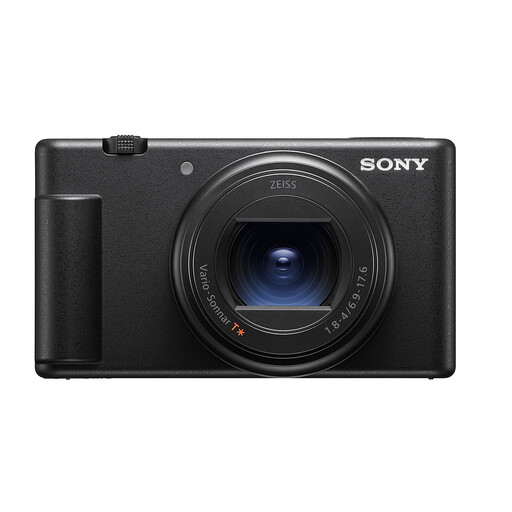
Sony ZV-1 II compact camera, 1-inch sensor and zoom lens
Consider this compact zoom option if its framing and controls meet your tile-photography needs.
The product title specifies a 1-inch stacked sensor and 20MP stills. Check the white-balance workflow and whether a suitable polarising filter can be fitted before relying on it for glazed tiles.
View on Joybuy
Common questions
Do I need full frame for ceramic-tile website photos?
No: an APS-C interchangeable-lens camera can suit routine website images if its files and controls meet your output needs. If you frequently make substantial crops or need larger source files, compare specific resolutions: Canon specifies 24.2MP for the EOS R50, while Sony specifies 33.0MP for the full-frame α7 IV.
Will a different camera body remove glare from glazed tiles?
No camera-body change alone controls reflections from a glossy glaze. Adjust the lighting and background; Nikon describes polarising filters as a way to reduce reflections, but you must check compatibility with the chosen lens.
How can I keep the white background looking neutral?
Use consistent lighting and set white balance for the light used during the shoot. Adobe explains that white balance helps white objects appear white; RAW recording, where supported, gives you an editable file for later adjustments.
What should I check about returns when ordering a camera online?
Check the applicable change-of-mind cancellation conditions and the retailer’s return process before ordering; remedies for faulty or misdescribed goods are a separate matter. GOV.UK says a retailer must offer a full refund if an item is faulty, not as described or does not do what it is supposed to do.


