Catalogue consistency seekers
If you photograph many folded items under the same lights, concentrate on framing each item consistently and managing the resulting files. Specialist macro magnification matters less when your shots show whole products.


Choose an interchangeable-lens mirrorless camera with a lens that frames your usual folded items at the distance available in your setup. Add a close-focusing or macro lens if weave, stitching or labels must fill the frame. Under artificial light, consistent lighting and white balance remain important: neither the camera body nor RAW capture alone guarantees faithful textile colour.
If you photograph many folded items under the same lights, concentrate on framing each item consistently and managing the resulting files. Specialist macro magnification matters less when your shots show whole products.
If listings also need close views of weave, stitching, embroidery or labels, the lens’s close-focus and magnification capabilities become important alongside its ability to frame the whole item.
If consistent-looking colour across a product range is a priority, you may want RAW files and a repeatable editing process. That takes more work than relying on automatic camera rendering.
Choose when: Most listing images show an entire folded item or fabric stack.
Trade-off: The supplied zoom may not focus closely enough to make tiny construction details fill the frame.
Choose when: Close images of weave, seams or labels are essential to the listing.
Trade-off: A separate lens may be needed, and working very close to the fabric can complicate light placement.
| Concern | Buying checks | Who this matters to |
|---|---|---|
| Repeatable whole-item framing | Check whether the screen is usable from your camera position and whether the lens frames your usual textile size at the available distance. | If I shoot a catalogue of folded items, I need to position the camera and frame each product consistently. Around 42% of consumers put this repeatable whole-item workflow first. |
| Texture and label detail | Check the exact lens’s maximum magnification and working distance before relying on it for close-ups. | For weave, stitching or small labels, I need details to occupy enough of the image without the camera obstructing the lights. Close-detail capture comes first for around 33% of consumers. |
| Colour editing | Confirm RAW capture on the chosen body, then test a consistent lighting, white-balance and export process against the fabric. | When I photograph a range of fabric colours, I want files I can edit through a controlled process rather than depending entirely on automatic rendering. Roughly 25% of consumers prioritise that colour workflow. |
A lens that frames a whole towel or garment may not reproduce its weave or a small label at the scale you need. Canon specifies up to 0.5× magnification for its RF 35mm F1.8 Macro, while Nikon and Sony specify 1:1 for the NIKKOR Z MC 50mm f/2.8 and E 30mm F3.5 Macro respectively.
Write down your widest whole-item shot and smallest required detail, then check the planned lens’s focus and magnification specifications.
A different lens may be needed in addition to the camera body.
A sensor specification does not tell you how closely the mounted lens can focus on stitching or fibres. The lens and your required image scale matter too.
Check lens compatibility, magnification and working distance before deciding whether the resolution of a camera body meets your shot list.
RAW files provide room for controlled editing, but changing lights or white-balance practice can still make sessions look inconsistent. The final image also needs checking against the physical textile.
Test representative light, dark and saturated fabrics under your actual lights, then use a repeatable capture and export process.
GOV.UK states that sellers of a new equivalent household electrical item must provide customers with a route to dispose of the old item.
Ask the retailer which take-back arrangement applies to your replacement camera, and remove personal images from any storage media before handing it over.
An EOS R route for whole-item framing, with an RF close-focus lens to consider if you also need texture shots.
A Z-mount route for buyers considering separate whole-item and close-detail lenses.
An E-mount route for buyers planning a RAW editing workflow and considering a separate macro lens.
These camera listings offer starting points for photographing folded items, including kits described with zoom lenses and a body-only listing. Check the exact bundle contents and lens close-focus capability against your shot list before choosing.
 No image available
Consider this APS-C kit for whole-item shots where a zoom lens helps adjust framing. Sony specifies 14-bit uncompressed RAW for the α6400; check the supplied lens’s close-focus capability if small textile details are required.
 No image available
Consider this APS-C camera for tabletop framing if the stated kit suits your shooting distance. Confirm that the 16–50 mm lens is included, as the bundle description and components list differ; also check its close-focus capability for texture shots and RAW capture if that is part of your workflow.
 No image available
This stated camera-and-zoom kit is an option for framing whole folded items, rather than the APS-C kit route described above. Check the lens’s focus distance and magnification before planning close texture images, and confirm RAW capture if editable files are essential to your process.
 No image available
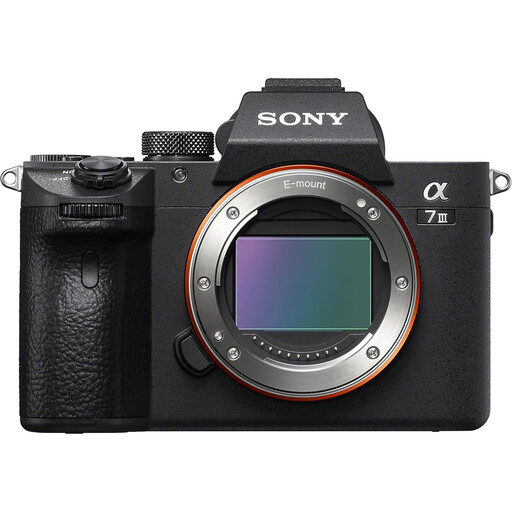
A body-only choice makes sense if you plan to select a lens for your usual textile size and any required close-ups. Confirm the package contents before purchase: the title says body only, while the detailed description also refers to a 28–70 mm lens.
 No image available
Consider this APS-C listing for whole-item images if its stated zoom covers your framing needs. Confirm that the lens is in the box, since it is absent from the components list, and check its close-focus capability and the body’s RAW options if those matter to your shots.
Not if your images only need to show whole folded items at the required size. For close views of weave, stitching or labels, check the magnification you need: Canon specifies 0.5× for its RF 35mm F1.8 Macro, while Nikon and Sony specify 1:1 for the NIKKOR Z MC 50mm f/2.8 and E 30mm F3.5 Macro.
Do not rely on automatic settings alone when consistent-looking textile colour is important. Keep your lighting and white-balance process consistent, compare test images with the physical fabric, and consider RAW capture if you plan to make controlled edits. Sony specifies 14-bit uncompressed RAW for the α6400.
Ask the retailer about its electrical-equipment take-back arrangement. GOV.UK states that sellers must provide a disposal route for old household electrical equipment when selling a new version of the same item. Remove personal images from storage media before handing over the old camera.