What matters when choosing?
Start by making the glass and print evenly photographable, then decide how much recorded detail the finished image needs. Finally, check whether the camera and lens fit the way you will set up and use them.
| Concern |
What to check |
Who this matters to |
| Reflections and colour |
Allow space for controllable lights angled to either side of the print; check the frame for reflected objects. Confirm the camera’s exposure and white-balance controls for your lighting workflow. |
If glass reflects the lights or room, I need a clear, evenly lit view of the artwork before extra resolution is useful. Around 42% of consumers put reflection and colour control first. |
| Detail and cropping |
Set your final output size and crop allowance, then compare stated resolution and a suitable lens. Nikon lists 45.7MP for the Z 7II, Canon 45MP for the EOS R5 Mark II and FUJIFILM 40.2MP for the X-T5. |
When I need to crop a reproduction or inspect fine detail, I want enough recorded pixels after the lighting is sorted. Detail and cropping are the primary need for around 33% of consumers. |
| Occasional use |
Check handling, the included lens and compatibility with stable support against the way you will also use the camera. Confirm that its resolution meets your intended output. |
For prints photographed only occasionally, I would rather choose a camera that fits my wider use than select one by megapixels alone. Around 25% of consumers prioritise that practical fit. |
Relevant brands and camera lines
These manufacturer-specified models illustrate different resolution and handling choices; none removes the need to control light reflected by the frame.
Nikon
Nikon lists the Z 7II as a 45.7MP full-frame mirrorless body for a resolution-led setup.
- Its stated resolution is relevant when detailed files and cropping are priorities.
- The body specification does not establish reproduction accuracy; lens choice, lighting and reflection control still matter.
Canon
Canon specifies a 45MP sensor for the EOS R5 Mark II and a 24.2MP full-frame sensor for the EOS R8.
- The two stated resolutions give buyers different amounts of recorded detail to assess against their output needs; Canon lists the EOS R8 body at approximately 414g.
- Neither body specification establishes a glare-free or colour-accurate framed-print photograph on its own.
FUJIFILM
FUJIFILM specifies a 40.2MP APS-C sensor and 14-bit RAW recording for the X-T5.
- Its stated resolution provides a high-detail option for buyers considering an APS-C system.
- Confirm a suitable X-mount lens and the rest of the reproduction setup; the sensor specification does not address glass reflections.
Sony
Sony lists the α7C II as a compact full-frame body with a 33.0MP sensor and vari-angle monitor.
- Its handling features may be relevant when the same camera will also be used away from the framed-print setup.
- If substantial cropping is required, compare its stated resolution with the required final output before choosing it.
Joybuy camera choices
These Sony camera-and-lens kits and one compact camera are choices for photographing framed prints as part of a wider photography setup. Choose the lighting arrangement and required output detail first, then check each camera and lens against your support and filter plans.
 No image available
Sony Alpha ZV-E10 II K with 16–50 mm lens
A camera-and-lens kit to consider if you want to set up framed-print shots with an interchangeable lens. The listed APS-C camera has 26MP stills resolution and a 16–50 mm f/3.5–5.6 power zoom kit lens.
Plan the lighting separately. If you intend to use a circular polariser, confirm the supplied lens’s filter-thread size before choosing one.
View on Joybuy
 No image available
Sony A6700 with 16–50 mm lens
Consider this APS-C camera kit if you want an interchangeable-lens starting point for framed prints and other subjects. The listed bundle includes a 16–50 mm lens.
Check the supplied lens’s close-focus and filter compatibility, and confirm that your intended support lets you keep the camera parallel to the print.
View on Joybuy
 No image available
Sony A6400 with 16–50 mm power zoom lens
This APS-C camera-and-lens kit is a starting point if you want to photograph framed prints with an interchangeable-lens camera. It includes a 16–50 mm power zoom lens.
For repeatable artwork shots, check the controls and support arrangement you need, as well as whether the supplied lens suits your print size and working distance.
View on Joybuy
 No image available
Sony Alpha 7 III with 28–70 mm zoom lens
Consider this full-frame camera kit if you want one interchangeable-lens system for framed prints and other photography. The listed bundle includes a 28–70 mm zoom lens.
Check whether that lens suits your working distance and any planned polariser, and keep glass-reflection control separate from the camera choice.
View on Joybuy
 No image available
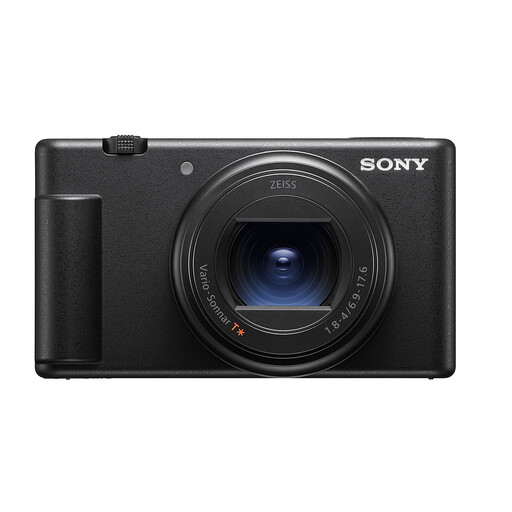
Sony ZV-1 II compact camera
A compact-camera choice to assess for occasional framed-print shots alongside general use. The listed camera has a 1-inch stacked sensor, a wide-angle zoom lens and 20MP stills resolution.
Check that its output allows the cropping you need, and confirm support and filter compatibility if those are part of your setup.
View on Joybuy
Frequently asked questions
Do I need a high-resolution camera for framed prints?
Not necessarily: higher stated resolution matters most when the finished file needs substantial detail or cropping room. The manufacturer-specified cameras discussed here span 24.2MP to 45.7MP, but even the higher-resolution bodies need lighting that keeps reflections off the artwork.
How should I light a framed print behind glass?
Start with controllable lights angled to either side rather than aimed straight at the glass. Waihora Gallery’s guidance uses two LED panels at roughly 45 degrees; inspect the resulting reflections and keep the supported camera parallel to the artwork.
Will a circular polariser remove every reflection?
No. A circular polariser can reduce reflections, but light placement remains the primary control. Check that it fits your lens and test its effect on the actual framed print, including how the colours appear.
Can editing software fix glare after the photograph is taken?
Do not count on editing to recover artwork obscured by glare. Adobe describes its Reflection Removal preview for plate-glass windows filling most or all of an image, rather than small framed areas with visible surrounds; inspect and reduce reflections before capture.
Can I publish my photograph of a framed print online in the UK?
Check the rights before publishing it. The UK Intellectual Property Office says copyright generally protects images and permission will usually be needed for copying or sharing them online; ownership, applicable licences and exceptions can affect your particular use.


