Tabletop quiz hosts
If remote players must see co-hosts, question cards, a scoreboard or props, you need to assess the whole table view rather than a head-and-shoulders shot.


Choose the view that fits your quiz layout before deciding how much resolution you need. A fixed 78° webcam can suit a consistent presenter position, while a selectable field of view gives you more control when co-hosts or tabletop materials need to appear. Check sound, lighting and mounting at the planned table position; 4K or automatic framing is more relevant if you need extra detail, cropping or a moving host.
If remote players must see co-hosts, question cards, a scoreboard or props, you need to assess the whole table view rather than a head-and-shoulders shot.
If household noise or uneven lighting could affect the call, compare the camera’s microphone and light-correction features, then try them in the room you will use.
If you set up only for quiz nights, a compact camera that can be positioned securely and covered between calls may suit you better than a permanent screen-based installation.
For a kitchen-table quiz, work out what remote players must see, then check whether they can hear the questions and whether the setup fits your space.
| Concern | What to check | Who this matters to |
|---|---|---|
| Framing people and materials | Check whether the field of view is fixed or selectable, and test the planned camera position with everyone and everything that must appear. | If co-hosts or question cards need to share the shot, I need a view that includes them without showing more of the kitchen than I want. Around 40% of consumers put framing flexibility first. |
| Speech and lighting | Compare the stated microphone and light-correction features; try the chosen calling app in the kitchen before quiz night. | When appliances or uneven light could interrupt my questions, being heard and seen clearly matters most. Clear speech and a usable image come first for around 30% of consumers. |
| Setup and privacy | Check the computer connection, stable mounting options and whether there is a physical lens cover or shutter. | For an occasional game, I want to put the camera away easily and cover its lens between calls. Around 30% of consumers prioritise simple setup and privacy. |
A fixed 78° view may suit a presenter in one position but leave out a co-host or materials on the table. A wider view may also reveal more of the room.
Place the camera where you intend to use it and check the shot with everyone seated in the conferencing app.
Extra resolution does not widen a camera’s field of view. The OBSBOT Meet 2 and Logitech Brio 4K both specify 4K at 30fps, so resolution and frame-rate settings also need to be considered separately.
Consider 4K if fine details or cropping matter; otherwise, establish the required view and sound setup first.
Showing cards or objects on a table may require a different camera position. Logitech specifies a ¼-inch tripod thread for Brio 4K, while AnkerWork recommends a tripod for a more secure B600 setup with a laptop.
Check the mounting option, cable reach and included accessories before settling on a position near food or drinks.
A separate mount or tripod may be needed to achieve the intended angle.
A wider shot can include a doorway, window or other areas you did not mean to show remote players.
Aim the camera at the table and an interior background where practical, and cover the lens between calls if the camera has a physical shutter or cover.
Logitech offers both a fixed-view webcam for a repeatable host position and a 4K model with selectable views.
The PowerConf C200 is relevant when the shot changes between a presenter and a wider table scene.
Meet 2 is an option to examine when a host moves around or wants automatic reframing.
These two webcams offer different starting points for a table setup: an all-in-one model with a stated adjustable 98° view and a clip-on model. Check the actual shot and computer connection before choosing either.
 No image available
Consider this for a wider table shot if its stated adjustable 98° view fits everyone and the materials you need to show.
The product name specifies 4K, a four-microphone array, dual speakers, fixed focus and a plug-and-play USB connection. Check how the view adjusts and whether hosts and nearby quiz materials remain in focus from the planned position.
Confirm the mounting angle and whether the camera has a physical privacy cover or shutter.
 No image available
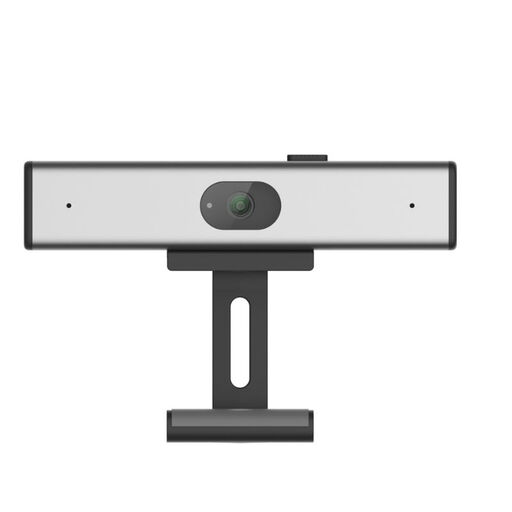
Consider this clip-on option if a laptop or monitor position gives you the quiz view you need.
The product name specifies 2K QHD, a noise-reduction microphone and a desktop or laptop clip-on format. Check its field of view with your table layout, along with the connection required by your computer and whether it has a physical privacy cover.
Wide enough to include the intended hosts and materials from the position where the camera will sit. The AnkerWork PowerConf C200 offers selectable 65°, 78° and 95° views through its software, while the Logitech C920s has a fixed 78° view; test the layout rather than choosing an angle in isolation.
Not if a lower-resolution camera already gives remote players a usable view of the host and quiz materials. PCMag UK describes Full HD as a starting point for webcam selection; consider 4K when extra image detail or cropping matters, and check the frame rate available at that resolution.
A tripod is useful if a laptop or monitor clip cannot give you a stable angle that shows the required part of the table. Logitech specifies a ¼-inch tripod thread for Brio 4K, and AnkerWork recommends a tripod for more secure B600 use with a laptop; check the chosen camera’s mount and included accessories.