Handmade sellers making repeat listings
If you photograph several knitted toys for listings, you need a setup that keeps framing, yarn colour and the white backdrop consistent from one item to the next.


For knitted-toy photos on a white background, choose an interchangeable-lens camera if you need close views of stitches as well as full-toy images. Check the lens’s close-focus capability before choosing a body, and plan for consistent white balance and separate control of the light on the toy and backdrop.
If you photograph several knitted toys for listings, you need a setup that keeps framing, yarn colour and the white backdrop consistent from one item to the next.
If tiny faces, seams or accessories need their own photographs, the lens’s close-focus capability matters more than body specifications alone. Canon UK, Nikon UK and Sony UK each specify different magnification capabilities for their close-focusing lenses.
An adjustable screen can make tabletop framing easier, while an interchangeable-lens body leaves the option of adding a close-focusing lens. You will still need to manage the light and white balance for a consistent backdrop.
Decide how close your detail photographs need to be before choosing a lens; then plan the lighting and colour workflow around the white-background setup.
| Concern | What to check | Who this matters to |
|---|---|---|
| Yarn colour and white backdrop | Check white-balance controls and whether stills can be recorded in RAW. Plan separate control of the backdrop and toy lighting. | If pale yarn changes colour under my lights, the listing will not show it as I intend. Around 36% of consumers put colour and backdrop consistency first. |
| Stitch and accessory detail | Compare the exact lens’s maximum magnification and close-focus distance; check whether that lens is included. | When I need a photograph of embroidery or a tiny accessory, I want it to occupy enough of the frame to inspect. For around 29% of consumers, close detail is the primary concern. |
| Repeatable tabletop framing | Look for a screen you can see from your chosen camera position and controls that let you keep exposure consistent under fixed lights. | Photographing several toys means I want to keep the angle and brightness steady between shots. Around 21% of consumers prioritise a repeatable workflow. |
| Use beyond product photos | Consider the body and lens combination you would carry, while checking that the lens still meets your tabletop needs. | If this camera will also come along for everyday photos or videos, I need it to work outside the tabletop setup. Broader use comes first for around 14% of consumers. |
A higher pixel count does not establish how large a tiny stitched feature will appear in the frame; close focusing and magnification depend on the lens.
Compare the included lens with the smallest detail you want to photograph. If close crops are a regular requirement, check compatible macro lenses before choosing a camera kit.
The macro lens may be a separate purchase from the camera kit.
Increasing the light on everything can leave the yarn too bright while the backdrop still needs attention. Canon UK’s high-key lighting guidance distinguishes background light from the main light on the subject.
Control the backdrop and toy lighting separately, then test the result with the yarn colours you will actually photograph.
Separately controlled lighting can require additional equipment and setup time.
Changing or mixed light can give white material a colour cast. Adobe explains that white balance adjusts how colours appear in a digital photograph.
Use consistent lighting and set white balance for that setup; a neutral reference and RAW files can help if you edit the photographs later.
Close focusing can put the front of the lens near a small toy. Sony UK specifies a 2.4 cm minimum working distance for its E 30mm F3.5 Macro, while Nikon UK states 7.2 cm at close focus for its Z DX MC 35mm f/1.7.
Check front-of-lens working distance alongside magnification, and make sure your lights or reflectors will fit around the composition.
Canon’s EOS R system offers a route from an adjustable-screen camera body to a separate close-focusing RF lens.
Nikon Z DX is worth considering when photographs of stitches and small accessories are a priority.
Sony E mount offers a dedicated macro option for buyers who need close photographs of very small details.
Fujifilm X mount is another interchangeable-lens route for a tabletop workflow involving editable still files.
These camera kits include zoom lenses for composing whole-toy photographs at the tabletop. If stitches or tiny accessories need close crops, compare the supplied lens’s close-focus specification and check compatible lens options before choosing a kit.
 No image available
The supplied zoom makes this a kit to consider for framing complete toys; check its close-focus capability if you also need stitch-level crops.
The product name specifies an APS-C interchangeable-lens camera and 26 megapixels.
 No image available
This APS-C camera and zoom-lens kit is an option for whole-toy framing. Check the lens’s close-focus capability for embroidery shots, and check the still-file and white-balance controls you need for colour editing.
 No image available
The included zoom offers a starting point for composing photographs of complete toys. Confirm how closely this exact lens focuses, and check RAW still capture and white-balance controls if you plan to correct yarn colour afterwards.
 No image available
This full-frame camera kit includes a zoom lens for framing complete toys at different distances. For small stitched features, check the included lens’s magnification and close-focus distance rather than relying on the camera format alone.
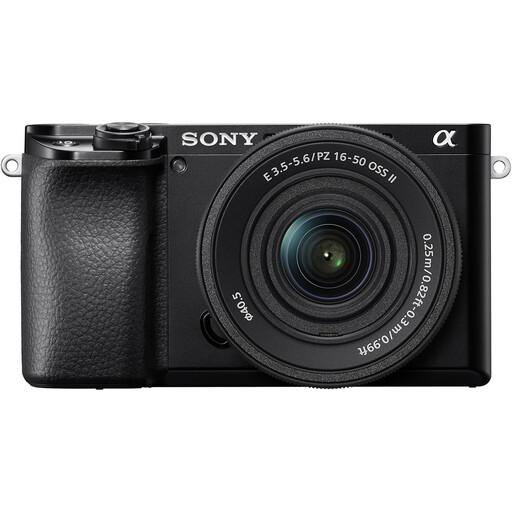 No image available
The supplied zoom makes this an option for whole-toy photographs. Check its close-focus specification before planning detail crops, and confirm the still-file and white-balance controls needed for your lighting workflow.
Not for every photograph: start by checking whether the lens you plan to use can frame an entire toy and focus closely enough for your required detail shots. If stitches or miniature accessories need to fill the frame, compare compatible macro lenses by their stated magnification and working distance.
The lighting and white-balance setting can affect how both appear. Keep the light consistent, set white balance for that setup and control the backdrop light separately from the light on the toy; RAW files can give you more room for later colour adjustment.
Choose according to the photographs the lens must make. A supplied zoom may suit full-toy images, but check its close-focus specification before assuming it will cover tiny details; for the exact bundle, also check which lens and accessories are included.
Use an appropriate electrical-equipment recycling route rather than treating the camera as ordinary rubbish. GOV.UK’s guidance on waste electrical and electronic equipment explains the aim of reducing disposal to landfill; check the receiving retailer or local authority’s instructions for the camera and its battery.