Close-detail lesson makers
If viewers need to follow small parts, tools and hand movements, plan the lens, working distance and stable overhead position together. Portability matters less during a fixed tabletop lesson.


For a fixed miniature-building lesson, choose a camera and lens that can frame the whole work area clearly from your planned mounting height. Test the camera under your actual lights before committing to a recording setup: as Nikon UK explains, LED lighting can produce bands when shutter timing and light frequency do not align. A stable overhead support, deliberate white balance and a manageable recording format also matter.
If viewers need to follow small parts, tools and hand movements, plan the lens, working distance and stable overhead position together. Portability matters less during a fixed tabletop lesson.
If you film under LEDs, screens or mixed indoor lighting, check a short recording for bands, exposure changes and mismatched colour before filming the full build. Nikon UK discusses shutter timing and LED banding in its lighting guidance.
If you want to start with a compact kit, consider the supplied lens, audio and transfer routine alongside the camera body. Panasonic lists a 12–32mm lens and built-in OZO Audio functions for its LUMIX G100D kit.
Work out the camera position and lighting first, then choose a lens and recording mode that suit the lesson. The percentages below describe consumers by their main purchasing priority.
| Concern | What to check | Who this matters to |
|---|---|---|
| Consistent artificial-light footage | Check movie exposure controls and any model-specific flicker adjustment; test your intended frame rate and shutter setting under the actual lights. | If bands or shifting colour would obscure a build step, I want to resolve the lighting before recording a full lesson. Around 36% of consumers put lighting consistency first. |
| Clear tabletop framing | Check the lens’s close-focus ability and whether the whole active work area fits at your available mounting height. | When my hands and tools surround tiny parts, I need viewers to see both the detail and the action. Close-detail framing comes first for around 29% of consumers. |
| Dependable recording workflow | Match the recording mode to a compatible memory card; consider narration and file storage. | For a long lesson, I need recordings and spoken instructions I can manage through editing. Roughly 21% of consumers prioritise that workflow. |
| Approachable first setup | Compare the supplied lens, audio features and transfer method with the recording modes you intend to use. | If I am starting with fixed tabletop videos, I would rather manage a straightforward kit than unused advanced formats. Around 14% of consumers place simplicity first. |
Nikon UK explains that LED lighting can produce bands when shutter timing and light frequency do not align. Mixed colour temperatures can also complicate the look of an indoor recording.
Record a short clip under the lamps you will use, set white balance deliberately and review the footage for bands before filming a complete lesson.
Changing unsuitable lights or adjusting the setup can add equipment needs and preparation time.
An interchangeable-lens camera still needs a lens that frames the build area at the available camera-to-table distance. A supplied kit zoom is a starting configuration, not a promise that every close-up will fit.
Measure the work area and mounting height, then check the intended lens’s field of view and close-focus distance.
A different lens or mounting arm may be needed if the planned combination cannot cover the workspace.
Recording modes can place different demands on cards and storage. Sony lists ZV-E10 II 4K modes reaching 600 Mbps, while Fujifilm recommends UHS Speed Class 3 media for X-M5 4K recording.
Select the mode you intend to use, then check that model’s compatible-card guidance and leave room for lesson files and backups.
Higher-data-rate recording can mean additional card and storage requirements.
The UK Office for Product Safety and Standards advises consumers to check appropriate markings and manufacturer details when buying relevant products online.
Check the seller, applicable product information, instructions and warnings, and what charger or cable is included before ordering.
Canon’s EOS R50 V is an APS-C interchangeable-lens route for buyers considering RF or RF-S lenses for tabletop framing.
Sony’s APS-C ZV-E10 II offers an interchangeable E-mount route with several 4K recording formats.
Fujifilm’s X-M5 is a compact APS-C interchangeable-lens option for creators who also want to make other kinds of video.
The LUMIX G100D kit is a compact Micro Four Thirds starting point with a supplied 12–32mm lens.
These Sony options cover interchangeable-lens kits and compact cameras for a miniature-building lesson. Check close-up framing and your actual lighting with the specific model you choose.
 Image unavailable
Consider this interchangeable-lens kit if you want to adjust tabletop framing and record moving hands in 4K. The listed configuration includes a 16–50mm f/3.5–5.6 lens and specifies 4K/60p and 10-bit 4:2:2 recording. Check the lens’s framing and close focus at your mounting height, and test your lights for flicker.
 Image unavailable
This kit suits consumers who want a supplied lens for an initial tabletop setup. It pairs an interchangeable-lens camera with a 16–50mm Power Zoom lens and lists 4K recording. Check the intended 4K mode, close-focus distance and view of the work area before choosing it.
 Image unavailable
The supplied zoom offers a starting point for adjusting the tabletop view without changing the camera body. This APS-C kit lists a 16–50mm Power Zoom lens and 4K video. Confirm that the lens focuses closely enough and that you can see the screen from the planned overhead position.
 Image unavailable
Consider this compact 4K option if you prefer a camera without planning an interchangeable-lens kit. Confirm the exact lens configuration and whether it can frame and focus on your build area at the intended mounting distance; test for flicker under your lights.
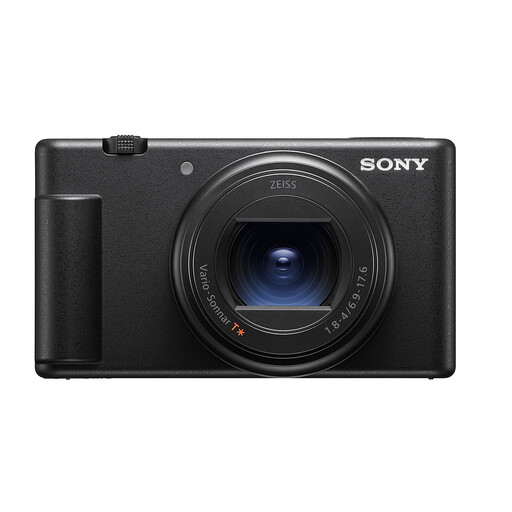 Image unavailable
This fixed-lens option may suit a compact 4K setup when you want some flexibility in framing without selecting a separate lens. Check close focus, the view from your overhead mounting position and the recording under your actual lights before committing to it.
Not necessarily, but test your intended camera under the actual LEDs, screens or mixed lighting. Nikon UK explains that shutter timing can affect visible bands; check the exact model’s movie controls rather than assuming every camera offers the same adjustment.
Choose a kit if its supplied lens can frame the entire work area and focus at your available mounting height. A body-only purchase makes more sense when you have already chosen a compatible lens for that view; Panasonic, for instance, specifies a 12–32mm lens with its LUMIX G100D kit.
Check the card requirements for both the exact camera and your chosen recording mode. Fujifilm recommends UHS Speed Class 3 for X-M5 4K recording, while Sony’s ZV-E10 II offers formats with different data rates; card capacity alone does not settle compatibility.
It may work when speech is clear at the camera’s mounted position, but listen to a test recording before relying on it. Panasonic specifies OZO Audio modes for the LUMIX G100D; if an overhead position leaves narration indistinct, check the camera’s external-audio options.
Check the seller and the product’s applicable markings, instructions, warnings and manufacturer details. The UK Office for Product Safety and Standards gives this advice for relevant consumer products; also confirm what charger or cable the particular listing includes.