Choose a camera that lets you frame the model from your planned shooting position, monitor the image and record in the format your lessons need. An interchangeable-lens 4K/60p model offers options for changing lenses and capturing fast brush movements, while a 4K/30p kit can suit a fixed, well-lit recorded lesson. Neither route replaces controlled lighting, stable mounting or a workable plan for narration and power.
Who the camera needs to serve
Detail-first miniature tutors
If showing fine brush placement is central to the lesson, you need to frame the model and work area clearly from a distance that leaves room for your hands. Check the lens and camera position together, rather than choosing by recording resolution alone.
Solo lesson creators
When you paint and operate the camera yourself, an image you can monitor from your working position and a repeatable setup matter alongside focus and narration. Decide where the camera, support and microphone will sit before settling on a body.
Live or hybrid workshop hosts
If you also teach through a computer, check the camera’s webcam or HDMI connection route, how you will capture your voice and how the camera will be powered throughout the session.
What to check before buying
For a model-painting lesson on a white backdrop, decide whether close framing, background presentation or the teaching workflow is your primary need. That choice helps determine which camera features and setup checks deserve attention first.
| Concern | What to check | Who this matters to |
|---|
| Close detail and framing |
Check the exact lens’s minimum focus distance and whether it covers the work area from your planned camera position. Decide whether you actually need a 4K/60p recording mode. |
If I need viewers to follow fine brushwork without my hands blocking the model, close framing determines my setup. Roughly 42% of consumers would put this need first. |
| White-background presentation |
Plan even lighting and a stable support; check that you can monitor and adjust exposure and white balance while the camera is mounted. |
When the backdrop looks uneven or the model loses visible detail, I need to assess both before recording. Around 33% of consumers would prioritise background and colour control. |
| Solo teaching and live use |
Check the model’s audio connections, webcam or HDMI route, computer compatibility and options for powering a full session. |
If I am explaining each step while painting or teaching live, I need a recording and connection setup I can manage alone. About 25% of consumers would make that workflow their primary concern. |
Setup mistakes to avoid
-
Expecting the camera to fix the white background
Uneven light and reflections can remain visible, while raising exposure just to brighten the backdrop can wash out detail on the painted model. Skylum’s white-background photography advice cautions against overexposing the subject for the background.
Test the light and backdrop with the model in place. Check exposure and white balance where the camera allows it, judging the model and background separately.
A backdrop, light diffusion and stable camera support may be needed in addition to the camera.
-
Choosing a body before checking the lens position
An interchangeable-lens camera does not establish that its supplied lens can focus on the miniature and show the whole work area from a position that keeps your hands clear.
Measure the work area and intended camera-to-model distance, then check the exact kit lens’s focal-length range and minimum focus distance.
A different lens or suitable overhead support may be needed if the planned position does not work with the kit.
-
Treating USB charging as a long-session power plan
A charging feature alone does not establish how a camera behaves while recording or streaming. An HDMI-based computer connection can also involve separate capture hardware; Canon’s HDMI guidance describes an HDMI-to-USB capture device for that route.
Check the exact model’s guidance for recording while powered, session limits and its intended live connection before selecting power or capture accessories.
The chosen setup may call for a compatible power accessory, spare battery or capture device.
Relevant brands and camera lines
Sony
The ZV-E10 II is an interchangeable-lens option to consider when lens choice and 4K/60p recording are priorities for a detail-focused lesson.
- Sony specifies a 26.0-megapixel APS-C sensor, 5.6K-oversampled 4K/60p recording and E-mount lens compatibility for the ZV-E10 II.
- Choose a lens for the actual work distance; lighting, mounting and sound still need separate planning.
Canon
The EOS R50 V is relevant if recorded lessons may also become computer-based live sessions.
- Canon lists 4K/60p, audio monitoring, USB webcam use and streaming controls for the EOS R50 V.
- For an HDMI live connection, check the camera-specific setup and allow for the capture hardware and power arrangement it requires.
Panasonic LUMIX
The G100D kit is a compact interchangeable-lens option for fixed-position recorded lessons when 4K/30p meets the intended format.
- Panasonic lists the G100D kit with a 12–32mm lens, 4K/30p recording and USB-C charging.
- It does not offer the 4K/60p mode cited for the Sony ZV-E10 II and Canon EOS R50 V; confirm the kit’s availability and whether its lens suits your working distance.
Joybuy camera choices
These choices include interchangeable-lens kits and compact cameras for recording a model-painting lesson. For any of them, check close-focus framing, mounting and session power against your planned work area before buying.
 No image available
Sony Alpha ZV-E10 II K with 16–50mm f/3.5–5.6 Power Zoom lens
Consider this kit if you want an interchangeable lens and 4K/60p for a detail-focused recorded lesson.
The product name specifies a 26-megapixel APS-C camera, a 16–50mm f/3.5–5.6 kit lens and 10-bit 4:2:2 recording. Check the lens’s minimum focus distance, your intended framing and the power arrangements for longer lessons.
View on Joybuy
 No image available
Sony ZV-E10K with 16–50mm Power Zoom lens
This interchangeable-lens kit may suit a recorded lesson if its supplied zoom lens frames the model and work area from your chosen position.
Check the lens’s minimum focus distance and the camera’s available 4K recording modes if frame rate affects your delivery plans.
View on Joybuy
 No image available
DJI Osmo Pocket 3 Creator Combo
Consider this compact camera set for a recorded lesson only after checking that it can frame close miniature work from a suitable fixed position.
The product name specifies a 1-inch CMOS sensor and 4K/120fps video. Confirm which recording mode you would use and whether your planned overhead or angled mount is suitable.
View on Joybuy
 No image available
Sony ZV-1F compact camera
This compact option is worth assessing if you prefer a fixed-lens camera for a repeatable filming position.
The product name specifies a 1-inch sensor and an ultra-wide lens. Check whether its fixed lens can focus on the model and frame the full work area from your support position.
View on Joybuy
 No image available
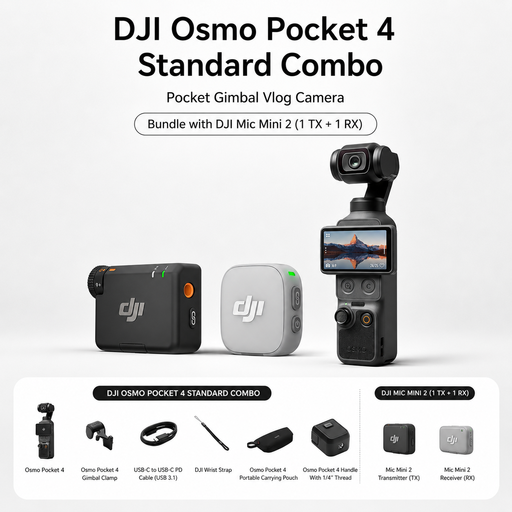
DJI Osmo Pocket 4 Travel Vlog Set with Mic Mini 2
Consider this compact set if its camera position and included microphone arrangement fit the way you plan to narrate a recorded lesson.
Check close-focus framing, screen visibility and fixed-mount suitability. If frame rate matters, confirm the normal recording modes rather than relying on a slow-motion mode.
View on Joybuy
Common questions
Do I need 4K/60p to film a model-painting lesson?
Not necessarily: 4K/30p can suit a fixed, well-lit lesson delivered at 25p or 30p. Consider 4K/60p if you plan to capture fast brush movements at that frame rate or slow them in editing; lens framing, focus and lighting still need attention.
Will a new camera make a white backdrop look clean?
No camera body replaces a well-controlled lighting setup. Check the backdrop and painted model separately so that brightening the background does not overexpose detail on the subject.
What should I check before teaching live with a camera?
Confirm the exact camera’s webcam or HDMI connection, computer compatibility, audio setup and power requirements. Canon’s guidance for its HDMI route describes using an HDMI cable and an HDMI-to-USB capture device; a camera’s USB webcam route may use a different setup.
Can I return an online camera purchase if it does not suit my setup?
For a qualifying UK distance purchase, GOV.UK’s consumer-return guidance says customers must tell the seller within 14 days of receiving the item to seek a change-of-mind refund. Check the applicable return conditions and process before using the camera extensively; remedies for faulty, damaged or misdescribed goods are a separate matter from changing your mind.


