A fixed-lens camera with a built-in zoom is a straightforward choice if you need to alternate between the whole collage area and closer views without changing lenses. An interchangeable-lens camera gives you more choice over the lens, while a compact action-camera setup may require a separately sold close-focus accessory and manual focusing. Whichever route you choose, check that it frames and focuses on your materials at the height your overhead mount can safely hold.
Who is this for?
Lesson makers with limited table space
If the camera must sit close above the table, you need to see whether its lens can include your entire arrangement of paper, tools and materials. Canon UK and Sony UK list built-in zooms on the PowerShot V1 and ZV-1 II, but the view you get still depends on your mounting height.
Teachers showing small collage details
If viewers need to follow cuts, paper edges and adhesive placement, check focus on the materials at the planned lens-to-table distance. GoPro specifies an 11 cm to 75 cm manual-focus range for its separately sold HERO13 Black Macro Lens Mod.
Teachers recording or streaming longer lessons
If a computer is part of your setup, check its connection, the cable and your power arrangement before settling on a camera. Sony UK says the ZV-E10 II outputs 720p over USB 2.0 even when a higher streaming setting is selected.
What matters when choosing?
Fixed-lens compact camera
Choose it when: You want a built-in zoom for changing the composition without swapping lenses; the Canon PowerShot V1 and Sony ZV-1 II are examples.
Trade-off: You cannot replace the fixed lens if a different table size or mounting height calls for another focal length.
Interchangeable-lens camera
Choose it when: You want to select a lens around your working distance or expect your framing needs to change.
Trade-off: Lens choice and focus distance become part of planning the overhead setup; a camera body alone does not settle either question.
Action camera with a close-focus accessory
Choose it when: A small camera and compact mounting matter most. GoPro offers a Macro Lens Mod for close detail with HERO13 Black.
Trade-off: GoPro sells that lens separately, and its focus ring must be adjusted manually.
For any of these routes, start with the view and focus you need at your actual mounting height. Then consider how much lens setup and computer connection your lesson format requires.
| Concern | What to check | Who this matters to |
|---|
| Whole-table framing |
Measure the usable lens-to-table distance and check the view with all your materials laid out. |
If my mount has to stay low, I need the entire collage area and my tools in the shot. Around 27% of consumers would put whole-table framing first. |
| Close-detail focus |
Test focus on the material plane at your working height; check whether the chosen lens or an accessory is needed. |
When I demonstrate a narrow cut or place a small piece of paper, viewers need to see that action rather than my hands in focus. Close-detail focus comes first for around 33% of consumers. |
| Simple setup |
Check whether the lens is built in or supplied, and whether you can see and operate the camera once mounted. |
I want to move between the workspace and individual materials without choosing and changing lenses before class. Around 20% of consumers would prioritise a simpler setup. |
| Live or long sessions |
Check the computer and cable requirements for streaming, plus the power arrangement for the intended lesson length. |
If I teach live or record a lengthy session, I need a connection and power plan that suit that format. For around 20% of consumers, this workflow would be the primary concern. |
Mistakes to avoid
-
Choosing by resolution alone
A recording setting cannot bring the whole workspace into view if the lens is too narrow at the available height, or make the camera focus at a distance it cannot use.
Measure your setup, lay out the actual materials and check both a full-table view and the closest detail you plan to show.
-
Assuming the camera includes every accessory
Charging and close-up arrangements depend on the model and package.
Check the box contents, charging method and compatibility of any lens or overhead accessory before ordering.
Canon UK says a USB-C charger is not included with the PowerShot V1. GoPro says the HERO13 Black Macro Lens Mod is sold separately.
-
Expecting the same USB streaming output on every computer
Sony UK says the ZV-E10 II outputs 720p over USB 2.0, even when 4K or HD is selected. Sony specifies a SuperSpeed USB 5Gbps-compatible computer and cable for its higher USB streaming settings.
Confirm your computer port and cable standard, then check the output you will use for a live lesson.
-
Including identifiable pupils without planning for privacy
The Information Commissioner's Office says data-protection law is likely to apply when a school makes photos or videos for official school use.
Keep the view on the table where possible. If people may be identifiable, follow your school's policy and data-protection process before recording or publishing.
Brands to consider for these camera routes
Canon
Canon offers both a built-in-lens option, the PowerShot V1, and an interchangeable-lens option, the EOS R50 V, for video-focused setups.
- Canon UK lists a built-in 16–50 mm f/2.8 lens, Dual Pixel Autofocus and UVC/UAC streaming for the PowerShot V1.
- An EOS R50 V overhead setup requires a suitable lens choice. Canon says a USB-C charger is not included with the PowerShot V1.
Sony
Sony's ZV-1 II is a fixed-lens compact option; its ZV-E10 II takes interchangeable lenses.
- Sony UK lists an 18–50 mm equivalent zoom and Product Showcase mode for the ZV-1 II.
- For ZV-E10 II USB streaming, Sony UK specifies 720p output over USB 2.0, so the computer and cable affect the available output.
GoPro
GoPro is relevant when a compact action-camera mount is more important to you than a conventional camera setup.
- GoPro specifies manual variable focus from 11 cm to 75 cm and focus peaking with the HERO13 Black Macro Lens Mod.
- The Macro Lens Mod is sold separately and requires manual focusing for close detail.
Joybuy camera choices for tabletop filming
These cameras offer fixed-lens and interchangeable-lens approaches to filming a collage lesson. For each one, check the view, focus and mounting requirements at your actual table height before choosing.
 No image available
Sony Alpha ZV-E10 II K with 16–50 mm f/3.5–5.6 power-zoom kit lens
Consider this kit if you want a supplied zoom lens to start planning an interchangeable-lens overhead setup. Its product title specifies APS-C, 26 megapixels, 4K60p video and real-time eye autofocus; check framing and focus on your tabletop with the supplied lens.
If you will stream over USB, Sony UK says ZV-E10 II output is 720p over a USB 2.0 connection.
Joybuy
 No image available
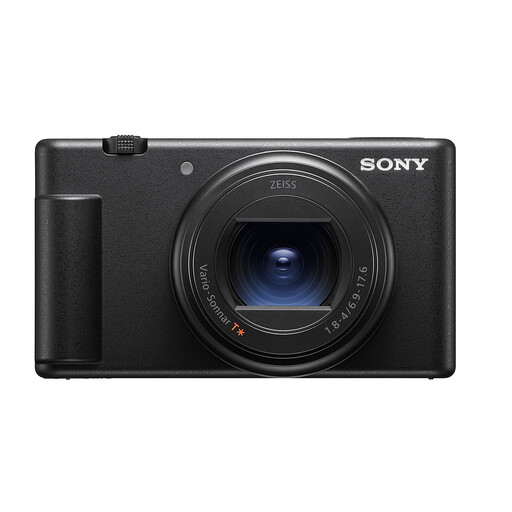
Sony ZV-1 II compact camera
Consider this fixed-lens camera if you want to adjust your framing without changing lenses. Sony UK specifies an 18–50 mm equivalent zoom, Product Showcase mode and 4K recording up to 30p; check whether both your full table and small materials work at your mounting height.
Joybuy
 No image available
Sony ZV-E10K with 16–50 mm power-zoom lens
This interchangeable-lens kit includes a zoom lens for planning your first overhead composition. Check the supplied lens at your table height for both workspace coverage and focus on small materials; confirm the computer connection and power arrangement if lessons will be live or lengthy.
Joybuy
 No image available
Sony ZV-1F compact vlog camera
Consider this compact fixed-lens option if you can set the overhead position around a single lens view rather than adjust framing with a zoom. The product title identifies a 1-inch sensor and an ultra-wide lens; check that the view includes your table and that the camera focuses on your materials at the planned height.
Joybuy
 No image available
Sony A6400 with 16–50 mm power-zoom lens
This APS-C interchangeable-lens kit includes a zoom lens for working out your overhead framing. Check its view and focus at your table height, and make sure your mount is suitable for the camera-and-lens setup.
Joybuy
Common questions
Do I need 4K to film a collage lesson?
Not necessarily: start by checking that the camera frames the workspace and focuses on the materials from your available overhead height. A 4K setting cannot correct a lens view that cuts off part of the table or a focus distance that does not suit your setup.
Can these cameras work as webcams for a live lesson?
Some have stated USB streaming options, but check the particular camera and computer combination. Canon UK lists UVC/UAC streaming for the PowerShot V1; Sony UK says the ZV-E10 II outputs 720p over USB 2.0 and specifies a SuperSpeed USB 5Gbps-compatible computer and cable for higher USB streaming settings.
Can a GoPro HERO13 Black show small collage details?
GoPro offers a separately sold Macro Lens Mod for close-detail work with HERO13 Black. GoPro specifies an 11 cm to 75 cm focus range and focus peaking, but you must adjust focus manually and check the view at your intended mounting position.
What if pupils appear in the lesson recording?
Follow your school's recording and data-protection process before filming or publishing identifiable people. The Information Commissioner's Office says data-protection law is likely to apply to photos or videos a school takes for official use, and those filmed must be informed how the material will be used.


