Who is this for?

Portfolio makers filming full sketchbook spreads

If the whole open book needs to appear in one shot, your camera position and lens must cover its width while keeping the marks you want to show in focus. Plan the overhead height around your largest spread, then try a separate detail shot.

Solo reviewers explaining pages on camera

If you move between speaking to camera and showing materials, consider how you will see the framing and start recording without help. Focus behaviour matters most when an object moves towards the lens or back to the page.

Mobile craft creators making horizontal and vertical clips

If the camera will also record process footage away from your desk, carrying it and changing orientation matter alongside the overhead review. Check that its fixed framing, if applicable, still suits your sketchbook at home.

What matters when choosing?

Interchangeable-lens camera

Choose it when: You want to select a lens around a repeatable overhead position and change your framing options over time.

Trade-off: The exact lens and bundle need checking; a body-only camera is not a complete filming setup.

Compact fixed-lens camera

Choose it when: The same camera needs to move readily between a desk review and handheld craft footage.

Trade-off: You cannot change its built-in lens to solve a framing problem; test page coverage and close focus at your working distance.

Concern What to check Who this matters to
Whole-page detail and framing At your planned overhead height, test the widest spread and a close detail. Check the lens choice and intended 4K recording mode. I need viewers to see the whole spread, then inspect smaller marks without losing focus; around 36% of consumers put page detail and framing first.
Repeatable desk setup Check the support position, accessible controls and screen visibility; compare the exact bundle contents. I want to set up the same shot each time without struggling to reach the camera; roughly 29% of consumers prioritise a repeatable desk workflow.
Presenter and page focus Try your usual face-to-object movements at the intended distance and check how you can monitor focus. When I explain a page and hold up materials, I need both parts of the demonstration to remain usable; about 21% of consumers put those focus transitions first.
Portable and vertical footage Check the orientation and recording formats you need, then test close focus when you return to the desk. I also film craft processes away from my workspace and need clips in more than one orientation; around 14% of consumers prioritise that flexibility.

Buying pitfalls

  • Assuming a camera body is a ready-to-film kit

    Sony UK Store lists a ZV-E10 II body-only configuration, while Canon UK Store lists an EOS R50 V content-creator kit with different contents. The configuration changes what you need to obtain before filming.

    Check the exact lens, recording card, power equipment and a support suitable for holding that camera securely above your desk.

    A lens, card, overhead support or power accessory may require a separate purchase, depending on the listing.

  • Choosing a portable camera without testing desk distance

    DJI specifies a fixed 20 mm-equivalent lens and a 20 cm minimum object distance for Osmo Pocket 3. Whether those dimensions work depends on your page size, mounting height and smallest intended detail.

    Measure the lens-to-page distance and record a test showing both your largest open spread and the details you plan to discuss.

  • Using stabilisation instead of a secure overhead mount

    Stabilisation is relevant to moving footage, but a desk review still needs the camera to stay safely in position above the pages.

    Choose a support that suits the desk and camera, then check the shot for movement, sagging and shadows while you turn pages.

    A suitable desk clamp, tripod or boom support may need to be obtained separately.

Brands to consider for these camera routes

Sony

The UK ZV-E10 II is an APS-C interchangeable-lens option for a desk setup where choosing the lens is part of the decision.

  • Sony specifies a 26.0-megapixel APS-C sensor, E-mount compatibility and 4K recording up to 60p. Its Product Showcase mode is intended for face-to-object demonstrations.
  • Sony UK Store lists a body-only version; check which lens, if any, accompanies the configuration you choose.

Canon

The EOS R50 V is an APS-C interchangeable-lens option for solo filming that alternates between a presenter and a sketchbook.

  • Canon describes a vari-angle screen, subject-tracking autofocus and a dedicated vertical tripod mount on the EOS R50 V.
  • Bundle contents vary. Canon UK Store says a USB-C charger is not included with its content-creator kit, so check the exact configuration and power equipment.

DJI

Osmo Pocket 3 is a compact fixed-lens gimbal-camera option when filming away from the desk is also important.

  • DJI specifies a rotatable screen, 4K recording and three-axis mechanical stabilisation for Osmo Pocket 3.
  • Its fixed 20 mm-equivalent lens and 20 cm minimum object distance make a test with your own sketchbook and overhead height particularly important.

Joybuy camera choices

These cameras offer different ways to film a sketchbook review, from zoom-lens setups to compact fixed-lens options and action-camera bundles. For any of them, check page coverage, close detail and a secure overhead mounting arrangement against your own desk before choosing.

Sony Alpha ZV-E10 II K camera with 16–50 mm power zoom kit lens

Sony Alpha ZV-E10 II K with 16–50 mm power zoom lens

Consider this zoom-lens kit if you want to adjust framing between a spread and artwork details; test both at your intended overhead height.

The listed configuration specifies an APS-C camera, a 16–50 mm f/3.5–5.6 lens, 26 megapixels and 4K60p recording.

Check that your support can hold the camera securely above the desk and confirm the other accessories needed for your setup.

View on Joybuy

Sony ZV-E10K camera with 16–50 mm power zoom lens

Sony ZV-E10K with 16–50 mm power zoom lens

This interchangeable-lens kit is worth considering for a fixed desk position where you want to adjust the zoom; try your widest spread and smallest detail before deciding.

The product name specifies a 16–50 mm power zoom lens. Check the recording mode, close-focus behaviour and overhead support against your planned shot.

View on Joybuy

Sony ZV-1F compact vlog camera

Sony ZV-1F compact vlog camera

Consider a compact camera if you also film away from your desk, but check whether its built-in lens covers an entire spread and focuses on your smallest artwork details.

The product name specifies a 1-inch sensor and an ultra-wide lens. Plan a secure overhead position separately.

View on Joybuy

SJCAM C400 4K action camera with dual touchscreens

SJCAM C400 4K action camera with dual touchscreens

If you also want portable process footage, test whether this action camera can show a complete spread and focus on close artwork at your desk distance.

The product name specifies a 154° wide-angle view, a flip display and 6-axis electronic image stabilisation. Check your mounting arrangement for a fixed overhead shot.

View on Joybuy
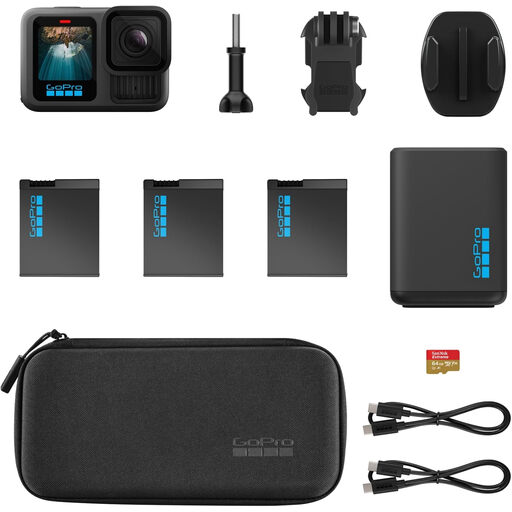
GoPro HERO13 Black Extended Power Bundle

GoPro HERO13 Black Extended Power Bundle

Consider this bundle if portable filming matters alongside the sketchbook review; test its page coverage and close focus before relying on it for overhead artwork shots.

Check the included mounting hardware against your desk and choose a secure support for the planned camera position.

View on Joybuy

Common questions

Do I need an interchangeable-lens camera for a sketchbook review?

No: a fixed-lens camera can work if it frames your entire spread and focuses on the details you need from your chosen position. Choose an interchangeable-lens setup when selecting a lens for that working distance and changing your framing options matter more than compactness.

How should I test an overhead sketchbook shot?

Set up the intended support and lighting, open your largest spread and record a short clip. Check the page edges, fine marks, focus and hand shadows, as well as whether you can see the framing and reach the recording controls from where you work.

What should I check when ordering a camera online in the UK?

Check the seller’s description, included items, delivery arrangements and cancellation information for the exact configuration before ordering. GOV.UK guidance on distance selling says customers can normally cancel up to 14 days after delivery without giving a reason, subject to applicable exceptions; check the information for your order rather than assuming every bundle has the same contents.

What can I do with an old camera when buying a new one?

Use an appropriate electrical recycling route rather than putting the old camera in household rubbish. GOV.UK guidance says that when you buy a new electrical product, the retailer must accept an old like-for-like item free of charge; check how that retailer arranges collection or drop-off.