Overhead demonstration teachers
You need the paper, hands and cutting path to remain visible throughout a fixed lesson. The lens must frame the work area and focus from a mounting position that stays clear of your hands.


For regular overhead lessons, an interchangeable-lens camera gives you a way to choose the framing for your work area, provided the lens focuses at the planned mounting height. A compact gimbal camera makes more sense when quick setup and moving clips matter more, but test whether its fixed lens shows the whole cutting surface without getting in the way of your hands. In either case, plan a stable overhead support and test speech against normal workshop noise.
You need the paper, hands and cutting path to remain visible throughout a fixed lesson. The lens must frame the work area and focus from a mounting position that stays clear of your hands.
You explain the cutting process while others may be talking or working nearby, so you need to test whether your voice remains understandable and whether the camera offers a suitable microphone route.
You need to reposition and pack away your equipment promptly, and may also record handheld or vertical clips between lessons.
Choose it when: You film regularly from a fixed overhead position and need to select a lens for your desk and mounting height.
Trade-off: Choosing the lens and rig adds setup and pack-away work; the camera body alone does not establish that the view will fit.
Choose it when: You frequently move the setup or want handheld and vertical clips alongside the fixed lesson.
Trade-off: A fixed lens limits your overhead framing choices, even when the camera is convenient to carry.
| Concern | What to check | Who this matters to |
|---|---|---|
| Overhead detail | Check full-desk framing and close-work focus using the intended lens and mounting height. Keep the rig clear of your hands. | If small cuts need to be visible throughout my demonstration, I need a dependable view of both the paper and blade position. Around 38% of consumers put readable overhead detail first. |
| Teaching audio | Confirm a suitable microphone connection or compatible wireless option, then make a speech test during normal workshop activity. | When nearby conversations might cover my explanation, understandable speech matters more to me than an extra video setting. Audio is the primary concern for around 37% of consumers. |
| Quick setup | Check the complete mounting arrangement, screen visibility and recording-media requirements; decide whether you need vertical clips. | If I move between tables and must pack away promptly, I want a setup I can reposition without disrupting the lesson. Around 25% of consumers prioritise that flexibility. |
An interchangeable lens gives you options, but the chosen lens still has to cover the desk and focus from the planned camera position.
Measure the cutting surface and mounting height, then check the view with the exact lens. Plan the body, lens and stable support as one setup.
The lens and overhead support may need to be obtained separately.
A sharp view will not help viewers follow spoken instructions if workshop activity masks your voice.
Record a short lesson segment while the room is in normal use. If speech is hard to follow, check a compatible microphone option before prioritising additional video settings.
DJI specifies a 20 mm-equivalent fixed lens and a 20 cm minimum object distance for the Osmo Pocket 3. Neither figure alone establishes the view of your cutting surface.
Test full-desk framing and close-work focus from the intended position. Pocket 3 also records to a separately supplied microSD card, so include a compatible card in the setup.
Recognisable participants or conversations can change what needs to be considered before footage is retained or shared.
Agree the recording area and intended use with the workshop operator before filming. If consent is used as the applicable basis, the Information Commissioner’s Office says requests should be clear, specific and separate from other information; its guidance is under review following legislative changes.
The EOS R50 offers an interchangeable-lens route for a planned overhead workstation.
The ZV-E10 II is another interchangeable-lens APS-C option for a fixed lesson rig.
The Osmo Pocket 3 is a compact gimbal-camera option when moving and repositioning equipment is part of the lesson workflow.
These choices include interchangeable-lens, fixed-lens compact and action cameras for lesson video. Match each one to your intended desk view, mounting arrangement and speech-recording needs rather than treating portability or a 4K label as proof that it suits overhead cutting work.
 No image available
Consider this compact gimbal camera if you move between workstations or also record handheld clips. Its listed 4K/120fps video and three-axis stabilisation do not establish that its fixed lens will frame your desk: test the view and focus from your intended overhead position.
Confirm the Creator Combo contents for the microphone equipment you need, and arrange a stable support and compatible microSD card.
 No image available
This interchangeable-lens kit is a candidate for a repeatable overhead rig where you want to adjust framing. The named kit includes a 16–50 mm lens and lists 4K60p video; check whether that lens covers and focuses on your work from the planned height.
Confirm the microphone arrangement, recording card and overhead support needed for the complete setup.
 No image available
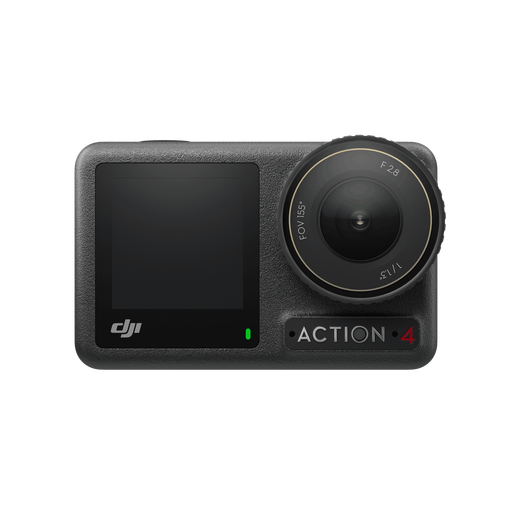
This 4K/120fps action-camera bundle is worth considering if a compact camera fits your wider filming plans. For the main paper-cutting lesson, test its overhead framing and close-work focus before committing to a mounting position.
Check how you will secure it clear of the cutting area and whether the bundle contains the microphone equipment you intend to use.
 No image available
This interchangeable-lens kit offers a supplied zoom lens for a planned overhead composition. Check its framing and close focus at your camera height rather than assuming the included lens suits every cutting surface.
Plan a stable support and test speech in the workshop; confirm any additional microphone connection or equipment you need.
 No image available
This fixed-lens compact camera may suit a setup that needs to be moved often. Its named ultra-wide lens makes a full-desk framing test particularly important: check whether the cutting action remains large enough in the shot and focuses at the intended distance.
Confirm a suitable overhead support and the microphone arrangement needed for speech in your workshop.
No: a fixed-lens camera can work if a test shows the whole cutting area clearly and it focuses from a position clear of your hands. Choose an interchangeable-lens route when you need to select a different view for your desk and mounting height; Canon confirms RF/RF-S lens compatibility for the EOS R50, while DJI specifies a fixed 20 mm-equivalent lens and 20 cm minimum object distance for Pocket 3.
Test it while the room is being used normally before relying on it for instruction. If other sounds cover your voice, look for a compatible microphone route: Canon UK specifies a 3.5 mm microphone jack on the EOS R50, and DJI states that Pocket 3 can connect directly to DJI Mic 2 transmitters.
Plan for a stable support, suitable recording media and, if the room test calls for one, a microphone. Check whether your chosen camera package includes the lens you intend to use; DJI specifies that Pocket 3 records to a separately supplied microSD card. Keep the mounted equipment clear of hands and the cutting area.
Agree where and how filming will take place with the workshop operator before recording recognisable people or sharing footage. The applicable UK data-protection basis depends on who is recording and how the footage will be used. If consent is the basis used, the Information Commissioner’s Office says requests should be prominent, understandable, specific and separate from other information; it notes that its consent guidance is under review following legislative changes.