Ceramic sellers making catalogue images
If you photograph complete bowls regularly, consistent framing, exposure and colour matter more than video-focused features.


For repeatable photographs of ceramic bowls against white, choose the camera and lens together, with control over exposure and colour, then plan for consistent lighting and stable support. A zoom can cover whole-bowl framing; if glaze texture or maker’s marks must fill the frame, check a compatible close-focus lens. Give video features greater weight only if you also make clips.
If you photograph complete bowls regularly, consistent framing, exposure and colour matter more than video-focused features.
For glaze texture, stamps, rims or small flaws, check the lens’s magnification and working distance as well as its suitability for whole-bowl shots.
If you also film demonstrations or product clips, consider screen position and video workflow alongside your still-image needs.
For white-background bowl photographs, decide how you will control colour and light, then whether your lens needs to capture small details; consider video features if clips are part of the same workflow.
| Concern | What to check | Who this matters to |
|---|---|---|
| Colour and white-background control | Check exposure and white-balance controls and whether the camera records RAW or RAW+JPEG. | When glaze colour and a neutral background need to remain consistent across listings, I want files I can adjust after shooting; around 42% of consumers put this control first. |
| Close detail | Check lens-mount compatibility, maximum magnification and the space available between lens and bowl. | If stamps or glaze texture need their own images, I need a lens that can frame them closely; roughly 33% of consumers prioritise detail. |
| Stills and video together | Check screen movement and the recording features needed for your clips. | Alongside finished-bowl photos, I may film demonstrations and need to compose both kinds of shot; around 25% of consumers make this combined workflow their priority. |
A camera body does not determine how closely a lens can frame a maker’s mark or how reflections appear on glaze.
Decide whether you need whole-bowl images or close details, then check lens compatibility and magnification alongside the lighting setup.
A suitable lens, stable support, lights and background materials may all be needed for the setup.
White ceramics and backgrounds make unwanted colour casts conspicuous. Adobe explains that white balance can be adjusted in Camera Raw, but editing does not replace consistent lighting and exposure.
If colour correction is part of your workflow, check RAW recording and make time to review the resulting images.
Correcting colour and background tones adds editing time.
Canon specifies up to 0.5x magnification for its RF 35mm F1.8 Macro IS STM; Nikon specifies 1:1 for the NIKKOR Z MC 50mm f/2.8, and Sony specifies 1.0x for the E 30mm F3.5 Macro.
Compare magnification and working distance against the size of the details you need to photograph. At high magnification, allow for shallower depth of field.
Nikon’s Product Review Mode is intended to shift focus during product-review video; it does not establish more accurate colour in static bowl photographs.
If you shoot stills only, assess the lens, capture controls, lighting and support before prioritising presenter-focused features.
The EOS R50 is an APS-C option for bowl stills and occasional video using compatible RF or RF-S lenses.
The Z50II combines still-photography controls with features intended for product demonstrations.
The Alpha 6400 is an APS-C option for buyers who want an editable still-image workflow.
These camera listings offer zoom-lens and body-only choices to assess for whole-bowl photography. For small ceramic details, check the lens’s close-focus capability separately; plan lighting and stable support for either approach.
 No image available
A full-frame camera and zoom-lens listing to consider for whole-bowl framing. If close images of glaze or marks matter, check the supplied lens’s maximum magnification before buying.
 No image available
Consider this APS-C kit if you need still photographs and also make studio clips. The title specifies 26 MP stills and 4K60p video; check still-exposure controls and the lens’s close-focus capability against your shooting needs.
 No image available
A zoom-lens option for whole-bowl shots when editable files matter: Sony specifies 14-bit uncompressed RAW recording for the Alpha 6400. Check the supplied lens’s close-focus capability if you also need small details to fill the frame.
 No image available
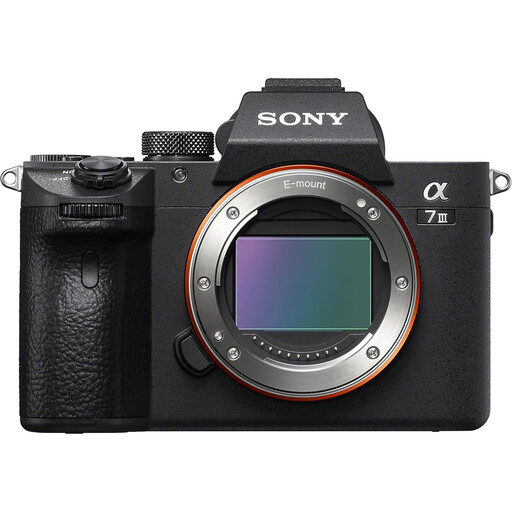
A body listing to assess if you intend to choose a lens for your bowl photographs. Confirm the actual bundle contents before ordering: the title says body only, while the accompanying product information mentions a 28–70 mm lens.
 No image available
An APS-C camera and zoom-lens listing to consider for whole-bowl framing. If editable colour files or close details are priorities, check RAW and white-balance options and the supplied lens’s magnification before buying.
No: full-frame is not a requirement for this task. The Canon EOS R50 and Sony Alpha 6400 are APS-C options; choose a suitable lens and control focus, exposure and lighting before deciding whether a different sensor format serves a specific need.
Choose RAW or RAW+JPEG if adjusting white balance after capture matters to your workflow. Sony specifies RAW recording for the Alpha 6400, and Adobe explains that white balance can be adjusted in Camera Raw; consistent lighting and exposure still matter when you take the photograph.
No, not solely because you are photographing bowls. Consider a macro-capable lens when glaze texture, stamps or condition details must fill more of the image; check its magnification and working distance rather than relying on the Macro label alone.
Confirm the exact lens and other included items against the listing before buying, particularly when the title and bundle details differ. If small details are important, also check the supplied lens’s magnification; a listed zoom range alone does not answer that question.