Small-batch ceramic sellers
You need consistent whole-bowl images for listings. A repeatable camera position and careful placement of artificial light matter when a reflective glaze changes appearance between shots.


For whole-bowl photographs, start with an interchangeable-lens camera, controlled lighting and a stable, repeatable setup; an APS-C mirrorless body is a practical starting point. Choose the lens around the smallest detail you need to show, and check camera and software compatibility if computer-based capture matters. A different body will not, by itself, control reflections from a glazed surface.
You need consistent whole-bowl images for listings. A repeatable camera position and careful placement of artificial light matter when a reflective glaze changes appearance between shots.
You need close views of glaze, rims, stamps or surface marks. The lens’s magnification and the space it leaves for lighting deserve particular attention.
You photograph several bowls from a fixed setup and want to review framing and focus on a computer as you work. Check the remote-capture and transfer options for the exact camera you plan to use.
For consumers choosing a camera specifically for ceramic bowls under artificial light, start with the photograph you need most often: a consistent whole-bowl view, a fine-detail close-up or a repeatable computer-assisted workflow.
| Concern | What to check | Who this matters to |
|---|---|---|
| Consistent whole-bowl images | Check lens framing, secure camera support and how your intended light placement handles reflections on a test bowl. | When every listing needs to show the bowl from a consistent angle, I want the glaze and shape to remain clear from one item to the next. Roughly 36% of consumers would put that consistency first. |
| Fine ceramic detail | Compare the exact lens’s maximum magnification and working distance; a 0.5x lens and a 1:1 lens offer different close-up scales. | If small marks, rim finishes or glaze texture must be visible, I need those details to occupy enough of the image. Around 29% of consumers would make close-up detail their primary concern. |
| Computer-assisted capture | Confirm remote-shooting and file-transfer support for the exact body, software, connection and computer. | Photographing a collection from one position, I want to inspect focus and composition on a larger screen before changing the set. About 21% of consumers would prioritise that workflow. |
| Sensor-format flexibility | Compare complete body-and-lens setups, and decide whether your lighting constraints call for a different sensor format. | If I cannot adjust the artificial light as freely, sensor format may weigh more heavily in my choice. Roughly 14% of consumers would put that flexibility ahead of the other needs. |
Canon lists the EOS R50 as a 24.2MP APS-C camera, while its EOS R8 specification describes a 24.2MP full-frame sensor. Those specifications identify two routes, not a reason to choose full frame automatically for a stationary bowl. The Pottery People’s ceramic-photography guidance emphasises lighting that reveals texture, reduces glare and preserves colour.
Reflections on glazed bowls can obscure shape and texture even when the camera records plenty of detail. The Pottery People identifies lighting as central to reducing glare and showing ceramic surfaces clearly.
Photograph a test bowl with the intended artificial-light arrangement. Allow space for diffusion, a stable camera position and repeatable light placement when planning the setup.
Adding diffusion, camera support or a suitable background later can mean changing a setup you have already built around the camera.
Canon specifies up to 0.5x magnification for its RF 35mm F1.8 Macro, whereas Nikon specifies 1:1 for the NIKKOR Z MC 50mm f/2.8. That difference matters when a small mark must occupy more of the image.
Decide how small a detail you need to photograph, then compare magnification and working distance for the exact lens rather than relying on its name.
High magnification brings a narrow depth of field. Sony specifies just 2.4cm between the front of its E 30mm macro lens and the subject at close focus, an example of how little room some close-up arrangements leave near the bowl.
Check whether your lens position leaves room to place lights without introducing unwanted reflections. Use stable support and consider whether a less magnified image shows enough detail.
If an edit materially changes the apparent glaze colour or hides damage, a customer cannot judge the bowl’s appearance from the photograph. The London Borough of Bromley’s Trading Standards guidance stresses accurate descriptions of goods offered to consumers.
Compare the edited image with the bowl under the intended viewing light, and make sure photographs and listing details represent its finish, condition and included items accurately.
Consider Canon’s RF/RF-S system if you want an APS-C starting body and are comparing compatible lenses and a computer-assisted EOS workflow.
Sony’s E-mount APS-C cameras are relevant if you want an interchangeable-lens setup and may use computer-assisted capture.
Nikon’s Z system is worth considering when small glaze details or maker’s marks make a dedicated macro lens central to the setup.
These interchangeable-lens cameras offer starting points for whole-bowl photographs under controlled artificial light. Compare the supplied lens with your framing needs, and check close-up capability or computer-control compatibility separately if either is essential to your work.
 No image available
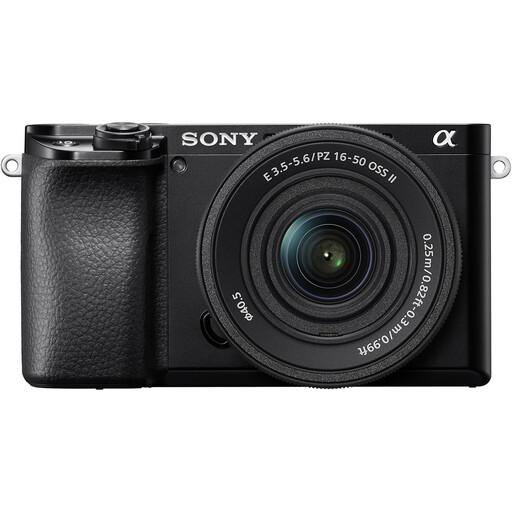
Consider this lens-and-body combination for whole-bowl framing, with the option to assess a computer-assisted workflow.
The listed lens is a 16–50mm Power Zoom. For small glaze details, check its close-focus scale; for tethered shooting, confirm remote-capture compatibility for this exact camera and your computer.
 No image available
This interchangeable-lens combination is an option for whole-bowl photographs from a controlled setup.
The title lists a 16–50mm lens. Check its close-focus capability before relying on it for marks or fine texture, and confirm the exact computer-capture setup if you intend to shoot tethered.
 No image available
The supplied zoom makes this an interchangeable-lens option to assess for repeatable whole-bowl views.
The title specifies a 16–50 mm f/3.5–5.6 Power Zoom kit lens. Check that lens’s magnification for detail shots and the exact camera’s computer-control compatibility if your catalogue workflow requires it.
 No image available
Consider this combination if you have a specific reason to choose a full-frame system for your bowl photographs, rather than treating sensor format as a substitute for lighting control.
The listed zoom covers 28–70mm. Check its close-focus capability if small marks must fill the frame; you may need to assess a different compatible lens for that task.
 No image available
This APS-C combination is relevant to whole-bowl framing when you want an interchangeable-lens starting point.
The title lists a 16–55mm zoom; confirm the exact included lens and bundle contents before buying. Check that lens’s close-focus capability if your images must also show fine ceramic detail.
No, not automatically for stationary bowls under artificial light you can control. An APS-C interchangeable-lens camera can be a practical starting point; consider a full-frame system if its characteristics answer a specific lighting or framing need, and compare the complete lens-and-body setup.
Add one when small glaze details, rim finishes or maker’s marks are essential images, and choose its magnification to suit the required close-up. Nikon specifies 1:1 for its NIKKOR Z MC 50mm f/2.8, while Canon specifies up to 0.5x for the RF 35mm F1.8 Macro; also check working distance and compatible camera mounts.
It can help when you repeatedly frame bowls from one position and want to review images on a computer. Canon describes remote shooting and file transfer through EOS Utility for compatible cameras, and Sony lists PC Remote for the ILCE-6400A; check support for your exact body, software, connection and computer.
Keep the image faithful to the bowl’s colour, finish and condition rather than hiding damage or changing the apparent glaze. The London Borough of Bromley’s Trading Standards guidance stresses accurate product descriptions; compare the edited image with the bowl and describe included items clearly.
Check the retailer’s returns policy and the manufacturer’s warranty terms for the exact body-and-lens bundle. Confirm what battery, charger and lens are included, and whether the body and lens have separate service or registration terms.