
24/7 Customer Support

Free returns

Same-day & Next-day Delivery

Quality Guaranteed

Unlock Your Welcome Offers: FREE Delivery | Up to 80% OFF | Free 30-day JoyPlus trial
Download the APP
By the Joybuy Product Recommendation Officer
Choosing camera and vlogging equipment involves more than comparing video resolution. A camera may advertise 4K recording, yet still produce distracting shake, weak audio or unusable footage in poor light. The right setup depends on where you film, how often you travel and whether you need a compact kit or a more expandable system.
This guide explains the common buying traps, the specifications worth checking and suitable options for vloggers, travellers, photographers, livestreamers and outdoor users in the UK.
4K is useful for cropping, editing and displaying detailed footage, but it does not automatically mean better results. Stabilisation, lens performance, autofocus, lighting and audio can have a greater effect on the final video.
Check whether the stated frame rate applies to the resolution you intend to use. For example, a camera may support 4K at 30fps but offer higher frame rates only at lower resolutions. Higher frame rates can be useful for slow motion, but they may also increase file sizes and battery consumption.
Viewers are usually less tolerant of muffled or inconsistent speech than average image quality. Built-in microphones can be adequate for casual clips, but interviews, outdoor filming and busy streets often require a wireless microphone or compatible external audio system.
Before buying, confirm whether the microphone connects directly by Bluetooth, through a receiver or using a dedicated camera port. Compatibility between transmitters, phones and cameras is not universal.
A camera tripod, camera clamp mount or phone holder may appear universal, but threads, clamps, shoe mounts and proprietary connections vary. A heavy camera on an unsuitable mount can shift position or fall.
Look for the required 1/4-inch thread, cold shoe, magnetic interface or action-camera mounting buckle. Also check the load capacity and whether the mounting surface is stable enough for the intended use.
For walking vlogs, travel footage and action recording, compare the type of stabilisation rather than relying on general phrases such as “steady video”.
Mechanical stabilisation may be unsuitable for rough underwater use or high-impact mounting, whereas an action camera with EIS can be more practical for cycling, hiking and sports.
A compact camera may be easy to carry but still require spare batteries, a power bank or regular charging. Check the stated recording time and the conditions behind it. Recording at 4K, using Wi-Fi or filming in cold weather can reduce practical runtime.
You should also confirm:
For example, the SJCAM C300 lists up to 460 minutes with its handle and auxiliary battery, while the SJCAM C400 lists up to 437 minutes in a similar configuration. These figures are product specifications, not a guarantee of identical results in every situation.
Water resistance varies significantly. The GoPro HERO is listed as waterproof to 10 metres without additional housing, while the SJCAM C300 and C400 require their waterproof cases for use up to 30 metres. The DJI Osmo Action 6 is listed for use to 20 metres without a case.
Always close port covers correctly, inspect seals and follow the manufacturer’s instructions. A gimbal camera such as the DJI Osmo Pocket 3 or DJI Osmo Pocket 4 should not be treated as an action camera simply because it records 4K video.
The following selections match different filming habits rather than presenting one product as suitable for everyone.
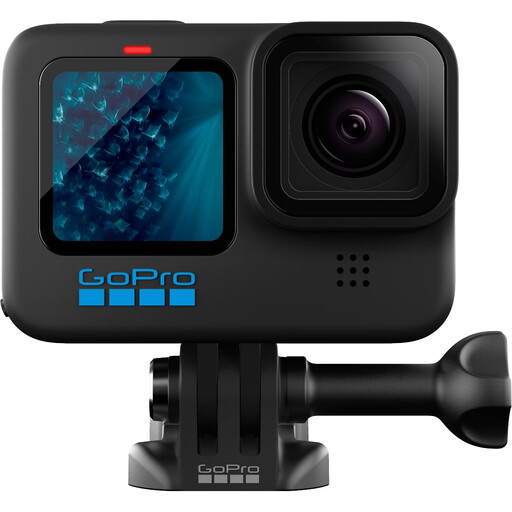
Why This Fits Their Persona: A compact starting point for beginners who want simple controls, 4K video, 12MP photos and a waterproof design for everyday adventures.
The specification lists stabilisation, one-button control and included mounting parts, reducing the need to purchase a complete accessory system immediately.
4K video, 10-metre waterproof rating without housing, Wi-Fi, Bluetooth and a removable battery.
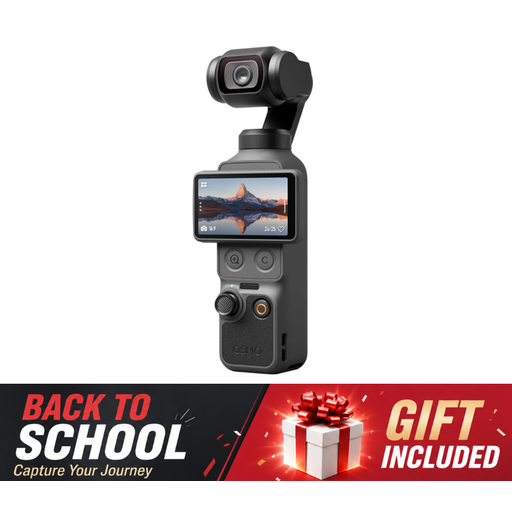
Why This Fits Their Persona: Designed for creators who prioritise a pocket-sized gimbal camera, rotatable screen and higher built-in storage for travel and regular vlogging.
Its stated 1-inch CMOS sensor, 3-axis stabilisation and 107GB built-in storage address common concerns about shaky footage and frequent card changes.
4K/240fps specification, 2× lossless zoom and a 2-inch rotatable screen. It is not waterproof, so outdoor users need weather precautions.
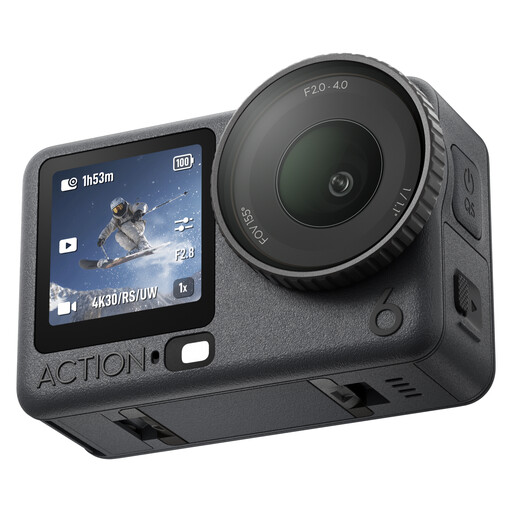
Why This Fits Their Persona: A practical match for cycling, surfing, hiking and other activities where weather resistance, battery capacity and hands-free control matter.
The stated 20-metre waterproof rating, 50GB internal storage and up to four-hour battery specification provide clear practical details beyond resolution alone.
Variable f/2.0–f/4.0 aperture, 4K recording, gesture and voice control, plus direct connection for two compatible DJI microphone transmitters.
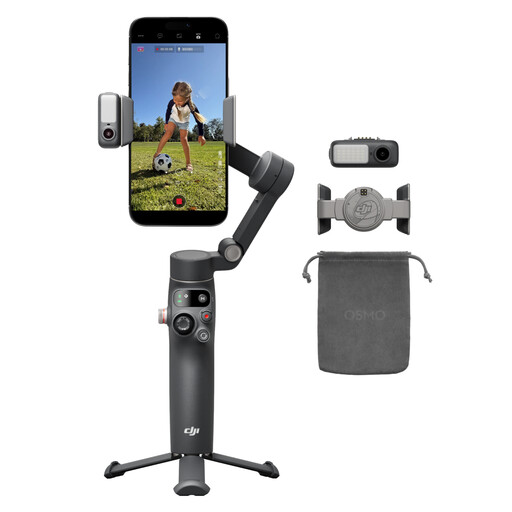
Why This Fits Their Persona: Suitable for creators who already use a smartphone and want smoother movement, subject tracking, lighting and audio support without carrying a separate camera.
The built-in extension rod, tripod and phone charging reduce the need for several separate accessories. Check app availability and phone compatibility before purchase.
3-axis stabilisation, 360-degree pan rotation, a stated 10-hour battery and integrated tracking, audio and lighting functions.
A camera is only one part of a reliable setup. Consider adding:
For photography rather than video, a small camera flash such as the ULANZI SL01 may provide a portable manual lighting option. Check hot-shoe compatibility with your Nikon, Sony, Fujifilm or Panasonic camera.
We have compiled a complete, real-time list of products that fully satisfy these strict selection criteria and UK safety regulations.
Not in every situation. A phone may be convenient for quick social posts, while a dedicated camera can offer physical controls, different stabilisation systems, larger storage options or improved mounting flexibility. A phone gimbal stabiliser can be a cost-effective step if your existing phone already meets your image-quality needs.
Lifespan depends on battery wear, frequency of use, storage and exposure to dust, moisture and impacts. Keep lenses clean, store lithium-battery devices in a cool, dry place and inspect mounts, seals and locking mechanisms regularly. Replace damaged cables, swollen batteries or loose mounting parts rather than continuing to use them.
Common ongoing costs include memory cards, spare batteries, charging accessories, protective cases and editing storage. High-resolution footage uses more space, so calculate the cost of suitable storage before choosing a camera that records at 4K or higher frame rates.