Detail-first textile tutorial makers
You need yarn texture, shed changes and hand placement to remain visible in a wide or medium shot, particularly if you plan to crop the footage later.


For a tripod-mounted weaving demonstration, choose a camera and lens that can frame the loom and both hands, then check that you can monitor focus and expose the textile against the bright window. Sony’s ZV-E10 II and Canon’s EOS R50 V offer 4K/60p options for footage you plan to slow down; Canon’s EOS R50 offers a 4K/30p route with human tracking, while Panasonic’s LUMIX G100D offers 4K/30p with audio and stabilisation features suited to narrated clips and handheld cutaways. None of those features replaces a test shot in the intended window light.
You need yarn texture, shed changes and hand placement to remain visible in a wide or medium shot, particularly if you plan to crop the footage later.
You need to check the composition and keep the intended subject in focus while your attention is on weaving, not on adjusting the camera.
You need spoken instructions to remain intelligible alongside loom sounds and may put audio setup ahead of higher-frame-rate recording.
Start with the space available to frame the loom and manage the window light. Then decide whether dependable focus, editing options or spoken explanation most affects your choice.
| Concern | What to check | Who this matters to |
|---|---|---|
| Textile detail and exposure | Check the lens view from your tripod position and the exact 4K mode. Test exposure on the hands and fabric with the window in the intended position. | If fine yarn and colour changes must remain visible, I need the textile exposed clearly without letting the window dictate the whole shot; around 38% of consumers put detail and exposure first. |
| Framing and focus | Check screen visibility from beside the loom and try autofocus on the intended action; consider a fixed manual-focus position when the action stays in one plane. | When I work alone, I need to see that both hands stay in frame without stopping to adjust the camera. Dependable framing and focus come first for around 31% of consumers. |
| Editing and slow motion | Confirm the frame rate and recording format of the exact mode you would use, plus the card and editing setup it requires. | To explain a quick shuttle movement, I may want footage I can slow down and edit later; around 23% of consumers prioritise that flexibility. |
| Narration and cutaways | Test speech against loom noise in the room and check the stabilisation setup if you will film handheld details. | If I teach while weaving and move in for occasional close views, I need speech and mobile shots to work alongside the main shot. Around 8% of consumers make this their primary concern. |
An interchangeable-lens camera body alone does not determine whether the loom, fabric and both hands fit in the shot.
Measure the available camera-to-loom distance and make a test composition from the planned tripod position. Check that the intended lens fits the camera mount.
You may need a different lens if the planned one cannot frame the demonstration from that position.
A bright window can still overwhelm a shaded demonstrator or textile, regardless of the camera’s resolution.
Try moving or diffusing the window light, set exposure for the hands and fabric, and lock white balance before reviewing a test clip.
4K/60p and colour-grading options are useful only if the selected recording mode serves the final video and fits your workflow.
Decide whether the tutorial needs slowed footage or later colour work, then check the mode, card requirements and editing compatibility.
The chosen format may require a suitable memory card, more storage or a compatible editing setup.
Panasonic lists OZO Audio and Hybrid I.S. for the LUMIX G100D, but loom noise still affects narration, and stabilisation does not replace a stable main shot.
Record a short clip with the loom operating and listen to it on headphones. Use a tripod for the fixed overview and assess handheld cutaways separately.
The ZV-E10 II is a relevant interchangeable-lens option when 4K/60p recording and a more involved editing workflow matter.
The EOS R50 and EOS R50 V offer distinct routes: a fixed 4K/30p tutorial setup or a workflow that uses 4K/60p and Canon Log 3.
The LUMIX G100D is worth considering for narrated demonstrations with occasional handheld cutaways.
These cameras offer different ways to position a shot around the loom, from interchangeable-lens setups to compact options for changing camera positions. Check framing, focus and recording controls against your intended demonstration before choosing.
 No image available
Consider this kit if you intend to film the loom in 4K and may slow down hand movements or edit colour later.
The product name specifies APS-C, 4K/60p and 10-bit 4:2:2 recording; Sony UK also lists these recording capabilities for the ZV-E10 II. Check that the included 16–50 mm lens frames both hands from your tripod position and that your card suits the mode you choose.
 No image available
If you want a compact camera beside the loom, check whether its wide-angle view makes the textile detail large enough in the finished shot.
The product name describes an ultra-wide lens. Confirm the exact recording mode and sensor specification if either affects your choice.
 No image available
For a solo demonstration, assess whether you can monitor the full loom composition from where you will stand.
Check the available recording modes, exposure controls and audio connections against your filming plan, as well as the lens view from your intended camera position.
 No image available
For a fixed loom shot, the included zoom lens gives you a starting point for testing how much of the working area fits in frame.
Check its view from the available tripod position. Confirm the exact 4K frame rate and exposure controls required for your planned recording setup.
 No image available
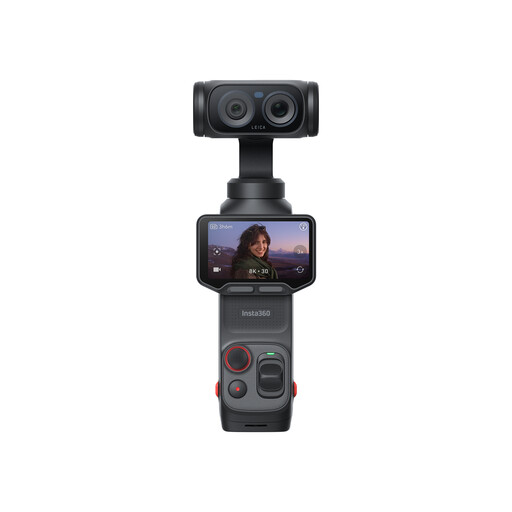
A pocket gimbal camera is a different setup to assess if you plan to move between a loom overview and handheld detail shots.
The product name specifies 3-axis stabilisation. Check the lens view, the conditions of any required slow-motion mode, and the focus, exposure and audio controls before relying on it for a full demonstration.
No: 4K/30p is an option for a fixed, real-time demonstration. Consider 4K/60p if you plan to slow down fast hand or shuttle movements while retaining a 4K recording, and check the selected mode, memory card and editing setup. Sony UK lists up to 4K/60p for the ZV-E10 II, Canon UK lists 4K/60p for the EOS R50 V, and Panasonic UK & Ireland lists 4K/30p for the G100D.
Use continuous autofocus if the demonstrator moves through the shot; consider manual focus when the important work stays on a consistent plane and you do not want focus shifting to the background. Canon UK lists human tracking for the EOS R50 and EOS R50 V, but test your intended framing with hands moving in front of the textile.
Treat the window as part of the lighting setup: try placing it to the side of the loom or diffusing its light instead of filming directly towards it. Set exposure for the textile and hands, lock white balance for the take and review a test clip before recording the full demonstration.
Not necessarily, but test spoken instructions while the loom is operating before deciding. Panasonic UK & Ireland lists OZO Audio for the G100D; room echo, loom noise and the camera’s distance from the speaker still matter. If you plan to add a microphone, check its compatibility with the exact camera.