First-time crochet lesson creators
If you want to start filming without choosing a separate lens, a kit is a practical starting point. You will still need to check that its lens frames your hands and work area from a secure overhead mount.


Choose a camera and lens that can frame both hands and the stitch area from a securely mounted overhead position. A lens kit removes an immediate compatibility decision, while a body-only camera needs a separately compatible lens. Prioritise framing, focus and lighting on the white surface before paying for recording modes you may not use.
If you want to start filming without choosing a separate lens, a kit is a practical starting point. You will still need to check that its lens frames your hands and work area from a secure overhead mount.
A repeatable overhead setup makes framing and focus worth checking carefully, especially when hands and yarn move across a bright white surface. An interchangeable-lens camera leaves room to change lenses later, but each lens must suit your mount height and work area.
If your lessons include slow-motion inserts or colour grading, the 4K 60p and 10-bit recording options specified for some models may matter. They are less relevant if you publish straightforward lessons with minimal editing.
Start with the view you can achieve above your actual work surface, then check the lens, lighting and recording controls needed to repeat that view across lessons.
| Concern | What to check | Who this matters to |
|---|---|---|
| Framing and stitch visibility | Test whether the lens shows both hands and the active stitches from your intended mount height. Check that the support can hold the complete camera-and-lens setup securely. | I need the whole demonstration in view but may also want to crop closer to a stitch while editing. Around 33% of consumers put framing and visible detail first. |
| Consistent colour and exposure | Test focus and exposure with the actual white surface and yarn. Position the lights so the camera and your hands do not cast distracting shadows. | When I film several lessons, I want the yarn and white background to look consistent rather than changing as my hands move. For around 27% of consumers, that consistency is the primary need. |
| A manageable first setup | Check the box contents for a lens and confirm its mount if buying one separately. Account for the complete setup when choosing an overhead support. | I want to record without discovering that I still have to select a compatible lens. Around 27% of consumers chiefly want to avoid that extra setup decision. |
| Editing flexibility | Check the exact resolution, frame rate and colour format you intend to record, alongside what your editing device can handle. | If I plan slow-motion hook demonstrations or colour grading, the recording format matters more to me than it would for a minimally edited lesson. Around 13% of consumers put that flexibility first. |
Canon UK Store lists the EOS R50 V configuration discussed here as a camera body without a lens. You need a compatible lens before you can test its overhead framing.
Check the exact box contents and lens mount, then work out whether your chosen lens can cover the work area from the planned camera height.
A separately chosen compatible lens adds another item to obtain; the lens choice may also affect what the overhead mount needs to support.
4K 60p or colour-grading formats will not remove shadows from the white surface or bring a poorly framed stitch into view.
Make a short recording with your actual yarn, hands, background, lights and overhead support before deciding whether advanced modes help your editing workflow.
Canon UK and Sony United Kingdom specify 4K 60p for the EOS R50 V and ZV-E10 II respectively; Panasonic UK & Ireland lists 4K at 25p and 30p for the G100D. The distinction matters if you plan higher-frame-rate inserts.
Check the resolution and frame-rate combination you will actually use, rather than relying on the 4K label alone.
The EOS R50 V is a video-oriented interchangeable-lens option for creators who want to choose an RF or RF-S lens for their workspace.
The ZV-E10 II represents an APS-C interchangeable-lens option; check whether the particular configuration you choose includes a lens.
The LUMIX G100D with a 12–32 mm kit lens is an option for creators who want a supplied lens and a screen they can position while setting up the shot.
These camera options offer either a supplied zoom lens or a lens described with the camera. For any of them, check the view and focusing distance at your intended overhead height, and choose lighting and a support suited to the complete setup.
 No image available
Consider this lens kit if you want an interchangeable-lens starting point and expect to use higher-frame-rate or colour-grading options. Its stated recording features include 4K 60p and 10-bit 4:2:2. Test whether the supplied lens frames and focuses on your crochet work from the planned overhead position.
 No image available
This kit suits consumers who would rather start with a supplied lens than select one separately. Check that its 16–50 mm lens captures the whole work area and the stitch detail you need from your mount height. If particular recording modes matter to your lessons, confirm the exact options before choosing it.
 No image available
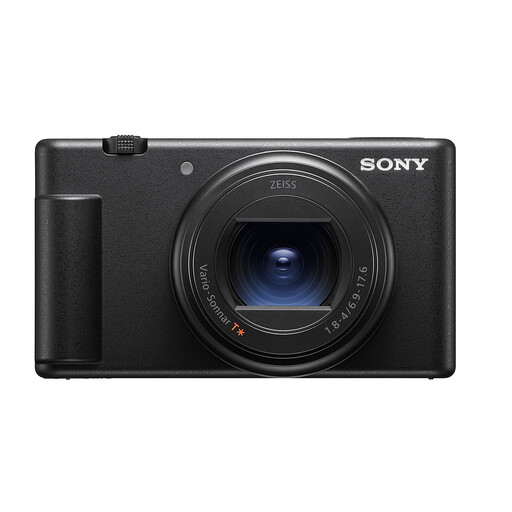
Consider this camera if you prefer a lens described as part of the camera rather than choosing a separate interchangeable lens. Its title specifies a 1-inch stacked sensor, 20 MP stills and 4K video. Test whether the lens can show the full crochet area and focus on the stitches from your planned overhead position.
 No image available
This lens kit is another option if you want to begin without selecting a separate lens. Check its framing and focus at the height your crochet setup allows. Choose an overhead support suited to the complete camera-and-lens load, and confirm any recording controls your workflow requires.
Not necessarily: 4K is worth considering if you intend to crop an overhead recording into closer views of stitches. For a fixed full-frame lesson, first make sure the lens covers the work area, the camera is secure and the lighting leaves the stitches visible. Canon UK, Sony United Kingdom and Panasonic UK & Ireland specify 4K for the models discussed here, but their listed frame-rate options differ.
Secure the camera above the work surface and record a short test with the actual yarn, hook and both hands in frame. Look for shadows from your hands and the camera; overhead-filming guidance from xameliax suggests repositioning the main light or using a second light source where shadows interfere with the shot.
You need a lens compatible with that camera before you can establish the view or focusing distance for your lesson. Canon UK Store lists the EOS R50 V configuration discussed here without a lens. Check the complete camera-and-lens load against your overhead support, and plan for lighting and recording media as part of the setup.