Choose the camera and lens around the smallest repair detail viewers must see, then plan a stable overhead position, controlled lighting and locked exposure and white balance. A compact 4K/30p setup may suit a fixed, real-time lesson; 4K/60p and more flexible recording formats matter more if you intend to slow down hand movements or adjust colour in editing. Neither recording option guarantees that a kit lens will frame tiny stitches closely enough.
Who is this for?
Close-up repair demonstrators
If viewers need to distinguish thread placement, needle movement and fabric edges, check the exact lens’s close-focus figures and the framing possible at your overhead mounting height. Resolution alone will not tell you how large a stitch appears in the shot.
Solo craft-course creators
When you operate the camera while working at the table, an accessible screen and record control can make framing easier. Check focus with your hands entering the shot rather than assuming subject tracking will follow a needle or thread.
Straightforward home-lesson makers
If you plan to film a fixed demonstration and publish it with limited editing, consider whether 4K/30p, your preferred way to record speech and a manageable transfer workflow meet your needs before choosing advanced recording modes.
What matters when choosing?
For a white-background textile repair lesson, settle the required close-up framing and overhead position before deciding which recording and editing features you need.
| Concern |
What to check |
Who this matters to |
| Fine-detail framing |
Check the exact lens’s minimum-focus distance and maximum magnification against your smallest repair and intended overhead height. |
When I demonstrate tiny stitches, I need the needle and fabric edge to appear large enough to follow; around 31% of consumers would put fine-detail framing first. |
| White fabric and colour |
Test the fabric under your planned lighting, then lock exposure and white balance while preserving visible texture in pale areas. |
If pale thread blends into the background, my explanation becomes harder to follow; roughly 25% of consumers would prioritise exposure and colour control. |
| Solo overhead operation |
Check that the camera can be positioned securely and that you can see the screen, start recording and confirm focus from your working position. |
Working alone, I need to know the repair stays in shot as my hands move; about 25% of consumers would make solo operation their primary concern. |
| Sound and workflow |
Decide how you will record speech, and check the exact model’s audio connections and recording formats against your editing plans. |
For a straightforward lesson, I need clear instructions without taking on an editing process I will not use; around 19% of consumers would put sound and workflow first. |
Buying pitfalls
-
Choosing the body without checking the lens
Close-up framing depends on the fitted lens as well as the camera. Sony publishes close-focus figures for its E PZ 16-50mm F3.5-5.6 OSS II, but those figures alone cannot establish whether your smallest stitch will fill enough of the frame.
Mark out the smallest detail you need to show, then check the exact lens and intended camera height before buying.
If the supplied lens cannot frame that detail closely enough, a compatible close-focus or macro lens may be needed.
-
Relying on the white backdrop to control the image
Bright backgrounds and pale fabric can lose visible texture when highlights are overexposed. A flexible recording format does not restore detail that was clipped during filming.
Test the actual fabric and backdrop under your planned lights, then set and lock exposure and white balance before recording the lesson.
-
Making 4K/60p a requirement for every lesson
A fixed, real-time demonstration may not need a 60p workflow. Panasonic specifies 4K/30p for the LUMIX G100D, while Sony and Canon specify 4K/60p for the ZV-E10 II and EOS R50 V respectively.
Choose the frame rate according to whether you will show movements in slow motion or produce a 60p video.
-
Overlooking rights before publication
Calling a published video educational does not automatically permit the use of book pages, music or other third-party work. UK Intellectual Property Office guidance says permission is usually needed to copy or use copyright material unless an applicable exception or licence covers the use.
Check the rights for each piece of third-party material before publishing, and consider whether identifiable people need to appear in the recording.
Relevant brands to consider
Sony
The ZV-E10 II kit is relevant when close-up tabletop framing and a more involved editing workflow are priorities.
- Sony specifies 4K/60p and 10-bit 4:2:2 recording for the ZV-E10 II. Its E PZ 16-50mm F3.5-5.6 OSS II lens has a stated minimum-focus distance of 0.25 m at wide angle and 0.30 m at telephoto, with 0.215x maximum magnification.
- Those lens figures do not guarantee that every small repair can be framed at the required scale.
Canon
The EOS R50 V route is relevant to solo filming when subject tracking and controls accessible from the front of the camera matter.
- Canon specifies subject-tracking autofocus, 4K/60p and Canon Log 3 for the EOS R50 V; the kit described by Canon UK Store has a vari-angle touchscreen and front-facing record button.
- Check the close-up framing of the exact RF or RF-S lens you intend to fit; the camera body does not establish it.
Panasonic
The LUMIX G100D with a 12-32mm lens is a compact route to consider for a straightforward, fixed lesson.
- Panasonic specifies 4K/30p recording, OZO Audio and Wi-Fi and Bluetooth connectivity for the G100D.
- The G100D does not offer 4K/60p; check whether the supplied lens frames your smallest repair closely enough.
Joybuy product choices
These choices include interchangeable-lens and compact cameras, a camera bundle, and a security-camera kit. For each one, check close-up framing and a suitable overhead arrangement before treating it as a way to film a textile repair lesson.
 No image available
Sony Alpha ZV-E10 II K with 16-50mm power-zoom lens
Consider this interchangeable-lens kit if you want to film close tabletop work and use more flexible recording options in editing. The product name specifies 4K/60p and 10-bit 4:2:2 recording. Check that the supplied lens frames your smallest repair at the planned overhead height; these recording options do not replace careful lighting and exposure.
View on Joybuy
 No image available
Sony ZV-E10K with 16–50mm power-zoom lens
This interchangeable-lens kit is an option for a solo lesson setup. Before choosing it for small stitches, check the exact supplied lens’s minimum-focus distance and magnification against your intended overhead framing.
View on Joybuy
 No image available
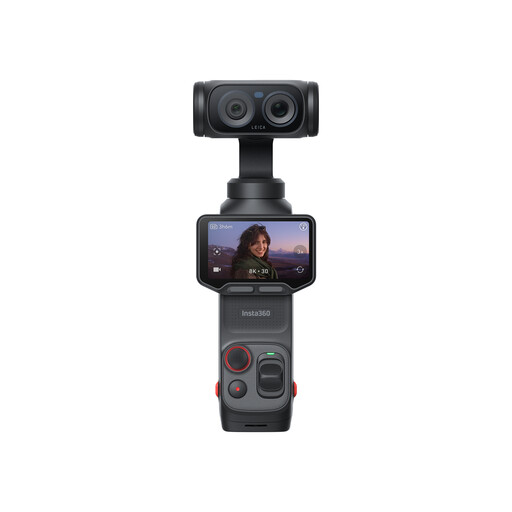
Insta360 Luna Ultra Standard Bundle, Cosmic Black
If you are considering this bundle for a solo lesson, confirm that it can be mounted securely over the work and frame your smallest repair closely enough. Check the recording and preview controls you would need from your working position.
View on Joybuy
 No image available
Sony ZV-1F compact camera, 1-inch sensor
Consider this compact camera if you prefer a fixed-lens setup. Its product name identifies an ultra-wide lens; check whether that lens can make your smallest repair large enough in the frame from a safe overhead position.
View on Joybuy
 No image available
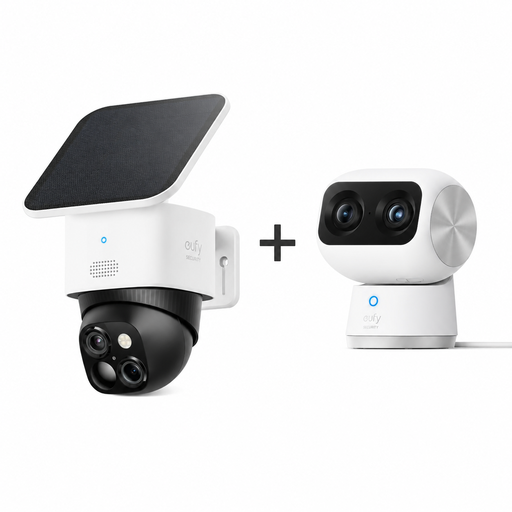
eufy Indoor Cam S350 and SoloCam S340 security-camera kit
This is a security-camera kit, not an interchangeable-lens lesson camera. If you are considering it for filming, check that its recording controls, clip export, close-up framing and mounting arrangement meet your teaching needs; the cameras’ stated resolution alone cannot establish that.
View on Joybuy
Frequently asked questions
Do I need a macro lens to film textile repairs?
Not necessarily: it depends on the smallest detail you need to fill the frame and the height of your overhead setup. Sony specifies a minimum-focus distance of 0.25 m at wide angle and 0.30 m at telephoto, plus 0.215x maximum magnification, for its E PZ 16-50mm F3.5-5.6 OSS II. Check the framing of your actual repair before deciding whether a compatible closer-focusing lens is needed.
Should I leave exposure on automatic against a white background?
For a repeatable lesson, test the actual fabric under controlled lighting and lock exposure and white balance once pale threads and weave remain visible. More flexible recording formats can help with subsequent adjustments, but they cannot restore highlights clipped during filming.
Is 4K/30p enough for a repair lesson?
4K/30p can suit a fixed demonstration shown in real time. Consider 4K/60p if you plan to slow down hand movements or produce a 60p video. Panasonic specifies 4K/30p for the LUMIX G100D, while Sony and Canon specify 4K/60p for the ZV-E10 II and EOS R50 V.
Can I show book pages or play music in a published teaching video?
Do not assume that educational use alone permits it. UK Intellectual Property Office guidance says permission is usually needed to copy or use copyright material; check whether permission, a licence or a specific exception covers the particular material and how you will use it.


