Choose the lens and camera together, starting with the smallest tile area you need to frame at your available table distance. A higher-resolution body gives you more room to crop, but it will not prevent glossy glaze from reflecting its surroundings; allow space for controlled lighting and stable support as well as the camera.
Who needs this setup?
Tile sellers making repeatable listing images
If you photograph several samples, a fixed tabletop arrangement can help you keep the framing consistent while showing each tile’s finish, edge and pattern. For glossy tiles, check what the surface reflects before changing camera settings to compensate.
Catalogue creators who crop into details
If a full-tile image must also supply close views of texture or decorative pattern, consider how much detail the source file needs to retain after cropping. Resolution matters here, but accurate focus and a stable, controlled setup matter too.
Beginners assembling a first dedicated setup
Start with the tile size and the distance available around your table. A camera body’s megapixel count cannot tell you whether its supplied lens will frame a small surface detail closely enough.
What matters when choosing?
Work out the framing you need at your table, then decide how much cropping you expect to do and how you will control reflections during repeated shoots.
| Concern |
What to check |
Who this matters to |
| Glare and colour |
Plan space for diffuse light, a neutral background and stable camera support. For glazed tiles, inspect the surroundings reflected in the surface. |
When glossy glaze picks up reflections from around my table, I need a setup whose light and surroundings I can control; roughly 29% of consumers put reflection and colour control first. |
| Detail after cropping |
Compare the exact body’s effective pixel count and decide whether your intended detail crops call for a higher-resolution source file. |
If one full-tile photograph must also supply close views of its edges or pattern, I want detail left after cropping; around 29% of consumers prioritise that need. |
| Close framing |
Check the exact lens mount, maximum magnification and minimum focusing distance against your tile size and available table space. |
With limited room to position my camera, I need the lens to frame a small tile or texture area closely enough; about 24% of consumers make close framing their primary concern. |
| A manageable first kit |
Check the exact package contents and what else your shoot requires, including a suitable lens, power, memory card, support and lighting. |
For my first dedicated tile setup, I want to know which pieces I must assemble before I can shoot repeatedly; roughly 18% of consumers put kit simplicity first. |
Buying mistakes to avoid
-
Assuming the supplied lens will capture tiny details
Close framing depends on the lens, not the camera body alone. Canon specifies up to 1:2 magnification for its RF 35mm F1.8 MACRO IS STM; that figure describes this particular lens and is not 1:1 magnification.
Measure the smallest tile area you want to show, then check magnification, minimum focusing distance and mount compatibility for the precise body-and-lens combination.
A different compatible close-focus lens may be needed to achieve your intended framing.
-
Expecting more megapixels to remove reflections
Glossy surfaces can reflect their surroundings regardless of image resolution. Skylum’s guidance on reflective-object photography describes unwanted environmental reflections; a more detailed file can still record them.
Arrange diffuse light and neutral surroundings before deciding whether your cropping or output needs justify more resolution.
-
Checking the body without checking the whole kit
Camera packages do not necessarily contain everything needed for a tabletop shoot. Nikon’s UK Z5II body-only listing, for example, states that a charger is not included.
Check the exact box contents alongside your requirements for a close-focus lens, power, memory card, stable support, lighting and background.
Camera brands and systems to consider
These examples illustrate different body-and-lens decisions; the lens and shooting setup still need to suit your tile size and table space.
Canon
An RF-mount route if close framing of small samples is your starting point.
- Canon lists a 24.2MP APS-C sensor for the EOS R50 and up to 1:2 magnification for the RF 35mm F1.8 MACRO IS STM lens.
- The stated close-focus capability belongs to that RF lens; confirm the lens and body combination you intend to buy.
Fujifilm
An APS-C route to consider when catalogue images will need substantial detail crops.
- FUJIFILM X Series UK specifies 40.2MP images and 14-bit RAW recording for the X-T5.
- Choose an X-mount lens for your required framing distance; resolution alone will not control reflections from glazed tiles.
Sony
A full-frame E-mount route for an editing-led workflow that extends beyond tile samples.
- Sony UK specifies a full-frame sensor and approximately 33.0 effective megapixels for the α7 IV.
- Select and check the close-focus capability of the E-mount lens separately; the body specification does not establish it.
Nikon
A full-frame Z-mount route if you are considering a body with in-body stabilisation.
- Nikon UK describes the Z5II as a full-frame camera with in-body vibration reduction and Z-mount lens support.
- A suitable close-focus lens remains a separate choice, and Nikon’s UK body-only listing says a charger is not included.
Joybuy cameras for tabletop tile photos
These Sony options offer different starting points: two APS-C kits with supplied zoom lenses and a camera listed with a wide-angle zoom. For any of them, check whether the lens can frame your smallest tile detail at the distance your table allows.
 No image available
Sony Alpha ZV-E10 II K with 16–50 mm f/3.5–5.6 Power Zoom lens
Consider this APS-C interchangeable-lens kit if you want the option to choose a different lens for your tabletop framing. The listed camera has 26 megapixels and includes a 16–50 mm f/3.5–5.6 Power Zoom lens. Check that lens’s minimum focusing distance and maximum magnification against the smallest tile detail you need to photograph.
View on Joybuy
 No image available
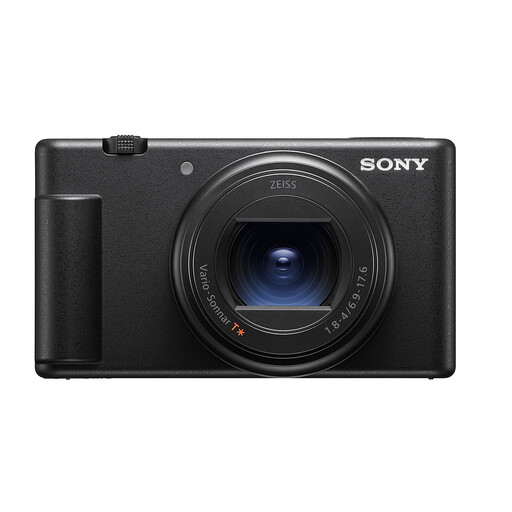
Sony ZV-1 II with wide-angle zoom lens
If you prefer a camera listed with a wide-angle zoom lens, consider whether its framing suits your tabletop shots. The product title specifies a 1-inch stacked sensor and 20MP stills. Check the lens’s minimum focusing distance and maximum magnification before relying on it for small texture details.
View on Joybuy
 No image available
Sony A6400 APS-C with 16–50 mm Power Zoom lens
This APS-C interchangeable-lens kit is a starting point if you want a supplied 16–50 mm Power Zoom lens. Before choosing it for close tile photographs, confirm the included lens’s minimum focusing distance and maximum magnification at the framing you need.
View on Joybuy
Frequently asked questions
Do I need a dedicated macro lens to photograph ceramic tiles?
Not necessarily: the deciding factor is whether your exact lens can frame the tile or detail at your available shooting distance. Canon specifies up to 1:2 magnification for the RF 35mm F1.8 MACRO IS STM, which offers one close-focus route but is not 1:1 magnification. Compare lens magnification and minimum focusing distance with the smallest area you need to show.
Will more megapixels get rid of glare on glossy tiles?
No. Higher resolution can leave more detail in a cropped photograph, but glossy tiles can still reflect their surroundings. Control the light and nearby surfaces first, then choose resolution according to the crops and output files you need.
Is a body-only camera enough for tabletop tile photography?
A body alone is not enough to establish the framing or complete the shooting setup. Check the compatible lens’s close-focus specifications and the exact package contents, then account for power, a memory card, stable support and lighting. Nikon’s UK Z5II body-only listing, for instance, states that a charger is not included.


