Makers photographing whole tools
If you photograph tools, kits or workbench arrangements, a standard zoom and a screen you can see from your shooting position may matter more than specialist close-up equipment.


For stationary craft tools, choose a lens that can frame the smallest detail you need, then plan stable support and consistent, diffused artificial lighting. A standard zoom may cover whole tools and contextual close-ups, but tiny markings call for a closer look at lens magnification; RAW capture is more relevant if you expect to edit colour and exposure repeatedly.
If you photograph tools, kits or workbench arrangements, a standard zoom and a screen you can see from your shooting position may matter more than specialist close-up equipment.
For fine edges, marks, wear or miniature components, check how large the exact lens can render a detail. A stable camera position and controlled lighting also matter at close range.
If you also demonstrate tools on video, consider how you will frame yourself and the workbench and whether the camera can shift focus to an item you show. Judge still-photo focus separately.
Start with the smallest detail that must fill the frame, then work out how you will control reflections and keep the camera in a repeatable position.
| Concern | What to check | Who this matters to |
|---|---|---|
| Close framing | Check the exact lens’s maximum magnification and the conditions for its closest focus. Decide whether you need a whole-tool view or a tiny part to fill the frame. | When a maker’s mark or small fastener needs to be clear, a wider tool photograph will not serve the same purpose. Around 33% of consumers put fine-detail framing first. |
| Colour and reflections | Plan consistent light colour and diffusion, then check the camera’s white-balance controls and RAW options if you intend to edit files. | Polished edges and coated surfaces can show distracting glare or colour casts under desk lights. Roughly 27% of consumers make control of colour and reflections their primary need. |
| Repeatable workflow | Consider screen position, stable framing and still-photo focus controls; assess product-focused video modes separately if you film demonstrations. | Repeated listings or tool demonstrations are easier to manage when framing and focus can be checked each time. About 20% of consumers prioritise that workflow. |
| A manageable first setup | Check the exact lens and kit contents, along with the support and lighting you would use for tabletop shots. | If you are starting with an interchangeable-lens camera, you may want a straightforward setup for whole-tool photographs rather than specialist close-ups. Around 20% of consumers put that need first. |
Resolution alone cannot tell you whether a tiny tool part will fill the frame. Canon specifies up to 0.25x magnification for the RF-S 18-45mm in manual focus; Nikon gives a 0.2 m minimum focus distance for the Z DX 16-50mm. Those figures describe different lens characteristics, not a like-for-like close-up comparison.
Identify the smallest part you need to photograph, then check the chosen lens’s magnification, closest-focus conditions and camera compatibility.
Frame-filling photographs of very small components may require a separate close-focus or macro lens.
TableTop Studio notes that harsh light can produce shadows, glare, reflections and hotspots. Lights with different colour temperatures can also make a repeatable colour setup harder to achieve.
Try lights with the same colour temperature, diffuse direct light and set white balance for the arrangement you actually use.
A consistent setup may call for matched lamps or diffusion material.
Stabilisation addresses camera movement; it does not hold successive shots in identical positions or remove reflections from a tool’s surface.
For stationary tools, position the camera on stable support and check focus, framing and lighting before relying on hand-held shooting features.
A tripod or other stable support may still be useful for repeated shots.
The EOS R50 with an RF-S 18-45mm kit lens is one route to consider for whole-tool photographs and contextual close-ups.
The Z50II with a Z DX 16-50mm lens is relevant if tabletop photographs are accompanied by maker demonstrations.
The α6700 is a body to consider if RAW editing is central to repeated tabletop photographs and you are prepared to choose a suitable lens.
These Sony camera-and-zoom options are relevant to tabletop tool photographs; the video-oriented models may also interest makers who film demonstrations. Compare the exact lens and kit contents with the size of the details you need to show.
 No image available
Consider this option if RAW editing is part of your tabletop workflow. Sony UK specifies a 26 MP APS-C sensor for the α6700 body. Confirm the exact kit contents and the supplied lens’s close-focus performance before choosing it for tiny markings.
 No image available
This camera-and-zoom option may suit a maker planning both tool photographs and video demonstrations. Check the included lens’s closest focus and magnification for small parts, and assess still-photo focus separately from video showcase features.
 No image available
For whole tools or wider workbench arrangements, this full-frame camera is paired with a 28–70mm zoom. Check the lens’s maximum magnification if small markings need to occupy much of the photograph.
 No image available
This APS-C camera and standard zoom are an option for general tabletop framing. Check the lens’s close-focus specifications for fine tool details, and confirm the editing and white-balance controls you intend to use.
 No image available
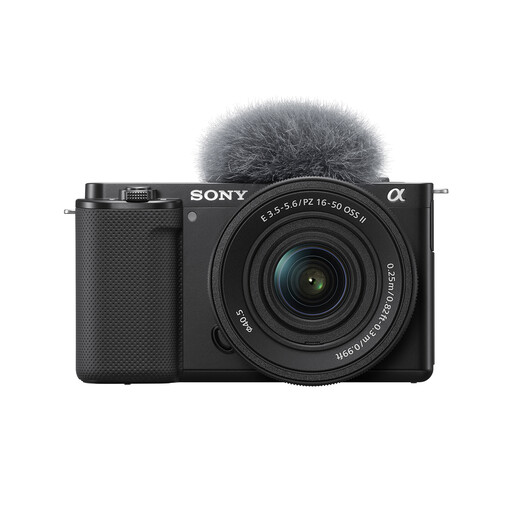
If you photograph tools and also make videos, this camera comes with a 16–50mm Power Zoom lens. Check its closest focus and magnification for detail shots, along with the RAW and white-balance controls needed for your still-photo workflow.
Not necessarily: a standard zoom may cover whole tools and contextual close-ups, but a tiny part that must fill the frame calls for checking magnification. Canon specifies up to 0.25x in manual focus for the RF-S 18-45mm; Nikon specifies a 0.2 m minimum focus distance for the Z DX 16-50mm. Neither figure alone settles whether your smallest detail will be framed as you need it.
Changing the camera alone will not remove reflections caused by the light falling on a tool. TableTop Studio notes that harsh lighting can create glare and hotspots; start by diffusing the lights, keeping their colour temperature consistent and setting white balance for that arrangement.
Check the applicable change-of-mind cancellation terms separately from remedies if the camera is faulty or misdescribed. GOV.UK states that a faulty item, an item that is not as described or one that does not do what it is supposed to do can qualify for a refund. Keep the listing and order details so you can identify the exact camera and kit purchased.