A self-contained compact is a simpler starting point for short clay demonstrations, while an interchangeable-lens camera gives you more choice over framing but requires a lens and stable support that suit your desk. A pocket gimbal camera offers a small setup, though its fixed wide view still needs testing at your intended camera position. Whichever route you choose, check the working distance, what fits in the frame and whether filming could capture someone sharing the bedroom.
Who is this for?
First-time tabletop tutorial makers
If you have little room for equipment, you may prefer a camera that needs fewer separate parts before you can record. Canon lists an integrated stand, tilt screen and microphones for the PowerShot V10, although you still need to check whether its position works at your desk.
Detail-focused clay creators
If fingers, tools and small textures are central to your videos, start with the distance between camera and clay. Canon lists close focusing for the PowerShot V1, while a Sony ZV-E10 II setup lets you choose a lens; either way, test the framing you actually need.
Creators sharing a bedroom
If you need to clear the space after filming, consider how quickly the camera and its support can be put away. Keep the view on your work surface and check whether the camera or microphone could capture another occupant, their belongings or a conversation.
What matters when choosing?
Fixed-lens compact
Choose when: You want a self-contained camera rather than selecting a separate lens; Canon’s PowerShot V10 favours a simpler start, while the PowerShot V1 offers a built-in zoom and closer focusing.
Allow for: Neither built-in lens can be exchanged, and the V10’s stand does not establish a safe overhead position.
Pocket gimbal camera
Choose when: A small camera that you can also take away from the desk matters; DJI lists a rotatable screen for the Osmo Pocket 3.
Allow for: Its fixed wide lens makes camera position important, and its gimbal is not a substitute for stable tabletop support.
Interchangeable-lens camera
Choose when: You want to select a lens around the distance available in your bedroom; Sony lists interchangeable lenses for the ZV-E10 II.
Allow for: The camera body alone does not settle lens choice or how you will hold it above or beside the work surface.
| Concern |
What to check |
Who this matters to |
| Tabletop framing |
Measure the available camera-to-work distance. Test whether a stable position includes both hands, the clay and your usual tools. |
If the whole work area will not fit from my available camera position, other features will not rescue the shot. Around 31% of consumers put repeatable framing and support first. |
| Close detail and focus |
Compare the stated focusing range with your working distance, then test close framing under the light you expect to use. |
Small textures and tool movements need to stay visible when I move my hands across the clay. Close detail and focus come first for around 25% of consumers. |
| Shared-space setup |
Check how quickly the equipment can be put away and whether the frame or audio could capture someone else. |
I need to clear the bedroom after recording without bringing another occupant or their conversation into the video. Around 25% of consumers prioritise that compact, considerate workflow. |
| Recording-ready equipment |
Check the exact bundle for a suitable memory card, charging equipment, lens where needed and stable support. |
I want to know that the equipment I bring home can record from the position I have planned. Completing the setup is the primary concern for around 19% of consumers. |
Mistakes to avoid
-
Choosing the camera before its position
Video specifications cannot tell you whether the available height and distance will fit your hands, clay and tools in one shot.
Measure the space and make a trial frame with a phone from the intended position before settling on a fixed lens or choosing a lens for another camera.
-
Expecting the DJI Osmo Pocket 3 to record without a card
DJI states that the Osmo Pocket 3 has no built-in storage.
Include a compatible microSD card in your setup and check its requirements for the recording mode you intend to use.
-
Assuming every kit is ready for your desk
A camera bundle does not necessarily contain everything needed for your planned shot. Sony offers a body-only ZV-E10 II listing, and Canon states that its PowerShot V10 Advanced Vlogging Kit does not include a USB-C charger.
Check the exact package for the lens, card and charging equipment you need, then plan a support that holds your chosen camera at the required angle.
-
Treating a shared bedroom like a dedicated set
Another occupant, their belongings or a private conversation can enter the picture or sound even when the camera points mainly at your work.
Frame closely around the clay, check the audio before recording and agree the filming arrangement with anyone sharing the room.
Relevant camera brands to consider
Canon
Canon’s PowerShot V10 and V1 illustrate two fixed-lens approaches to a clay-modelling setup.
- Canon lists a built-in stand, tilt screen and stereo microphones for the V10. The V1 has a 16–50 mm f/2.8 built-in lens and a stated closest focusing distance of 0.05 m.
- Check the V10’s angle before relying on its stand for a tabletop view. The V1 remains a fixed-lens camera and is heavier than the V10.
DJI
The Osmo Pocket 3 is a small gimbal-camera option for filming at the desk and away from it.
- DJI lists a rotatable screen, three-axis mechanical stabilisation and a focus range starting at 0.2 m.
- Its lens has a fixed wide perspective, and DJI states that the camera needs a microSD card for storage. Check the support height against your intended frame.
Sony
Sony’s ZV-E10 II is relevant if you want to choose a lens for the space between your camera and work surface.
- Sony lists an APS-C sensor, interchangeable lenses and 4K recording up to 60p for the ZV-E10 II.
- A camera body’s specifications do not establish that a particular lens will frame or focus on your clay from the available distance; plan stable support too.
Joybuy cameras for this setup
These choices include a pocket gimbal camera, a GoPro Creator Edition and two distinct Sony interchangeable-lens kits. For any of them, judge the camera together with its working distance, recording accessories and support—not by the camera name alone.
 Image unavailable
DJI Osmo Pocket 3 Creator Combo
Consider this compact camera if you need to put your filming setup away after a session. DJI specifies a 0.2 m minimum focusing distance and three-axis mechanical stabilisation for the Osmo Pocket 3; check whether your intended support gives you the required view of the clay. It has no built-in storage, so plan for a compatible microSD card.
View on Joybuy
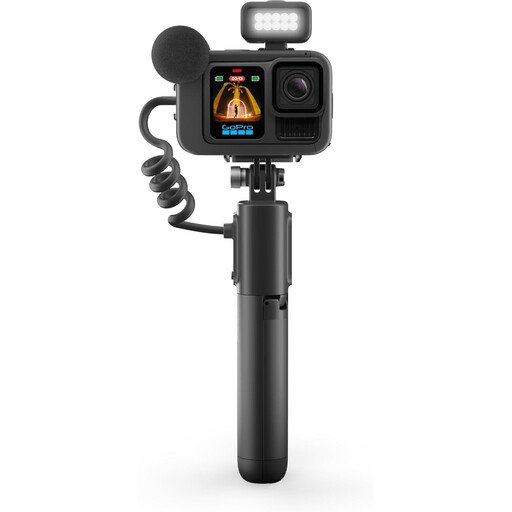 Image unavailable
GoPro HERO13 Creator Edition — Black
For clay tutorials, check whether this Creator Edition can frame small pieces clearly from your available camera position. Test the intended working distance and make sure any support holds the camera securely at the angle you need.
View on Joybuy
 Image unavailable
Sony Alpha ZV-E10 II K with 16–50 mm f/3.5–5.6 kit lens
Consider this kit if you want to adjust a zoom lens to frame the desk from your available position. The included lens is specified as 16–50 mm f/3.5–5.6, and Sony lists 4K recording up to 60p for the ZV-E10 II. Check that the lens focuses closely enough for your clay details and arrange stable support for the complete camera-and-lens setup.
View on Joybuy
 Image unavailable
Sony ZV-E10K with 16–50 mm power zoom lens
This separate ZV-E10K kit is worth considering if you want a 16–50 mm lens with which to plan your tabletop frame. Check the lens’s focusing distance against the space between camera and clay, confirm the package contents and arrange a stable filming position.
View on Joybuy
Frequently asked questions
Do I need an overhead mount to film clay modelling?
Not necessarily: an angled view can show your hands and clay if the whole working area fits. Decide on the viewpoint before choosing a camera, then check that the support holds it securely and clears the work surface; a built-in stand alone does not establish overhead suitability.
Does the DJI Osmo Pocket 3 need a separate memory card?
Yes. DJI states that the Osmo Pocket 3 has no built-in storage and uses a microSD card. Check the card requirements for the recording mode you plan to use and the contents of the exact bundle.
Will a charger come with a Canon PowerShot V10 kit?
Check the exact kit rather than assuming it includes one. Canon’s PowerShot V10 Advanced Vlogging Kit listing states that a USB-C charger is not included and specifies a required charging-power range of 7.5 W to 15 W; other bundles may differ.


