Close-up stitch demonstrators
If viewers need to follow the hook, yarn and individual stitches, plan a fixed camera position and check the whole working area on a screen you can see while teaching.


Choose the camera around a stable view of your hands, hook and workpiece, then plan how your voice will be heard over workshop activity. An interchangeable-lens camera offers more ways to adjust framing, while a fixed-lens compact reduces setup decisions if its view fits your table. A camcorder’s optical zoom is more relevant when you need to reframe between the tutor and a wider room view.
If viewers need to follow the hook, yarn and individual stitches, plan a fixed camera position and check the whole working area on a screen you can see while teaching.
If nearby conversation or activity competes with your explanation, plan where a microphone will sit and how you will check the recorded sound.
If you use the same table and camera position each session, a fixed-lens camera can remove lens-changing decisions, provided its built-in view covers the work.
Decide whether the camera will stay on one close teaching view or also cover the room. That choice affects how useful interchangeable lenses, a built-in lens or optical zoom will be.
Choose when: You expect to change between tabletop demonstrations and wider views by selecting a lens for each position.
Allow for: The lens and support become part of the setup, so the camera body alone does not settle the framing.
Choose when: You want fewer setup decisions and the built-in lens covers your table from a practical camera position.
Allow for: You cannot swap the lens if the available view or working distance does not suit the lesson.
Choose when: You need to reframe optically between a tutor farther away and a wider workshop view.
Allow for: Zoom does less for a permanently fixed overhead shot than a suitable camera position and clear view of the stitches.
| Concern | What to check | Who this matters to |
|---|---|---|
| Stitch framing | Check the complete work area from the intended overhead or front-facing position, including whether you can see the screen while teaching. | If the hook or yarn slips out of view, viewers cannot follow the movement; around 33% of consumers put clear stitch framing first. |
| Spoken instruction | Check microphone compatibility and how you will listen to a trial recording made during normal workshop activity. | Nearby voices can compete with an explanation, so roughly 27% of consumers prioritise understandable speech above their other camera needs. |
| Repeatable setup | Check whether the lens covers your usual table from a position you can reproduce each session. | When lessons use the same station, I would rather start recording without choosing a lens each time; about 20% of consumers make a straightforward setup their primary concern. |
| Changing views | Check whether the lens or optical zoom can cover the views you need from a stable support position. | If I must show both the demonstrator and the wider class, one fixed close shot will not do; around 20% of consumers place adaptable workshop coverage first. |
An interchangeable lens gives you framing choices, but the chosen lens and camera position still determine whether hands, hook and workpiece fit. A fixed lens needs the same check.
Mark the camera position and work area before buying, then check the view from that distance and whether you can see the screen while teaching.
Your intended position may call for a different lens or a suitable mounting arm, tripod or adapter.
Speech can be difficult to follow when other people are talking or working nearby, even if the demonstration is well framed.
Make a short recording during normal workshop activity and listen on headphones. If the tutor is hard to hear, check a compatible microphone and monitoring arrangement.
That arrangement may also need a microphone mount or monitoring accessory.
The UK Information Commissioner’s Office says that organisational video recording involving identifiable people can fall within UK data-protection rules. The purpose and operator of the recording matter.
Frame the worktable rather than the wider room where possible. If the filming is connected to professional or organisational activity, establish the appropriate recording, information and handling arrangements for that activity.
Canon offers both the interchangeable-lens EOS R50 V and the fixed-lens PowerShot V1 as relevant examples for a teaching setup.
Sony’s ZV-E10 II represents an APS-C interchangeable-lens option for a configurable lesson setup.
Panasonic’s LUMIX G100D and HC-VX3 illustrate different approaches: an interchangeable-lens camera and a camcorder with integrated zoom.
These cameras include interchangeable-lens kits and compact recording sets relevant to filming a crochet lesson. For any of them, check the view from your intended support position and test speech recording in the workshop.
 No image available
Consider this interchangeable-lens kit if you want to adjust a mounted view of the crochet table.
The product name specifies an APS-C camera, a 26-megapixel resolution and 4K 60p video. Check that the supplied lens frames the full work area from your planned position, and test your intended audio arrangement in the room.
 No image available
This interchangeable-lens kit is worth considering for a lesson station whose framing may change over time.
The named bundle includes a 16–50 mm power zoom lens. Check its view at your working distance and listen to a trial recording with the microphone arrangement you intend to use.
 No image available
This compact camera set may suit a repeatable lesson position if a suitable support gives you the tabletop view you need.
The product name specifies a 1-inch CMOS sensor, 4K/120 fps video, 3-axis stabilisation and an included microphone. Check close-up framing and the mounting arrangement, then test speech recording amid normal workshop activity.
 No image available
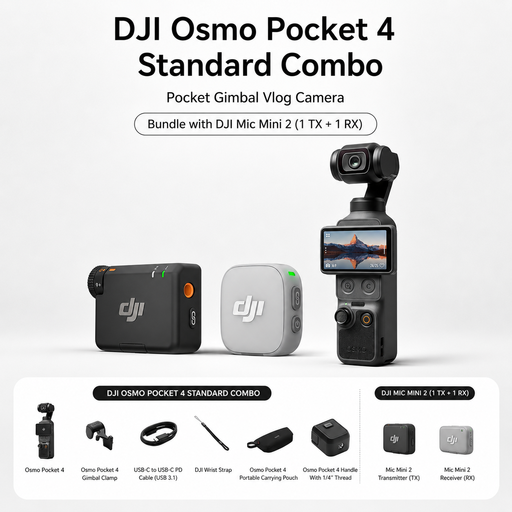
Consider this set if you want a compact camera and a microphone in the same named bundle.
The product name identifies a Standard Combo with Mic Mini 2. Before choosing it for a fixed crochet lesson, check the support position, screen visibility and complete work-area view, and test the microphone in the workshop.
No: a fixed-lens camera can work when its view covers your hands, hook and workpiece from a practical position. Choose interchangeable lenses if you expect to change between close demonstrations and wider views and are willing to plan the lens and support for each.
Prioritise one if nearby voices or activity make your spoken instructions difficult to hear. Canon UK describes wireless and shotgun microphone options for the EOS R50 V, but whichever arrangement you choose, record and listen to a short test in the actual room.
No; plan around the stated recording time for the exact camera, battery and video mode. Panasonic UK & Ireland lists approximately 50 minutes of 4K MP4 recording with the HC-VX3’s supplied battery, so a longer session needs a recording plan that accounts for that estimate.
If identifiable people are recorded for an organisation or professional activity, assess the applicable data-protection duties before filming. The UK Information Commissioner’s Office says organisational processing of identifiable footage can fall under the UK GDPR and Data Protection Act 2018; purely personal or household activity without a professional or commercial connection is treated differently. Keep incidental background capture to a minimum and check the arrangement for the actual organiser and purpose.