What matters when choosing a camera?
For an overhead lesson under artificial light, settle the work-area framing and lighting first, then decide how you will capture speech and whether advanced video modes serve your lessons.
| Concern |
What to check |
Who this matters to |
| Stitch clarity under artificial light |
Check whether 4K allows the crops you need, and test focus, exposure and the intended lights with your yarn. |
If viewers must distinguish small loops and similar yarn colours in a paused close-up, I would put visibility ahead of extra recording modes; around 40% of consumers put stitch clarity first. |
| Solo overhead framing |
Check screen movement and the lens's view from your mounting height; ensure the support can carry the complete setup. |
When I work alone, I need to see that both hands remain in frame without disturbing the camera. Around 30% of consumers prioritise a dependable solo overhead setup. |
| Spoken instruction and live delivery |
Check the intended microphone connection and, for live classes, the camera-to-computer streaming method. |
If I teach stitch counts aloud or run a live class, listeners need to follow my words as well as my hands; clear audio or live delivery comes first for around 20% of consumers. |
| Advanced editing options |
Match 4K 60p, log or 10-bit modes to your editing plans, and check recording-card requirements. |
For slow-motion inserts or more involved colour editing, I may accept a longer workflow. Advanced recording options are the primary concern for around 10% of consumers. |
Joybuy cameras for lesson filming
These camera and bundle choices offer different starting points for recording a crochet lesson. Check each one against your overhead mounting, framing, audio and artificial-light setup rather than treating included accessories or headline video modes as proof of a suitable finished lesson.
 No image available
Sony Alpha ZV-E10 II K with 16–50 mm power-zoom lens
Consider this kit if you want an interchangeable lens for framing the work and plan to use higher-frame-rate footage. Its named configuration includes a 16–50 mm f/3.5–5.6 power-zoom lens and lists 4K 60p and 10-bit 4:2:2 recording. Check the view from your intended mounting height and the card required for your chosen recording mode; test the complete setup under your lights.
View on Joybuy
 No image available
Sony ZV-E10K with 16–50 mm power-zoom lens
Consider the included 16–50 mm power-zoom lens when planning the view of your work surface. Check how you will monitor framing, record speech and mount the camera overhead, then test your intended lights and yarn before filming a full lesson.
View on Joybuy
 No image available
DJI Osmo Pocket 3 Creator Combo
This compact camera bundle is worth considering if included audio equipment matters to your lesson setup; its name specifies a microphone and 4K video recording at up to 120 fps. Confirm a secure overhead mounting arrangement separately rather than assuming a small tripod will position it above your work, and test stitch visibility under your lights.
View on Joybuy
 No image available
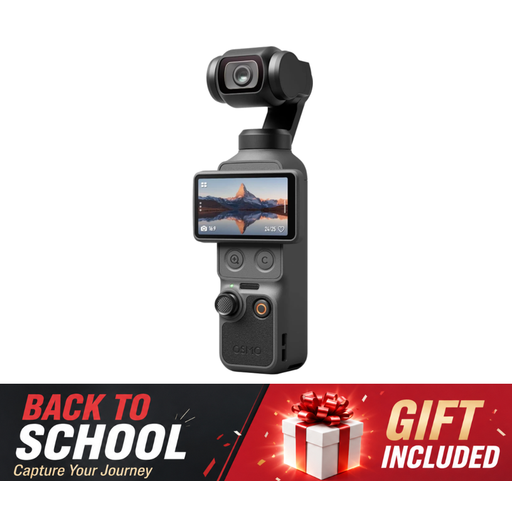
DJI Osmo Pocket 4 Standard Combo
For a compact-camera approach, assess whether this model can be positioned securely over the work and whether its audio options suit spoken teaching. Its listed configuration names 4K recording, a 2-inch rotatable screen and 107 GB of built-in storage. Check framing and artificial-light behaviour in your intended setup.
View on Joybuy
 No image available
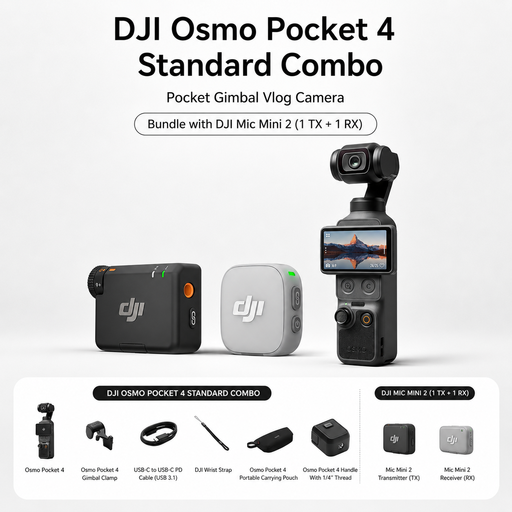
DJI Osmo Pocket 4 Travel Vlog Set with Mic Mini 2
Consider this Standard Combo bundle if an included Mic Mini 2 is relevant to your spoken instruction. Before choosing it for an overhead lesson, confirm how the microphone operates with the camera, how you will check the frame and what support will hold the camera above the work. Test the resulting footage with your yarn and lights.
View on Joybuy
Frequently asked questions
How can I check for flicker under artificial lights?
Record a short test with the exact camera settings and lights you intend to use, then inspect the footage before filming the whole lesson. The UK Health Security Agency notes that UK electricity distribution uses 50 Hz; where your camera offers relevant anti-flicker or shutter settings, test them rather than assuming one setting will suit every LED light.
Do I need 4K 60p for a crochet tutorial?
No: a stable 4K 25p or 30p recording can serve a normal-speed overhead lesson if the stitches are clearly framed, focused and lit. Consider 4K 60p if you have a particular slow-motion or editing use for it; Canon UK Store lists 4K 30p for the EOS R50, while Sony United Kingdom lists up to 4K 60p for the ZV-E10 II.
What else should I check before buying a camera body?
Check the lens, overhead support, recording card, microphone and power arrangement for your complete setup. Canon UK Store lists its EOS R50 and EOS R50 V body options without an included USB-C charger, while Panasonic specifies UHS-I UHS Speed Class 3 compatible SDHC or SDXC media for the LUMIX G100D.
Can I show a crochet pattern or play music in my lesson?
Check your rights to use third-party material before including it, rather than assuming filming it gives you permission. The UK Intellectual Property Office states that copyright protects original literary, dramatic, musical and artistic works; check the ownership, licence or permission that applies to the particular pattern, music or image.


