For a lesson that moves between the instructor and small demonstrations, consider an interchangeable-lens camera with a lens that frames both planned views, a screen you can check from the filming position and an external-microphone option. Prioritise intelligible speech and workable framing before higher frame rates or editing features. A compact fixed-lens camera is another option if its view and audio setup meet those same needs.
Who is filming?
Instructors teaching beside workshop activity
If other people or equipment may be heard during a lesson, plan where the instructor will speak and how the microphone will capture their voice. Canon documents external-microphone and audio-monitoring options for the EOS R50 V; check the audio connections on any other camera you consider.
Tutors showing controls and tabletop work
Moving from a presenter shot to camera buttons, lenses or prints calls for a lens and camera position that cover both views. An interchangeable-lens system gives you a choice of lenses, but the view from the supplied lens still needs checking in your workshop.
Teachers recording and delivering live lessons
If a computer will receive the camera feed, check the specific model's webcam or USB mode as well as the cable and computer connection. Sony documents connection requirements for ZV-E10 II streaming, while Canon lists webcam use for the EOS R50 V.
What matters when choosing?
Start with the instructor's sound and the two shots the lesson needs; then decide whether computer-connected delivery or more demanding recording formats belong in the setup.
| Concern |
What to check |
Who this matters to |
| Clear speech |
Check microphone compatibility and whether you can monitor the audio while recording. Plan microphone placement around the instructor, not just the camera. |
I need instructions to remain understandable while other work continues nearby. Around 34% of consumers put clear teaching audio first. |
| Presenter and detail shots |
Check the exact lens bundle's field of view and close-focus suitability at your planned camera distances; confirm you can see the screen from its mounting position. |
My lesson moves between speaking to the group and showing small controls or prints, so both views need to fit. Framing is the primary concern for around 33% of consumers. |
| Computer connection |
Confirm the camera's USB or webcam mode and the required computer and cable. Sony says ZV-E10 II USB 2.0 connections deliver 720p output. |
When I teach live or monitor a lesson on a computer, the whole connection must work as intended. Around 20% of consumers prioritise that workflow. |
| Recording and editing modes |
Choose the recording mode your finished lesson needs, then check whether your editing setup can handle it. Sony and Canon list 4K 60p on the cited models; Panasonic lists up to 4K 30p for the G100D. |
I plan to edit the footage more extensively and need recording options that fit that work. For around 13% of consumers, post-production flexibility comes first. |
Mistakes to avoid
-
Choosing the camera before planning the sound
A microphone built into a camera may also pick up workshop activity. Park Cameras notes that an external microphone can reduce camera noise and capture a clearer audio signal, but placement and compatibility still matter.
Work out where the instructor and camera will be, then check the intended microphone against the camera's audio connections.
A separate microphone may also need a mount, cable or compatible wireless equipment.
-
Assuming the supplied lens covers every demonstration
An interchangeable-lens body does not determine what fits in the shot: the fitted lens and camera position do. Panasonic lists a 12–32mm zoom with the cited G100D kit, but its suitability depends on the room and worktable layout.
Check the field of view and close-up framing with the exact kit you intend to use, including any overhead camera position.
A different lens or additional camera support may be needed to obtain the planned view.
-
Equating USB streaming with 4K live output
Sony says the ZV-E10 II needs a SuperSpeed USB 5 Gbps-compatible computer and cable for its documented 4K or HD USB streaming modes. With USB 2.0, its actual output is 720p even if a higher resolution is selected on the camera.
Check the camera mode, cable, computer port and receiving platform together before relying on a live workflow.
-
Filming people or teaching material without planning its use
Identifiable footage held by an organisation can involve personal data covered by UK data-protection rules, according to the Information Commissioner's Office. GOV.UK also explains that copyright owners can control and license use of their work.
Set out the workshop's filming and publication arrangements, and check permissions for other creators' material before recording or sharing the lesson.
Brands and models to consider
These model-specific features offer different starting points; the lens, microphone and filming position still determine whether a setup fits your lesson.
Sony
Sony's ZV-E10 II is an APS-C interchangeable-lens option for lessons that need lens choice and a documented USB streaming route.
- Sony lists a 26.0-megapixel APS-C sensor, E-mount lens compatibility and 4K 60p recording using 5.6K oversampling for this model.
- Sony specifies a SuperSpeed USB 5 Gbps-compatible computer and cable for 4K or HD USB streaming; a USB 2.0 connection delivers 720p output.
Canon
Canon's EOS R50 V combines interchangeable lenses with video, microphone and computer-workflow features.
- Canon lists 4K 60p recording, microphone support, audio monitoring and webcam use for the EOS R50 V.
- Those features do not establish whether a particular lens frames your worktable or where a microphone should sit in a busy room.
Panasonic
Panasonic's cited Lumix G100D kit provides a Micro Four Thirds interchangeable-lens camera with a supplied 12–32mm zoom.
- Panasonic lists a free-angle 3-inch monitor, 5-axis Hybrid I.S. and 4K recording at 24p, 25p or 30p for this configuration.
- Its listed 4K modes do not include 60p. Check the supplied zoom's view before relying on it for both presenter and tabletop shots.
Joybuy cameras and kits
These choices include interchangeable-lens kits for selecting a lesson view and compact cameras or a camera-and-audio bundle for other recording setups. Check each option against the workshop's sound, framing and computer-connection needs rather than assuming the cameras are interchangeable.
 No image available
Sony Alpha ZV-E10 II K with 16–50 mm power zoom
Consider this interchangeable-lens kit if you need to plan separate presenter and demonstration views. Its title specifies an APS-C camera, a 16–50 mm f/3.5–5.6 lens, 26 megapixels and 4K 60p recording. Confirm the exact included kit and check its view at your worktable distance before buying.
View on Joybuy
 No image available
Sony ZV-E10K with 16–50mm power zoom
This interchangeable-lens kit is a starting point for planning different lesson shots. Its name identifies a supplied 16–50mm power zoom; check whether that lens frames both the instructor and tabletop details from your intended positions. If lessons will be delivered through a computer, confirm the connection mode for this specific model.
View on Joybuy
 No image available
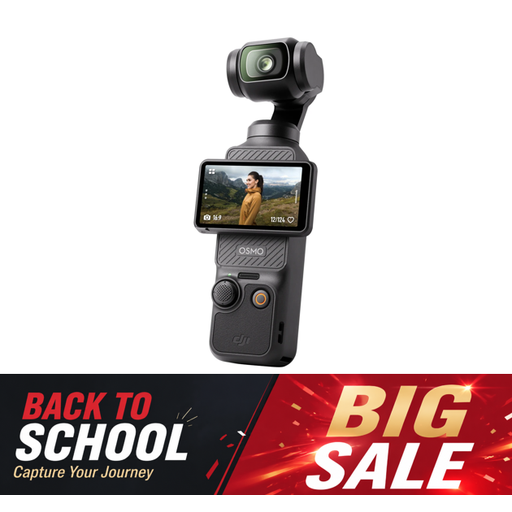
DJI Osmo Pocket 3
Consider this compact camera if you expect to reposition it during the lesson. Its name specifies a 1-inch CMOS sensor, 4K/120fps video, three-axis stabilisation and a 2-inch rotatable touchscreen. Check whether its fixed view captures the required close-ups and whether your intended audio and computer workflows are compatible.
View on Joybuy
 No image available
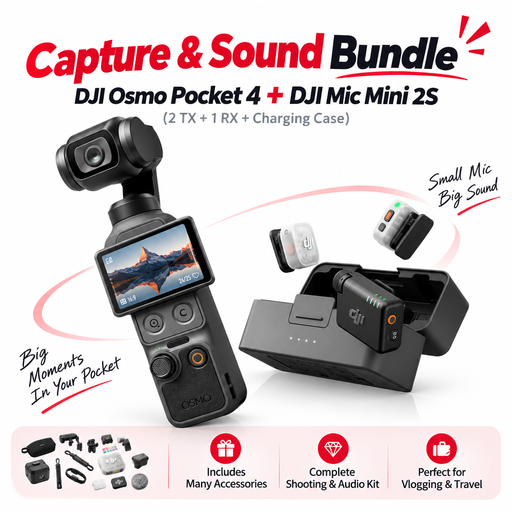
DJI Osmo Pocket 4 + DJI Mic Mini 2S bundle
This named bundle brings a camera and microphone equipment into the same purchase decision. Its title lists two transmitters, one receiver and a charging case. Before treating it as a workshop audio setup, confirm how the supplied receiver connects to the camera; also check the camera's screen and framing against your planned shots.
View on Joybuy
 No image available
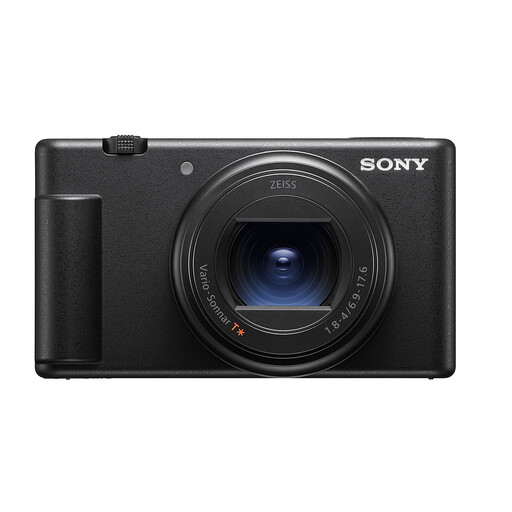
Sony ZV-1 II
This fixed-lens option may suit a lesson filmed from a planned camera position. Its name specifies a 1-inch stacked sensor, wide-angle zoom lens, 20MP stills and 4K video. Check external-microphone connections, screen visibility and close-up framing before choosing it for a shared workshop.
View on Joybuy
Frequently asked questions
Do I need an external microphone for a shared-workshop lesson?
Not necessarily, but plan and test the sound before relying on a camera's built-in microphone where other people or equipment will be active. Park Cameras notes that an external microphone can capture clearer audio with less camera noise; choose its placement for the instructor's position and check compatibility with the camera.
Can I use a mirrorless camera as a webcam for a lesson?
Yes, if the specific camera and connection support the workflow. Canon lists webcam use for the EOS R50 V, and Sony documents USB streaming for the ZV-E10 II. Sony specifies a SuperSpeed USB 5 Gbps-compatible computer and cable for the latter's 4K or HD USB streaming; USB 2.0 delivers 720p output.
What if workshop participants appear in the recording?
Check the workshop's arrangements for recording and using identifiable footage before you film. The Information Commissioner's Office explains that information about identifiable living people held by organisations can be personal data covered by UK GDPR and the Data Protection Act 2018. The appropriate obligations depend on who is recording and how the footage will be used; do not assume that consent is always the required lawful basis.
Can I include someone else's photographs, slides or music?
Do not assume that material can be republished simply because it appears in a lesson recording. GOV.UK explains that copyright owners can decide how their work is used and license that use. Check the rights and applicable permissions for material you intend to record or share.


