Choose an interchangeable-lens camera if a fixed lesson shot needs different views of the instructor, worktable and floral details, and you can provide a suitable lens, stable support and audio setup. A compact gimbal camera makes more sense when quick setup and occasional moving clips matter more than changing the lens; check that its fixed view covers the worktable before committing to it. In either case, clear speech and dependable focus on the demonstration matter more to this lesson than a headline frame-rate figure.
Who is each setup for?
Close-up teaching demonstrators
If viewers need to follow stem placement, hand movements and tool use, plan the camera position and framing around the worktable. A stable shot, suitable lens and focus behaviour matter more than simply fitting the whole room into view.
Instructors who need clear speech
When other people may talk or move nearby, plan how to capture the instructor’s voice rather than relying on a camera positioned across the table. Canon lists wireless and shotgun microphone options for the EOS R50 V; Sony lists a microphone terminal for the ZV-E10 II, while DJI describes compatible wireless transmitters for the Osmo Pocket 3.
Fast-setup solo creators
If you need to set up and pack away in a shared space, a compact camera may suit short moving clips alongside the main lesson. DJI specifies three-axis mechanical stabilisation for the Osmo Pocket 3, but its fixed lens still needs to give you the table view you want.
What matters when choosing?
Interchangeable-lens camera
Choose it when: You can plan a fixed camera position and want to select a lens for the instructor-and-table shot or closer work.
Allow for: A suitable lens and stable support; a body-only package is not a complete filming setup.
Compact gimbal camera
Choose it when: A small footprint, quick repositioning and occasional moving shots are central to the lesson.
Allow for: A fixed lens that cannot change the view optically; check the planned table shot and recording media.
| Concern |
What to check |
Who this matters to |
| Framing the worktable |
Check the lens or fixed field of view from your intended position, then confirm close-focus suitability and safe support for that position. |
If I am showing precisely where stems and tools go, viewers need to see the active work area without my hands blocking it. Around 29% of consumers put detail framing first. |
| Clear spoken instruction |
Confirm the microphone connection or compatible wireless system, and check which audio components come with the exact package. |
When conversation continues around the table, I need my explanation to remain intelligible. Clear speech is the primary concern for roughly 29% of consumers. |
| Indoor image and focus |
Check focus behaviour on hands and flowers under the workshop lighting, along with the planned lens and camera position. |
Changing light and hands moving through the shot could make the demonstration difficult to follow. About 24% of consumers chiefly prioritise indoor image quality and dependable focus. |
| Quick setup and movement |
Check camera size, stabilisation, mounting arrangements and the media needed to record. |
If I have limited room and need occasional moving clips, I want a setup I can reposition without disrupting the lesson. Quick setup and mobility come first for around 18% of consumers. |
Checks before you buy
-
Buying a body before planning the table shot
An interchangeable-lens body needs a suitable lens, and a fixed teaching angle needs stable support. Canon UK Store’s EOS R50 V body-only box list does not include a lens.
Mark where the camera will stand and what must fit in frame, then check the lens, support, recording media, power and audio needed for that arrangement.
-
Relying on distant built-in audio
Nearby conversation and handling noise can compete with the instructor’s explanation even when the picture is clear.
Choose an external-audio path that suits the number of speakers, and check which microphone components are included in the particular package.
-
Assuming a compact camera will frame every detail
DJI specifies a fixed 20 mm-equivalent lens for the Osmo Pocket 3, so its optical view cannot be changed by swapping lenses. The camera also requires microSD storage to record.
Test the proposed camera position against the table layout before choosing that fixed view, and confirm suitable recording media.
-
Overlooking people outside the demonstration
In a shared workshop, identifiable attendees may appear or be heard in footage intended for publication. The Information Commissioner’s Office advises that recognisable images are usually personal data and sets out lawful-basis duties for organisations using video surveillance systems; the appropriate arrangements depend on the filming purpose and organiser.
Agree the filming area, participant information, handling and publication plans with the organiser before recording identifiable people.
Brands to consider for these camera setups
Canon
The EOS R50 V is an APS-C interchangeable-lens option for a planned, supported teaching shot.
- Canon lists RF/RF-S lens compatibility and wireless or shotgun microphone options, giving you choices for framing and spoken instruction.
- Canon UK Store’s body-only package does not include a lens; choose one for the intended table view.
Sony
The ZV-E10 II is an APS-C interchangeable-lens camera to consider when flowers or tools will repeatedly be shown close to the camera.
- Sony describes product-focused filming features and lists microphone and headphone terminals for a planned audio workflow.
- For a body-only package, confirm the lens and support required for your shot, as well as the audio components you intend to use.
DJI
The Osmo Pocket 3 offers a compact gimbal route for quick setup and occasional moving footage.
- DJI specifies a 179 g camera with three-axis mechanical stabilisation and a rotating screen.
- Its 20 mm-equivalent lens is fixed, and recording requires microSD storage; check compatible audio components for the package you choose.
Joybuy camera choices
These choices cover interchangeable-lens kits for a planned table shot and compact DJI camera packages for a smaller setup. Check the framing, focus and audio requirements of your particular lesson before choosing between them.
 No image available
Sony Alpha ZV-E10 II K with 16–50 mm f/3.5–5.6 Power Zoom lens
Consider this kit if you want to adjust a fixed worktable shot using the supplied zoom lens. Its stated recording specification includes 4K60p; check whether the lens focuses closely enough for your flower details and confirm the media and audio setup you need.
View on Joybuy
 No image available
DJI Osmo Pocket 3 Creator Combo
Consider this compact gimbal package for quick setup and occasional moving clips. DJI specifies a fixed 20 mm-equivalent lens and three-axis mechanical stabilisation for the Pocket 3; check the table view, recording media and exact microphone components in the combo.
View on Joybuy
 No image available
Sony ZV-E10K with 16–50 mm Power Zoom lens
The included zoom lens gives you a choice of framing for a supported teaching shot. Before relying on it for small floral details, check its close-focus behaviour at your planned camera position and confirm your spoken-audio arrangement.
View on Joybuy
 No image available
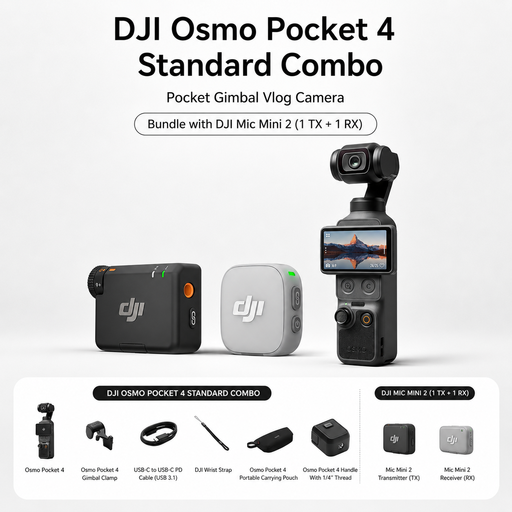
DJI Osmo Pocket 4 Travel Vlog Set with Mic Mini 2
Consider this camera-and-microphone set if a small setup suits the workshop. Check its lens view, close-focus behaviour and microphone contents against the planned table shot and the person speaking.
View on Joybuy
 No image available
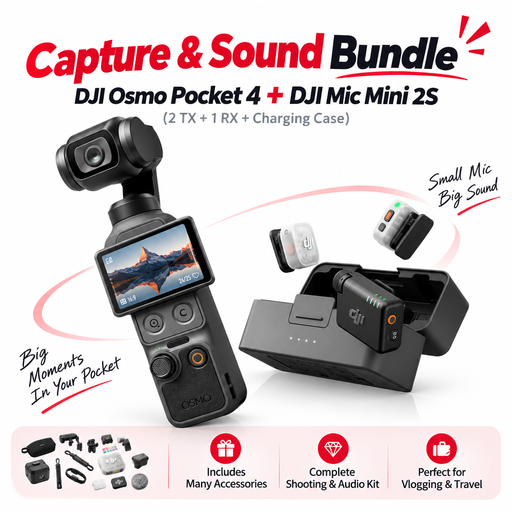
DJI Osmo Pocket 4 + DJI Mic Mini 2S Capture & Sound Bundle
This bundle is worth checking when two people need to speak during the lesson: its name specifies two transmitters, one receiver and a charging case. Confirm the camera’s view and close-focus behaviour for the worktable before choosing it for detailed demonstrations.
View on Joybuy
Questions about filming a lesson
Do I need an external microphone for a flower-arranging lesson?
Plan an external-audio option if the instructor must remain easy to hear while others talk in the workshop. Canon describes wireless and shotgun microphone options for the EOS R50 V, while DJI states that the Osmo Pocket 3 can connect to compatible DJI Mic 2 or Mic Mini transmitters; check which components come with the package you choose.
Can a compact gimbal camera take the place of a mirrorless camera?
It can suit this lesson if its fixed view covers the worktable and quick setup or moving clips matter most. DJI specifies a fixed 20 mm-equivalent lens for the Osmo Pocket 3; choose an interchangeable-lens route instead if selecting different optical views is central to your lesson plan.
What do I need to check before I can start recording?
Confirm a lens where required, safe camera support, recording media and the audio components for your speakers. Canon UK Store’s EOS R50 V body-only box list has no lens, while DJI specifies that the Osmo Pocket 3 needs microSD storage and has no built-in storage.
Can I film other people in a shared UK workshop?
Check the organiser’s filming and data-protection arrangements before recording or publishing identifiable attendees. The Information Commissioner’s Office advises that recognisable images are usually personal data and that organisations using video surveillance systems need to identify and document a lawful basis; what applies to a particular lesson depends on its purpose and how the footage is handled.


