Choose an interchangeable-lens camera if changing the framing or working distance is central to showing miniature details; you will still need a suitable lens and stable overhead support. A compact fixed-lens gimbal camera makes more sense when quick positioning matters and its focus distance allows the model to fill enough of the frame. For a full or live lesson, check the exact setup for audio, power, recording media and computer connection before buying.
Who is each setup for?
Close-up miniature demonstrators
If viewers need to see brush placement and small colour changes, start with the framing and focus distance your model requires. Sony and Canon offer interchangeable-lens camera routes, while DJI specifies a fixed lens and a 0.2 m minimum focus distance for the Osmo Pocket 3.
Live workshop hosts
A repeatable overhead position, understandable speech and a working computer connection matter as much as the picture. Canon describes a USB UVC/UAC route for compatible cameras; confirm support for the exact camera, computer and lesson platform.
Small-space lesson makers
A compact camera may be easier to position around a crowded painting desk. Before choosing a fixed-lens model, check whether the available camera height and its minimum focus distance still let you frame the miniature clearly.
What matters when choosing?
Choose the camera route by the detail you need to show, then plan how it will stay above the desk and record an entire lesson.
Interchangeable-lens camera
Choose it when: You need to change the field of view or working distance for wider desk shots and close detail.
Allow for: A suitable lens and secure overhead support; the camera body alone does not establish close-up framing.
Compact fixed-lens gimbal camera
Choose it when: Quick positioning or wider desk views matter more, and its specified focus range suits your camera position.
Allow for: A lens you cannot exchange. DJI specifies a 0.2 m minimum focus distance for the Osmo Pocket 3, so check the framing before relying on it for tiny subjects.
| Concern |
What to check |
Who this matters to |
| Close-up detail and working distance |
Check the planned overhead height and visible work area, then the exact lens or fixed camera’s minimum focus distance. |
If brush placement and small colour changes must remain visible, I need the model to fill enough of the frame without moving the camera too close. Around 33% of consumers put close-up detail first. |
| Overhead and live setup |
Check mount stability and the exact camera’s connection method and compatibility with your computer and platform. |
For a live demonstration, I want to frame the work from my painting position and keep the connection straightforward. Setup and streaming are the primary concern for around 27% of consumers. |
| Lesson-length recording |
Check supported power arrangements, recording limits and memory-card requirements for the intended mode. |
A longer lesson needs to run without an avoidable interruption or missing footage. Around 20% of consumers chiefly prioritise power and recording media. |
| Spoken instruction |
Check microphone compatibility, where the microphone will sit and what the chosen kit includes. |
When the camera sits above the desk, I still need my explanation to be understandable from where I paint. Clear spoken instruction comes first for around 20% of consumers. |
Mistakes to avoid
-
Choosing by resolution alone
A 4K recording setting cannot fix a model that appears too small or sits outside the camera’s focus range. DJI specifies a 0.2 m minimum focus distance for the fixed-lens Osmo Pocket 3.
Work out the camera height and area to be shown. Check a fixed-lens camera’s focus range, or the specifications of the particular lens you would use on an interchangeable-lens body.
Changing the framing later may require a different lens, sturdier overhead support or additional lighting.
-
Treating the camera as a complete overhead kit
Lens choice and secure mounting still need planning for a mirrorless setup. DJI specifies no built-in storage for the Osmo Pocket 3, so recording with that model requires a compatible microSD card.
Check the complete kit against your intended setup: lens where relevant, overhead support, recording media, power, audio and any live-connection accessories.
-
Assuming the overhead camera will capture clear speech
The position that shows a miniature well may place a built-in microphone away from the speaker. Built-in audio features do not establish how clearly speech will record in your room.
Make a spoken test from the painting position. If you need an external microphone, check compatibility and whether it comes with the chosen kit.
Brands to consider for these camera routes
Sony
Sony’s ZV-E10 II is an APS-C interchangeable-lens option that uses E-mount lenses.
- Sony lists 4K recording up to 60p for the ZV-E10 II.
- Choose the lens for the required close framing and working distance, and plan separate overhead support.
Canon
Canon’s EOS R50 V offers an APS-C interchangeable-lens route with RF and RF-S lens support.
- Canon lists 4K/60p and subject-tracking autofocus for the EOS R50 V.
- For live use, confirm that the exact camera configuration supports your intended computer, connection method and platform.
DJI
DJI’s Osmo Pocket 3 is a compact fixed-lens gimbal option for buyers considering wider desk views or moving shots.
- DJI specifies a three-axis gimbal, a 20 mm-equivalent f/2.0 lens and 4K recording options for the Osmo Pocket 3.
- Its lens is fixed and DJI specifies a 0.2 m minimum focus distance; check whether your miniature fills enough of the frame from that distance.
Panasonic
Panasonic’s Lumix G100D kit is a compact Micro Four Thirds interchangeable-lens option.
- Panasonic lists 4K/30p recording and five OZO Audio recording modes for the G100D kit.
- Its stated 4K/30p maximum does not meet a requirement for 4K recording at 50/60p.
Joybuy camera choices
These choices include interchangeable-lens kits and a vlog combo. For any overhead lesson setup, check the exact model, close framing and kit contents against the position you intend to use.
 No image available
Sony Alpha ZV-E10 II K with 16–50 mm f/3.5–5.6 Power Zoom lens
Consider this interchangeable-lens kit if you want to adapt your framing as your lesson shots change.
The product title specifies an APS-C camera, a 16–50 mm f/3.5–5.6 kit lens and 4K/60p video. Check whether that lens frames the model closely enough at your planned overhead height, and plan the mount, recording media and power arrangement for a full lesson.
View on Joybuy
 No image available
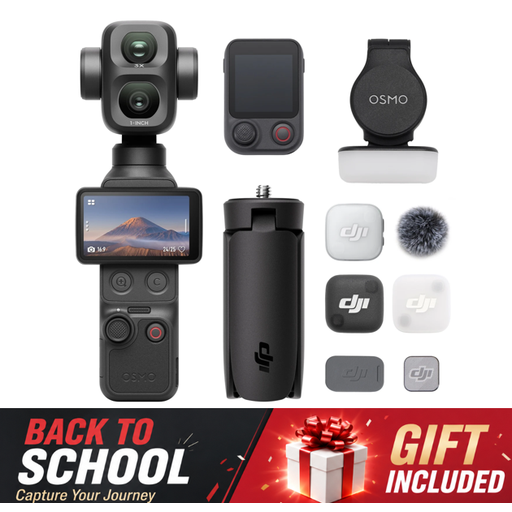
Osmo Pocket 4P Vlog Combo, Black
If you are considering this vlog combo for a painting lesson, confirm the exact camera model and whether it can frame your miniature from the intended position.
Check the combo’s contents, recording media, audio options and mounting arrangement before planning an overhead or lesson-length setup.
View on Joybuy
 No image available
Sony ZV-E10K with 16–50 mm Power Zoom lens
Consider this interchangeable-lens kit if you want the option to change lenses as your desk and detail framing needs develop.
The product title identifies the included 16–50 mm Power Zoom lens. Check that lens’s close-focusing ability at your overhead height, along with the support, recording media and connection needed for your lesson.
View on Joybuy
Common questions
Can a compact gimbal camera film a miniature close up?
It can if the exact model focuses at your planned camera-to-model distance and gives you sufficiently tight framing. DJI specifies a focus range beginning at 0.2 m for the Osmo Pocket 3; check the view from your intended overhead height rather than assuming that specification applies to another model.
Can I use a camera as a webcam for a live painting lesson?
Yes, if the exact camera and your computer and platform support the chosen connection method. Canon describes USB UVC/UAC for compatible cameras and also outlines HDMI approaches; check the requirements of your particular setup.
What should I test before recording a full lesson?
Rehearse at the intended camera height with your planned lighting, lens or fixed-lens distance, microphone, recording media and computer connection. Check whether your hands obscure the model, whether focus stays where you need it and whether the setup runs for the planned session.


