Miniature-detail tutorial makers
If viewers need to follow fine brush placement and small paint transitions, plan the close-up lens and a stable camera position together. A camera body alone will not establish how tightly you can frame the model.


For a fixed lesson that needs to show fine brushwork, choose an interchangeable-lens camera if you can pair it with a lens that frames the model closely and leaves room for your hands and lights. A compact gimbal camera suits quicker setup and moving or vertical clips, provided its focus distance allows the close-up you need. Light the model and hands separately from the dark backdrop, and test the framing and exposure before recording a full lesson.
If viewers need to follow fine brush placement and small paint transitions, plan the close-up lens and a stable camera position together. A camera body alone will not establish how tightly you can frame the model.
When you paint and operate the camera yourself, a screen you can see from the workbench, repeatable mounting and a suitable narration setup make the filming arrangement easier to manage.
If you also film quick process clips, a compact camera and easy changes between horizontal and vertical framing may matter more to you than interchangeable lenses. Check close-up framing separately.
Choose it when: A fixed tabletop lesson must show very small painted details and you can build the shot around a suitable close-focusing lens.
Allow for: Lens choice, working room around the model and a support that can hold the camera and lens in position.
Choose it when: Quick setup, moving cutaways and changes of video orientation matter, and the model fits your intended framing at the camera's focus distance.
Allow for: Less flexibility to change close-up optics; DJI specifies a 0.2 m minimum focus distance for Osmo Pocket 3.
| Concern | What to check | Who this matters to |
|---|---|---|
| Fine-detail framing | Check the exact lens or camera's close-focus specification and whether the mounted shot leaves room for hands and lighting. | I need viewers to distinguish a brush tip from the edge I am painting, without crowding my hands out of the shot. Roughly 36% of consumers put fine-detail framing first. |
| Teaching setup | Check screen movement and whether the support can safely hold the camera and chosen lens above or beside the work area. | When I teach alone, I need to see the composition and return to the same angle after a pause. For around 29% of consumers, that repeatable setup is the primary concern. |
| Spoken instruction | Confirm the exact microphone connection and whether the microphone you intend to use is part of the bundle. | If I explain each painting step aloud, I want my narration to remain understandable while I work. Clear spoken instruction comes first for roughly 21% of consumers. |
| Quick, varied clips | Check vertical framing, mounting options and close-focus distance before relying on one camera for both cutaways and tabletop lessons. | I also make short clips and want to reframe quickly between shots, even if my fixed lesson needs a separate setup. Around 14% of consumers prioritise that flexibility. |
Resolution alone does not tell you whether a tiny model will fill the frame. Sony's E 30mm F3.5 Macro is a separate 1:1 lens, while Canon specifies 0.59x maximum magnification for its RF-S 18-150mm lens in manual-focus macro use at 35 mm; those figures do not describe every lens for either camera.
Work out your intended camera-to-model distance, then check the exact lens's magnification and the physical space available for your hands and lights. DJI specifies that Osmo Pocket 3 focuses from 0.2 m.
A separate close-focusing lens and a suitable overhead support may be needed for an interchangeable-lens setup.
A dark background does not remove the need to show paint colour, brushwork and surface detail clearly. Changes in the scene as hands or pale objects enter the shot can also make an automatic exposure setting distracting.
Light the model and hands, secure the camera in a repeatable position and record a short exposure test before filming the lesson.
Nearby room noise and handling can compete with spoken painting instructions. Canon specifies a 3.5 mm microphone jack for EOS R50, but an audio arrangement that works with one camera should not be assumed to work with another.
Confirm the connection and bundle contents for the exact camera and microphone you plan to use, then consider where the microphone and any cables or receiver will sit.
An external microphone or compatible mounting accessory may add to the equipment you need to carry and set up.
Consider the ZV-E10 II system if you want an interchangeable-lens camera with a separate E-mount macro option for dedicated miniature close-ups.
Consider EOS R50 for a fixed solo-teaching setup where an adjustable screen and an external-microphone connection matter alongside lens choice.
Consider Osmo Pocket 3 if compact handling, a rotating screen and stabilised moving cutaways are more important than changing lenses.
These options cover compact gimbal cameras for quicker clips and an interchangeable-lens camera for a planned tabletop setup. Check the close-up framing of the exact camera and lens combination before choosing one for fine brushwork.
 No image available
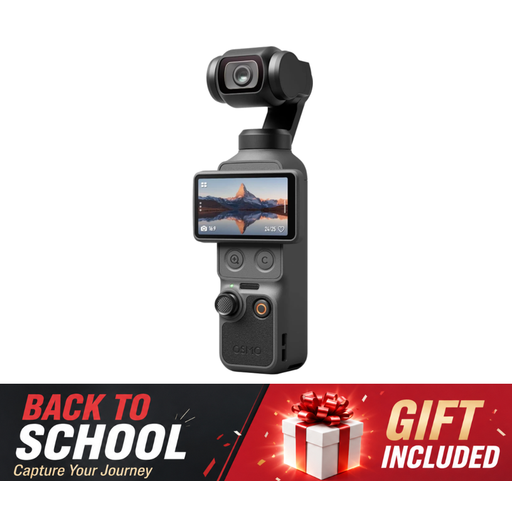
Consider this compact gimbal camera for short demonstrations and moving cutaways. DJI specifies a rotatable 2-inch screen and three-axis stabilisation for Osmo Pocket 3; the combo title also lists a microphone. Its stated focus range begins at 0.2 m, so check miniature framing at that distance before relying on it for brush-tip close-ups.
 No image available
Consider this interchangeable-lens kit for a fixed lesson if you are willing to choose a lens around the close-up shot you need. The kit title specifies a 16–50 mm f/3.5–5.6 Power Zoom lens, and Sony specifies 4K 60p recording for ZV-E10 II. Check whether that included lens frames your miniature closely enough; Sony's 1:1 E 30mm F3.5 Macro is a separate lens. Plan the overhead support and microphone connection around your intended setup.
 No image available
Consider this pocket gimbal option for quick demonstrations and reframing between shots. Its product title lists a 2-inch rotatable screen and three-axis stabilisation. Before using it for a fixed miniature lesson, confirm the focus distance, the framing you can achieve at the workbench, and the microphone connection and bundle contents needed for narration.
Not necessarily: the background can remain dark while you light the model and hands for the shot. Prioritise close-up framing, stable mounting and a controlled exposure; give low-light performance greater weight if you cannot provide adequate light on the work area.
It can work if the model fills enough of the frame at a distance where the camera can focus, but it is not automatically equivalent to a macro-lens setup. DJI specifies a 0.2 m minimum focus distance for Osmo Pocket 3; check your intended composition at that distance. Sony specifies 1:1 magnification for its separate E 30mm F3.5 Macro lens.
Check how your chosen camera connects to the microphone you intend to use and whether the relevant accessories are included. Canon specifies a 3.5 mm microphone jack for EOS R50. Position the microphone and camera support so neither obstructs your hands or the work area.
For an eligible UK distance sale, the Consumer Contracts Regulations 2013 normally allow cancellation up to 14 days after you, or a nominated person other than the carrier, take physical possession of the camera, according to legislation.gov.uk. Check the seller's notification and return process and any applicable exceptions. Cancellation after a change of mind is separate from remedies for faulty, damaged or misdescribed goods.