Overhead demonstration teachers
If viewers need to follow finger placement and crease lines across a full work surface, check the lens coverage and mounting distance as carefully as the recording resolution.


Choose a camera and lens that can be mounted securely and frame the whole folding area while keeping crease detail visible; spoken instructions also need to remain clear amid workshop noise. A compact kit with a supplied lens reduces setup decisions, while an interchangeable-lens setup gives you more ways to adjust an unsuitable overhead view. Check the mounting position, lens coverage and audio arrangement before buying.
If viewers need to follow finger placement and crease lines across a full work surface, check the lens coverage and mounting distance as carefully as the recording resolution.
Nearby conversation or workshop activity can compete with spoken steps. Consider how you will position or connect a microphone, and test the sound from your intended teaching position.
If you set up and clear away for each session, a supplied lens and a screen you can see from the recording position may make a fixed lesson easier to arrange.
Start with the size of the folding area and where the camera can be mounted. Then plan for speech in the shared room before deciding whether higher frame rates or a simpler kit matter to your lessons.
| Concern | What to check | Who this matters to |
|---|---|---|
| Folds and hands in frame | Check whether the exact lens covers the work area at your mounting height, with room for hand movement. | If I need viewers to see where each edge meets, I cannot let a full-table view make the fold too small to follow; around 33% of consumers put clear overhead detail first. |
| Understandable speech | Check the intended microphone connection or audio controls, then make a test recording with normal workshop activity. | When I explain each step beside other people working, my voice needs to remain intelligible. Around 25% of consumers prioritise spoken-audio clarity. |
| Recording flexibility | Compare the exact 4K frame-rate and recording options you would use, alongside lens choice and your editing setup. | If I plan to reframe demonstrations or edit quick hand movements, I need recording options that suit that workflow; around 25% of consumers place production flexibility first. |
| Quick setup | Check the supplied lens, screen position, support and charging equipment for the exact package. | With a workbench to clear after each lesson, I want a kit I can set up consistently without choosing separate components. Quick setup comes first for around 17% of consumers. |
Even a 4K recording can make folds hard to see if the paper occupies too little of a wide shot.
Measure the work area and planned camera-to-table distance, then check that the exact lens frames the mat with space for your hands.
Changing the framing may require a different lens or support position.
Background voices and workshop activity can make instructions difficult to follow even when the paper is sharp.
Test a short recording in the room while the workshop is in normal use, using the microphone arrangement you intend to keep.
A separate microphone, stand or recorder may add equipment and setup steps.
Package contents vary: Panasonic Store UK says its G100D kit excludes a USB cable and AC adapter, while Canon UK Store says the EOS R50 V body excludes a USB-C charger.
Check the contents of the exact package and arrange compatible power equipment before the first lesson.
The Information Commissioner's Office explains that organisational recordings of identifiable living people can involve personal data covered by UK data-protection law.
Keep the shot on the work surface where possible, tell people when they may be recorded, and assess how identifiable footage will be handled before sharing it.
The EOS R50 V is an interchangeable-lens option for instructors planning a dedicated video setup.
The ZV-E10 II offers an E-mount lens choice for buyers tailoring the view to their table and mounting height.
The LUMIX G100D kit pairs a supplied zoom lens with a free-angle screen for a fixed lesson setup.
These options include Sony interchangeable-lens kits, DJI pocket-camera bundles and an SJCAM action camera for filming at a work surface. Check the framing, secure support and sound setup of any option against your workshop.
 No image available
Consider this kit if you want a supplied zoom lens and 4K/60p for filming folding demonstrations. Its title also specifies an APS-C camera and 10-bit 4:2:2 recording.
Check whether the lens covers the entire work surface at your planned mounting height, and test your intended speech-recording arrangement in the workshop.
 No image available
This interchangeable-lens kit supplies a 16–50mm Power Zoom lens for a lesson setup where you want to adjust the view from a fixed support.
Confirm that it frames your table at the available height. If a particular 4K frame rate or microphone arrangement matters to you, check the exact recording mode and package before choosing.
 No image available
Consider this compact bundle if a pocket camera and included microphone suit the way you set up each lesson. The product title specifies a 1-inch CMOS sensor, 4K/120fps video and 3-axis stabilisation.
Check how you would secure it above or beside the work surface: an included mini tripod alone does not establish an overhead mounting solution. Test both the framing and speech recording in your workshop.
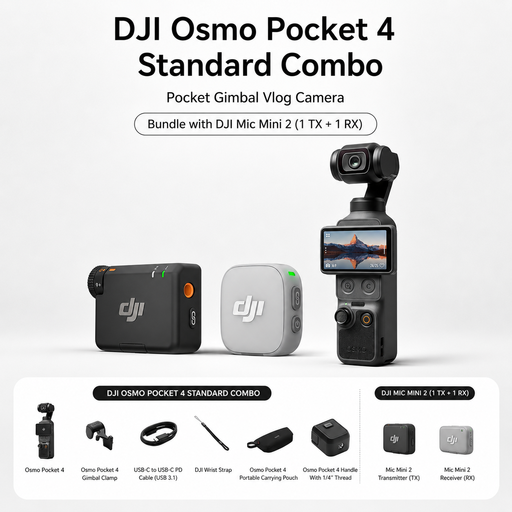 No image available
This pocket-camera set names a Mic Mini 2 in the bundle, which may suit a lesson where you want a separate way to capture your voice.
Before relying on it for a fixed demonstration, check how the camera can be mounted securely, how you will view the composition and whether the audio arrangement works amid workshop activity.
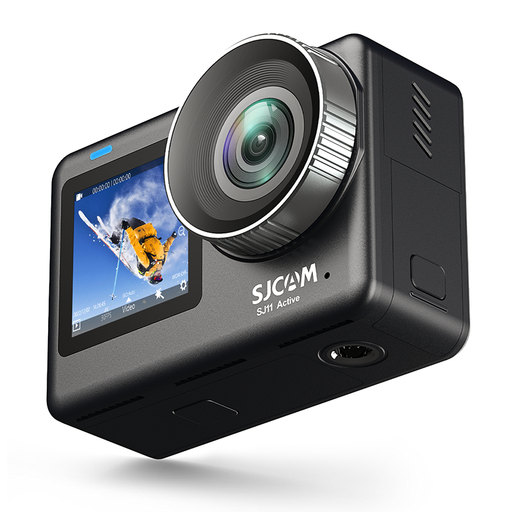 No image available
This compact action camera has two screens and lists 4K/30fps video. Its product title specifies a 2.33-inch touchscreen and a 1.3-inch front display.
Check whether paper details remain large enough in the full-table view, whether the camera can be mounted securely and how you will record spoken instructions.
4K can help retain visible detail when you crop a lesson, but it cannot compensate for a distant or poorly framed view of the paper. Check lens coverage, a stable mounting position and how large the folds appear in the final composition.
A built-in microphone may not keep your instructions clear when other people are talking or working nearby. Test it in the actual room; if speech is hard to follow, check a suitable external-audio arrangement and the camera's connection or audio-control options.
First check whether people will be identifiable and whether you can keep the shot on the work surface. The Information Commissioner's Office explains that organisational recordings containing personal data about identifiable living individuals are covered by UK GDPR and the Data Protection Act 2018; the requirements for a particular lesson depend on who records it and how the footage is used.
Plan for a secure support, a lens that frames the work area, suitable power and an audio arrangement that works in the room. Check the exact package contents: Panasonic Store UK says its G100D kit excludes a USB cable and AC adapter, while Canon UK Store says the EOS R50 V body excludes a USB-C charger.