For photographs of whole origami models, a camera-and-standard-zoom kit is a starting point if its lens can focus close enough for your compositions. Choose a compatible macro lens when miniature models or fine folds need to fill the frame. Against a white background, check exposure and white balance before assuming a different camera body will correct grey-looking whites or colour casts.
Who is this setup for?
White-background accuracy seekers
If you photograph origami for listings, instructions or a portfolio, you may need white paper to remain distinct from its backdrop without looking grey or taking on a colour cast. Canon UK explains how a light-toned scene can affect metering, while Nikon UK explains the role of white balance in rendering white objects.
Fine-fold close-up photographers
For miniature models, layered folds or paper texture, the lens’s close-focusing ability and magnification matter alongside the camera body. The macro-lens specifications published by Sony UK, Nikon UK and Canon UK show why the exact lens is worth checking.
Simple tabletop-kit buyers
If you mainly photograph whole models, a camera supplied with a standard zoom lets you begin without choosing a specialist lens first. Canon UK and Nikon UK both list camera-and-zoom kits; check the included lens against the size of your models.
What matters when choosing?
Decide how closely you need to frame the folds, then check the lens and camera controls against your tabletop space and lighting.
Camera with a kit zoom
Choose it when: You mainly photograph whole, medium-to-large models and want the camera and a standard zoom in one package. Canon UK lists an EOS R50 kit with an RF-S 18-45mm lens; Nikon UK lists a Z50II kit with a 16-50mm lens.
Trade-off: A kit zoom’s inclusion does not establish life-size macro magnification. Check its close-focusing specifications before relying on it for miniature folds.
Camera with a macro lens
Choose it when: Small folds or paper texture need close, frame-filling photographs. Sony UK specifies 1:1 magnification for its E 30mm F3.5 Macro, and Nikon UK specifies life-size 1:1 for its Z MC 50mm f/2.8.
Trade-off: The macro capability belongs to the particular lens, which must fit the camera mount and may be a separate purchase. Check working distance against the space needed for the model and lighting.
| Concern |
What to check |
Who this matters to |
| White tones and paper colour |
Check for exposure compensation or manual exposure and adjustable white balance. Review a test image for detail in the white paper. |
If I photograph pale paper against white, I need the backdrop to look bright without losing visible folds or changing the paper’s colour. Around 33% of consumers put tonal and colour accuracy first. |
| Fine-fold detail |
Check the exact lens’s magnification, close-focusing distance and mount compatibility. If you need life-size reproduction, look for a stated 1:1 ratio. |
When a miniature model occupies too little of the frame, I need a lens that can bring its small folds into a close composition. Close-detail capture comes first for around 25% of consumers. |
| Tabletop framing |
Check screen movement and the lens’s zoom range against your shooting space, particularly for overhead views. |
If I switch between straight-on and overhead images, I want to frame the model without struggling to see the screen. Around 25% of consumers prioritise flexible tabletop framing. |
| A straightforward starting kit |
Check whether the listing includes a compatible lens or is body-only, and confirm the supplied lens variant. |
If I do not already own a compatible lens, I want a camera-and-lens package for whole-model photographs. A simpler starting setup is the primary need for around 17% of consumers. |
Mistakes to avoid
-
Choosing by megapixels alone
A camera body’s resolution does not tell you how closely its lens can focus. Sony UK and Nikon UK specify 1:1 magnification for particular macro lenses, whereas Canon UK specifies up to 1:2 for its RF 35mm F1.8 Macro.
Start with the smallest model or fold you need to frame, then check the intended lens’s magnification, focusing and working distances, and mount compatibility.
-
Leaving exposure entirely to automatic metering
Canon UK explains that metering can render a predominantly light scene too dark. Brightening it without checking the result can also remove visible detail from white paper.
Take a test photograph, adjust exposure as needed and inspect both the backdrop and the paper’s creases before photographing the full set.
-
Changing the lighting throughout a batch
White balance adjusts colour temperature, but changing the light can change how the same setting renders paper colour. Nikon UK advises revisiting white balance when lighting changes.
Keep lighting consistent where possible and verify white balance before a batch, particularly when the paper’s colour needs to remain consistent between photographs.
-
Mistaking a body-only listing for a camera-and-lens kit
Sony UK’s cited ZV-E10 II listing is body-only, while the cited Canon EOS R50 and Nikon Z50II kits include standard zoom lenses. A body-only camera needs a compatible lens for this work.
Confirm the exact contents of a listing and account for any lens or camera support your planned photographs require.
Relevant brands to consider
Canon
Canon UK lists the EOS R50 with an RF-S 18-45mm kit lens. Its vari-angle touchscreen is relevant when framing a model from above or away from eye level.
- The cited EOS R50 kit includes a 24.2-megapixel APS-C camera and the RF-S 18-45mm lens.
- For close detail, check the separate lens you intend to use: Canon UK specifies up to 1:2 magnification for the RF 35mm F1.8 Macro, not life-size 1:1.
Sony
Sony UK lists the ZV-E10 II body separately from its E 30mm F3.5 Macro lens, leaving the lens choice to the buyer.
- Sony UK specifies a 26.0-megapixel APS-C sensor for the ZV-E10 II and 1:1 magnification for the E 30mm F3.5 Macro.
- The cited camera listing is body-only. Sony UK states a 2.4cm minimum working distance for that macro lens, so check whether your model and lighting can be arranged at the required distance.
Nikon
Nikon UK lists a Z50II kit with a NIKKOR Z DX 16-50mm f/3.5-6.3 VR zoom for whole-model compositions.
- Nikon UK specifies life-size 1:1 magnification for the separate NIKKOR Z MC 50mm f/2.8 macro lens.
- The kit zoom and macro lens are different choices; do not assume the kit includes the macro lens.
Joybuy camera choices
These camera-and-zoom listings are relevant to photographing whole origami models on a tabletop. For frame-filling photographs of tiny folds, check the supplied lens’s close-focusing ability and any compatible macro-lens option separately.
 No image available
Sony Alpha ZV-E10 II K with 16–50mm power zoom
Consider this camera-and-lens kit for whole-model tabletop photographs where a zoom is useful for changing the framing. Its title specifies an APS-C camera, a 26-megapixel resolution and a 16–50mm f/3.5–5.6 power zoom.
Before choosing it for white-background work, check its exposure controls; for miniature folds, check the lens’s close-focusing ability.
View on Joybuy
 No image available
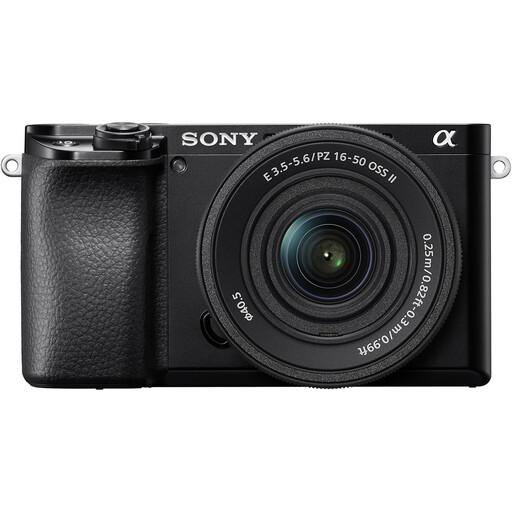
Sony A6400 APS-C with 16–50mm power zoom
Consider the included zoom for compositions of whole origami models. The product title identifies an APS-C camera supplied with a 16–50mm power zoom lens.
Check the exposure and white-balance controls for your lighting setup, and the lens’s close-focusing specifications if folds must fill the frame.
View on Joybuy
 No image available
Sony Alpha 7 III full-frame with 28–70mm zoom
This camera-and-zoom listing is an option for photographing whole models. Its title identifies a full-frame Alpha 7 III camera supplied with a 28–70mm zoom lens.
Do not infer close-up magnification from the full-frame designation: check the supplied lens’s focusing specifications if small folds are your priority, along with the camera controls you need for white scenes.
View on Joybuy
 No image available
Sony A6700 APS-C with 16–50mm lens
The supplied zoom makes this a camera-and-lens option for whole-model tabletop compositions. The product title specifies an APS-C A6700 camera with a 16–50mm lens.
Check the white-balance options for consistent paper colour and the lens’s close-focusing specifications before planning frame-filling detail shots.
View on Joybuy
 No image available
Sony A6100 APS-C with zoom lens
This camera-and-zoom listing may suit whole-model tabletop photographs. Confirm which lens comes with it before ordering: the listing title says 16–55mm, while its detailed description says 16–50mm.
Also check the exposure and white-balance controls for white-background work and the supplied lens’s close-focusing ability for small folds.
View on Joybuy
Common questions
Why does white origami against a white background look grey?
Automatic metering can make a predominantly light scene too dark. Canon UK explains that metering may underexpose a very light-toned subject; adjust exposure and inspect a test image so the background looks bright while the paper retains visible folds and texture.
Do I need a macro lens to photograph origami?
Not necessarily for photographs of whole models: a standard kit zoom may suffice if it focuses close enough for the model to fill the frame as intended. For miniature models or fine folds, check a compatible macro lens’s stated magnification. Sony UK and Nikon UK specify 1:1 options, while Canon UK specifies up to 1:2 for its RF 35mm F1.8 Macro.
How should I handle white balance with coloured paper?
Keep the lighting consistent and set or verify white balance before photographing a batch. Nikon UK explains that white balance adjusts colour temperature to help white objects appear white; revisit the setting when the lighting changes.
What if a camera bought in the UK is faulty?
A faulty camera may give you statutory remedies that are separate from a retailer’s change-of-mind returns policy. The Consumer Rights Act 2015 provides a short-term right to reject qualifying faulty goods, subject to its conditions; contact the seller with details of the fault rather than assuming its voluntary returns policy is your only option.


