Choose a compact tablet if you mainly read short guides and downloaded pages while packing light; consider a larger screen if full-page PDFs, grammar tables or parallel texts matter more than carry size. For an exposed pitch, check the exact model’s protection rating and outdoor screen characteristics, and keep the tablet protected. Whichever size you choose, confirm that your guide files or app work offline and that you have a suitable charging plan.
Who is each tablet format for?
Outdoor guide readers
If you read on an exposed pitch or move around the campsite with the tablet, screen visibility, dust and water protection, and use with gloves may shape your choice. Samsung identifies these as model-specific features of the Galaxy Tab Active5 Pro.
Light-packing phrasebook users
For short guides and occasional look-ups, a compact screen may be easier to pack than a document-sized tablet. Amazon lists the Fire HD 8 with an 8-inch display and expandable storage for downloaded files; check that your chosen guide service works on the device.
PDF and annotation learners
Full-page manuals, grammar charts and parallel-text PDFs make screen space more important. Lenovo lists a 12.7-inch display for the Idea Tab Pro, though that larger format takes more room in a campsite bag.
What matters when choosing?
Start with where you will read, then check that your guides work offline and fit the screen at a comfortable text size.
| Concern |
What to check |
Who this matters to |
| Outdoor reading and protection |
Check screen visibility in your usual reading position and the exact model’s stated dust and water rating. |
If I read on an exposed pitch, I need to see the page and protect the tablet when weather changes; around 40% of consumers put outdoor readability and protection first. |
| Offline access and charging |
Confirm that your app and guides open offline, then check the tablet’s charging requirements and your available power source. |
I want my downloaded guides ready even when the campsite connection is unreliable, with a workable way to recharge; offline access and charging come first for roughly 30% of consumers. |
| Carry size and page view |
View a representative guide at your intended text size; compare screen size with the space the tablet and case take in your bag. |
For dense PDFs, I need enough page space without carrying more tablet than the trip warrants; about 30% of consumers make that balance their primary concern. |
Mistakes to avoid
-
Assuming every PDF will read comfortably on a compact screen
An 8-inch display may suit short passages but call for frequent zooming on scanned manuals or dense tables. A larger display offers more page area but occupies more bag space.
Open a representative guide at the text size you intend to use before settling on a screen size.
-
Leaving a protected tablet exposed to rain
Samsung states that the Galaxy Tab Active5 Pro has an IP68 rating, but that model-specific rating is not a reason to leave a tablet outdoors or charge it while wet.
Check the exact model’s protection guidance, use a case and put the device somewhere dry when it is not in use.
-
Choosing a tablet before checking the guide service
Storage capacity alone cannot tell you whether a particular language-guide app can be installed or whether its guides will open without a connection.
Check device support, download and account requirements for the exact service, then test the guides offline before travelling.
-
Overloading a campsite electrical hook-up
Warwickshire County Council advises campers not to overload sockets with multiple appliances and to use approved adapters and extension leads.
Keep charging equipment dry, check cables and connections, and avoid chaining chargers and adapters.
Relevant brands to consider
Samsung
Samsung offers different tablet formats relevant to campsite reading; the features of its rugged Galaxy Tab Active5 Pro should not be assumed for other Galaxy Tab models.
- Samsung specifies IP68 dust and water resistance, glove-responsive touch and a 10.1-inch display rated up to 600 nits for the Galaxy Tab Active5 Pro.
- If those outdoor features are not needed, compare the size and protection of the particular model you are considering rather than choosing by brand alone.
Lenovo
The Idea Tab Pro is relevant when full-page manuals and side-by-side language materials are central to the trip.
- Lenovo specifies a 12.7-inch, 2944 × 1840 display and a 10,200mAh battery capacity for the Idea Tab Pro.
- A 12.7-inch tablet needs more packing space; use protected, dry storage if you plan to take it around the campsite. Battery capacity does not establish reading time.
Amazon
The Fire HD 8 is a compact option for short guides and downloaded reading rather than a large page view.
- Amazon lists an 8-inch HD display and, for the cited 64GB Fire HD 8 model, microSD expansion up to 1TB with a compatible card.
- Check that your language-guide app and its offline downloads work on the exact Fire tablet before choosing it.
Joybuy tablets for reading guides
These choices cover compact reading, larger guide pages and an E Ink note-taking format. Match the screen and file or app support to your actual guides, and check protection and charging needs separately for campsite use.
 No image available
iFLYTEK AINOTE 2 10.65-inch E Ink tablet with protective case
Consider this note-taking format if your guides are available in files you can open on the device. Its stated screen size is 10.65 inches; check your exact file formats and offline use before choosing it.
Plan for the light available where you read, as the product information states that it has no built-in reading light.
View on Joybuy
 No image available
Xiaomi Pad 7 Grey, 8GB RAM, 128GB storage with Focus Pen
This tablet is worth considering if you want to read guides and use an included pen. Check how your actual documents display and whether your chosen guide app downloads content for offline use.
The listing says a charger is not included. Confirm what compatible charging equipment you will take, and keep the tablet protected from damp conditions.
View on Joybuy
 No image available
Apple iPad Pro 11-inch (M5), Wi-Fi, 1TB, Nano Glass, Silver
The 11-inch format is an option when short passages and more detailed guide pages both matter. This is the 1TB Nano Glass variant; assess its screen with your own reading material rather than assuming it will be glare-free outdoors.
Confirm offline support for your guide app and keep the device protected from campsite weather.
View on Joybuy
 No image available
Apple iPad mini 7 (A17 Pro), 512GB, Space Grey
Consider this compact model if your guides are mainly short passages or phrasebook entries and packing space matters. Its 512GB variant offers local storage, but check a dense PDF at your preferred text size before relying on a small screen.
Confirm that your chosen app opens downloaded guides offline and protect the tablet from rain and damp.
View on Joybuy
 No image available
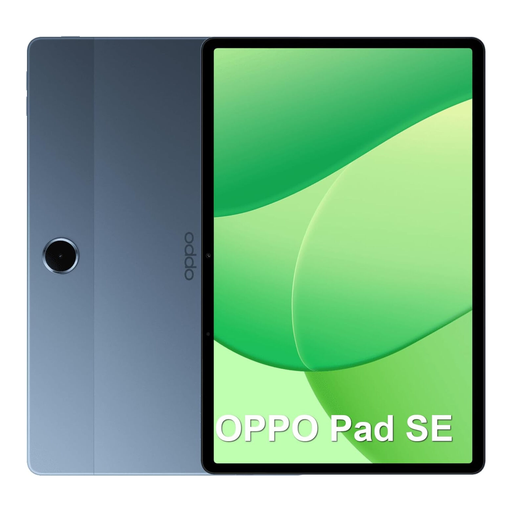
OPPO Pad SE OPD2419 EUN, 4GB RAM, 128GB, Twilight Blue
This Wi-Fi tablet is an option for keeping guide files locally; check that the screen suits your documents and that your chosen guide service works offline.
The product information says this model is not waterproof. Keep it dry and protected when reading around the campsite.
View on Joybuy
Common questions
Do I need an internet connection to read guides at the campsite?
Not if your particular guide files or app support offline reading and you download what you need beforehand. Check the service’s device and account requirements, then switch off Wi-Fi and mobile data to test the exact guides before leaving.
Is an IP68 tablet necessary for camping?
Not for every campsite reading setup: it matters more if you regularly use the tablet around rain, dust or dirty hands. Samsung states that the Galaxy Tab Active5 Pro has an IP68 rating and glove-responsive touch; if you read mainly somewhere dry, focus on your guide format and keep whichever tablet you choose protected.
What screen size should I choose for language-guide PDFs?
Choose by the layout of the PDFs you actually use: an 8-inch display can work for short passages, while scanned pages, parallel translations and detailed tables may be easier to inspect on a larger screen. Amazon lists an 8-inch Fire HD 8 and Lenovo a 12.7-inch Idea Tab Pro; compare a representative page at your intended text size.
How should I charge a tablet at a campsite hook-up?
Keep charging equipment dry and avoid overloading the socket. Warwickshire County Council advises campers to use approved adapters and extension leads and not to overload electrical hook-ups; also check the tablet maker’s charger requirements and inspect your cables and connections before use.


