What to check before buying
Start with the connection and the care home’s practical arrangements, then test whether the resident can see, hear and operate the calling setup comfortably.
| Priority |
What to check |
Your needs |
| Connection in the room |
Confirm personal-device permission, room-level Wi-Fi, guest sign-in and re-connection steps. Test a real video call before the return period ends. For cellular use, check indoor signal, SIM or eSIM compatibility and who will manage the plan. |
I need calls to work in the resident’s actual room, not only in a shared area or at home. The Department of Health and Social Care reported that 27% of responding adult social care providers in England said they used no care technologies for care and support in its 2025 survey; this is a provider figure, not a measure of Wi-Fi availability, so ask the named home directly. |
| Simple call setup |
Set up the chosen calling app, contacts and account before handover. Check large display settings, captions, magnification, spoken feedback and favourite-contact options on the exact device. |
I want the resident to answer or start a call with as few steps as practical, while a trusted family member can help with updates, account recovery and access details. |
| Hands-free positioning |
Choose a case designed for the exact tablet model. Test stand stability, screen angle, front-camera framing, microphone access, charging-cable routing and reach to essential controls. |
The tablet needs to sit securely on a bedside table, tray or chair-side surface so the resident can take part without gripping it throughout the call. |
Joybuy tablet options
These Joybuy options are cellular-capable tablets for family video calls where an independent mobile connection may be needed alongside Wi-Fi. A suitable case, stand, care-home permission and tested calling setup still need arranging separately.
 No image available
TABWEE W90 11-inch Android Tablet, Dual 4G SIM
A cellular-capable option for a room where Wi-Fi cannot yet be relied on, with an 11-inch screen and listed front camera for calls.
Listed specifications include a 1920 x 1200 display, dual 4G SIM, Wi-Fi and an 8MP front camera. Check indoor 4G signal, SIM-plan ownership, care-home permission and an exact-model stand case. Verify the supplied battery specification if this matters, as the catalogue gives different capacity figures.
Joybuy
 No image available
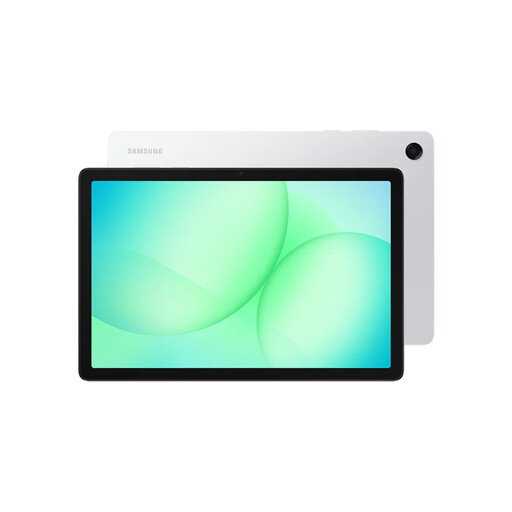
Samsung Galaxy Tab A11+ 5G X236, 6GB RAM, 128GB
This model provides listed 5G and Wi-Fi connection options for families deciding between the home network and mobile data.
The listing identifies an 11-inch Android tablet with 1920 x 1200 resolution, a 5MP front camera, quad speakers and a 3.5mm jack. Confirm local 5G coverage, SIM management and a stable case for model SM-X236BZSAXSP before relying on hands-free calls.
Joybuy
 No image available
TECLAST ArtPad Pro 12.7-inch 2K Tablet, Dual SIM 4G LTE
A larger-screen cellular route for calls where the tablet will be securely positioned rather than held for long periods.
Listed specifications include a 12.7-inch 2K display, 8MP front camera, dual-SIM 4G LTE, Wi-Fi and Bluetooth 5.2. The included stylus is not a substitute for a stable stand; check the intended surface, cable routing and exact-model accessory fit.
Joybuy
 No image available
TECLAST T70 14-inch Tablet, Dual SIM 4G LTE
This large-format model is more suited to a securely supported viewing position than prolonged hand-held use.
The listing states a 14-inch 1920 x 1200 display, 8MP front camera, 4G LTE, Wi-Fi, Bluetooth 5.2 and a listed weight of 960g. Choose an exact-model stand case and verify the installed Android version and accessibility controls before purchase.
Joybuy
 No image available
TECLAST T65 Plus 13.4-inch Tablet, Dual SIM 4G LTE
A cellular-capable option with a broad screen for calls that are planned around a fixed, hands-free position.
Listed details include a 13.4-inch 1920 x 1200 display, Android 15, dual-SIM 4G LTE, Wi-Fi and an 8MP front-camera claim. Its listed 720g weight makes stand stability, charging access and camera framing important checks.
Joybuy
Frequently asked questions
Should I choose Wi-Fi-only or a cellular tablet for a care-home resident?
Choose Wi-Fi-only only after the named home confirms that the resident can use Wi-Fi in the intended room and a real video-call test works there. Choose cellular capability when Wi-Fi access is unsuitable, but first check indoor mobile signal, SIM or eSIM compatibility, monthly data management and who will manage the account.
What should I ask the care home before buying?
Ask whether a personal tablet is permitted in the resident’s room, whether Wi-Fi is available there, whether guest login or re-authentication is needed, who can help reconnect Wi-Fi or charge the device, where it may be placed, and who to contact if the device or account stops working. The Care Quality Commission says provider equipment must be suitable, secure and properly used.
Can a tablet be set up so close family are easy to call?
Yes, where the chosen device and calling app support the required settings. On iPad, Apple Support says Assistive Access can show favourite contacts on the first Calls screen and can restrict calling to selected contacts. A trusted supporter should set this up using suitable account and recovery arrangements.
What case and stand should I buy?
Choose a protective case made specifically for the exact tablet model and test it before the return period ends. Check that the stand is stable on the intended surface, leaves the front camera and microphones clear, allows charging while positioned and keeps essential controls within reach.
Is a refurbished tablet suitable for family video calls?
It can be suitable when the exact device runs the selected calling app and the seller clearly states its condition, warranty and return terms. Before the return window closes, check the front camera, microphone, speaker, charging port, Wi-Fi or cellular variant, account-reset status and availability of a compatible case.


