Residents who call while seated
A tablet on a bedside table or chair-side surface avoids holding a phone throughout a call. The screen, controls, sound and viewing angle still need to work for the resident in that position.


Choose a Wi-Fi tablet with a stable, model-fitting stand case if the care home permits personal devices and its Wi-Fi works where the resident will call. If that connection is unreliable, consider a cellular tablet only after checking the intended network in the room; a refurbished tablet is another option if its battery condition, warranty and calling-app compatibility meet the family’s needs.
A tablet on a bedside table or chair-side surface avoids holding a phone throughout a call. The screen, controls, sound and viewing angle still need to work for the resident in that position.
Someone may need to set up the calling account and contacts, keep the device charged and help if it disconnects. Agree with the care home what assistance is available before relying on a particular calling routine.
A refurbished tablet is worth considering when the exact model, battery condition, accessories, warranty and returns terms are clear. Apple UK, for example, specifies a new battery and outer shell for its Certified Refurbished iPad (A16); those terms should not be assumed for other sellers.
Confirm the calling location and app first, then choose connectivity, screen setup and accessories around the resident’s routine.
| Priority | What to check | Your needs |
|---|---|---|
| Connection | Ask the care home about personal-device access, sign-in and Wi-Fi in the actual calling room. If considering mobile data, use Ofcom’s postcode coverage guidance and test the intended network indoors where possible; its predictions are not a guarantee of reception. Age UK notes that video calls can use substantial mobile data. | I want calls to work from the resident’s usual seat without depending on a connection they cannot restore or unexpectedly using up a mobile-data allowance. |
| Screen and controls | Try the screen at the intended viewing distance, then adjust text and display size. Age UK describes these settings as ways to make devices easier to see and read; the resident still needs to try the calling controls. | Faces and buttons need to be easy for my relative to see and reach while the tablet is on a table, not in their hands. |
| Calling routine | Confirm the chosen app’s current device and account requirements. Save essential contacts, practise answering as well as placing a call, and agree who will handle charging and reconnection. | A familiar way to answer a family call matters more to us than additional tablet features. |
| Case and position | Match a case to the exact tablet model. Check that its stand is stable at the required landscape angle and leaves the camera, speakers and charging connection usable. | I would like the tablet to stay upright beside a bed or chair without my relative having to hold it. |
| Refurbished condition | Check the exact model, battery condition, included charging accessories, warranty, seller returns terms and support for the intended calling app. Apple UK’s Certified Refurbished iPad (A16) terms apply to that offering, not to refurbished tablets generally. | If we buy refurbished, I want to know what condition and support we are actually getting before setting it up for regular calls. |
A Wi-Fi-only tablet depends on access and a usable connection at the place where calls happen. A sign-in process the resident cannot repeat may also interrupt the routine.
Ask the home whether personal tablets are permitted and test its connection in the intended room or lounge before choosing Wi-Fi-only hardware.
Ofcom cautions that building construction and local conditions can make indoor reception differ from postcode-level guidance.
Check the care-home postcode with Ofcom, then test the intended network in the room where possible before relying on a cellular tablet.
A cellular setup also needs an ongoing data arrangement; Age UK warns that video calling can use substantial mobile data.
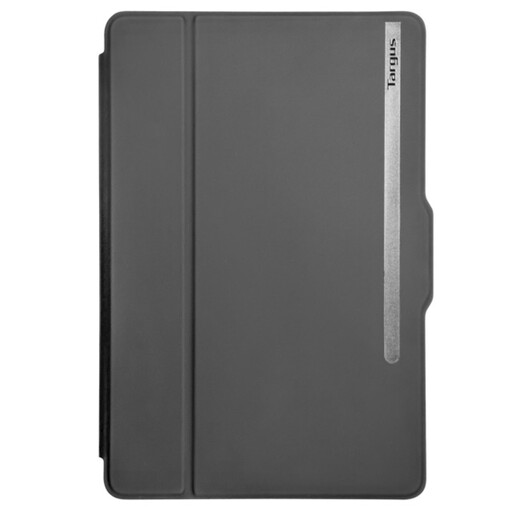
Camera, speaker, button and charging cut-outs depend on the tablet model. The Targus Click-In case listed for Galaxy Tab A9+ should not be treated as fitting every 11-inch tablet.
Match the full model, then try the case’s landscape position and access to the camera, sound and charging connection.
Apple UK specifies a new battery, new outer shell and one-year warranty for its Certified Refurbished iPad (A16). Those are terms of that offering, not a description of other used or refurbished stock.
Get the seller’s battery-condition description, included accessories, warranty and returns terms for the exact tablet being considered.
The iPad (A16) is an iPadOS option to assess for seated calls; Apple UK specifies an 11-inch display and a landscape 12MP front camera.
The Galaxy Tab A9+ range includes an 11-inch Wi-Fi model and a separately specified 5G model on Samsung UK’s pages.
Lenovo UK lists the Tab M11 with an 11-inch display and quad speakers, making it a model to examine for a seated Wi-Fi calling setup.
These options include a case for a specific Galaxy Tab A9+ model, Wi-Fi tablets and tablets to assess for mobile-data use. Choose a tablet only after checking the care home’s connection and the intended calling app; choose the case only for a matching tablet.
 No image available
The folding stand offers a hands-free viewing position for seated calls with a compatible Galaxy Tab A9+; this case is not a tablet.
Check the tablet’s exact model and try the stand angle, camera framing, speaker openings and charging access before relying on the setup.
 No image available
This Wi-Fi tablet is an option to assess if the care home’s connection works in the resident’s calling location.
The product name specifies an 11-inch screen, Android 15 and 5 GHz Wi-Fi. Confirm the calling app and find a stable, model-fitting stand or case for seated use.
 No image available
This is a cellular option to consider if care-home Wi-Fi is unsuitable and the intended mobile network works in the resident’s room.
The product name specifies dual 4G SIM support and 5G Wi-Fi; 5G Wi-Fi does not mean 5G mobile service. Confirm the exact network-compatible variant, calling app and a suitable stand before purchase.
 No image available
Its dual-SIM description makes this a model to investigate if the family needs a connection independent of care-home Wi-Fi.
The product name specifies an 11-inch FHD+ 90Hz display and 5G Wi-Fi. Confirm the exact cellular variant and bands with the seller and intended UK network; also check the calling app and stand fit.
 No image available
This tablet is another option to assess for calls over dependable care-home Wi-Fi.
The product name specifies an 11-inch 90Hz IPS screen. Check the intended calling app and a model-fitting stand case, then try the viewing position and call controls with the resident.
Choose Wi-Fi if the care home permits a personal tablet and its connection works where the resident will call. If it does not, consider cellular after checking the intended network at the care-home postcode and, where possible, in the room itself; Ofcom says indoor coverage guidance is not a guarantee of actual reception.
Ask whether personal tablets may connect to resident Wi-Fi, whether it works in the relevant room or lounge, and whether sign-in must be repeated. Also agree who can help with charging or reconnection and where the device can be kept.
Yes, if a case made for the exact tablet model holds it securely at a useful viewing angle. The Targus Click-In case for Galaxy Tab A9+ is listed with folding viewing positions, but that does not make it compatible with other 11-inch tablets; check camera, speaker and charging access too.
Adjust text and display size, put the calling app and essential contacts where they are easy to find, and practise answering an incoming call together. Age UK describes display adjustments for readability; if using Android app pinning to keep one app visible, the person managing the tablet should also test how to unpin it.