
24/7 Customer Support

Free returns

Same-day & Next-day Delivery

Quality Guaranteed

Unlock Your Welcome Offers: FREE Delivery | Up to 80% OFF | Free 30-day JoyPlus trial
Download the APP
Driving an older vehicle in the UK doesn't mean you have to miss out on modern technology. If you're tired of fumbling with your phone for navigation or wishing you had the security of a dash cam, a combined CarPlay screen with a dash cam offers a brilliant solution. These all-in-one units can modernise your car, lorry or motorhome without the need for a costly and permanent custom installation.
However, the market is flooded with options, and it's easy to make a purchase you'll regret. Before you buy, it's crucial to understand the common pitfalls that can turn a promising upgrade into a frustrating waste of money.
To ensure you get a device that performs well and lasts, focus on these core specifications. They are the difference between a daily convenience and a daily headache.
For a dashboard car screen to be genuinely useful, clarity is paramount.
car screen with reversing camera, ensure the rear camera is at least 1080p and waterproof to withstand UK weather.The main appeal of these devices is their ease of use.
plug and play carplay system should power up from your vehicle's 12V-24V cigarette lighter socket. This makes it a universal carplay head unit suitable for almost any vehicle, including leased or company cars where permanent modifications are forbidden.wireless android auto display or CarPlay experience, the device must support both 2.4GHz and 5Ghz Wi-Fi. Dual-band connectivity provides a more stable, faster link to your smartphone, significantly reducing the chance of connection drops.A good dash cam and navigation screen combo includes intelligent recording functions for peace of mind.
We've identified several products that align with these critical standards, matching them to different driver needs and budgets.
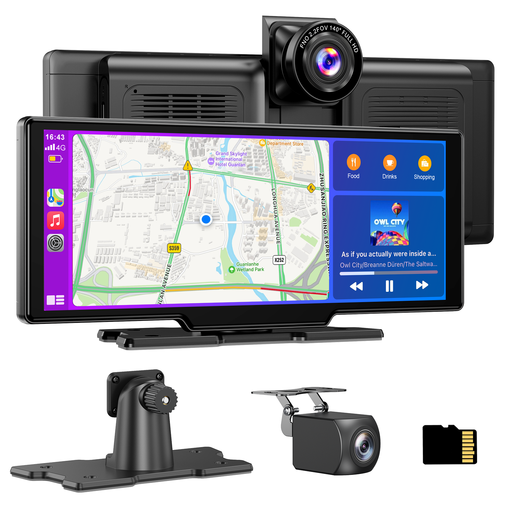
Why This Fits Their Persona: This is for the driver who wants a complete, no-fuss solution. It combines a large, high-resolution screen with a high-quality 4K front and 1080p rear dash cam system, ready to go straight out of the box.
It directly counters the "hidden costs" pitfall by including the 1080p rear camera and a 64GB TF card. The dual-band Wi-Fi also ensures a stable wireless connection.
A complete 2-in-1 system with a 4K front camera and a large 10.26-inch HD screen (1600x600). It's a comprehensive car infotainment upgrade and security device in one package.
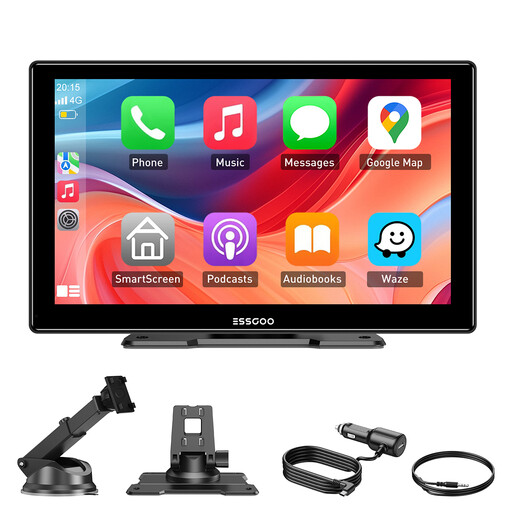
Why This Fits Their Persona: Ideal for drivers whose main goal is to get modern navigation and media streaming. This unit focuses on providing a high-quality, stable portable CarPlay screen without the added cost of an integrated dash cam.
It avoids feature-bloat by focusing on the core infotainment experience. The 9-inch HD screen (1024x600) is clear and bright, steering clear of the "dim screen" flaw.
A straightforward and reliable plug-and-play infotainment upgrade. It offers versatile audio outputs (FM, AUX and Bluetooth) and is compatible with aftermarket reversing cameras if you decide to add one later.

Why This Fits Their Persona: This is for drivers whose car already has a factory-fitted screen with wired CarPlay or Android Auto. They don't need a new screen; they just want to get rid of the annoying USB cable for a cleaner, automatic connection.
This is the ultimate fix for the "unstable wireless" trap. It's a dedicated device with 5.8GHz Wi-Fi designed for one purpose: providing a rock-solid wireless link to your existing system.
A simple, discreet dongle that converts your car's existing wired system to wireless. It maintains all original controls (steering wheel buttons, knobs) and connects automatically after the first setup.
We have compiled a complete, real-time list of products that fully satisfy these strict selection criteria and UK safety regulations.
Yes, the vast majority of these portable units are designed for simple, DIY installation. They typically come with a suction cup or adhesive mount for your dashboard or windscreen and are powered by plugging them into your car's 12V socket. The most involved step is usually routing the wire for the rear camera, but many kits include a small trim tool to help you tuck the cable away neatly.
These devices provide multiple audio output options to suit any car. You can use the small built-in speaker for basic sound, but for music and calls, you'll want to connect to your car's stereo. This can be done in three main ways:
Yes, they use a feature called loop recording. The device records continuously in short segments. When the memory card becomes full, it automatically overwrites the oldest, non-essential footage to make space for new recordings. If the built-in G-sensor detects an incident like a collision, it automatically locks that specific video file, ensuring it is not overwritten and is saved as evidence.