
24/7 Customer Support

Free returns

Same-day & Next-day Delivery

Quality Guaranteed

Unlock Your Welcome Offers: FREE Delivery | Up to 80% OFF | Free 30-day JoyPlus trial
Download the APP
Is your daily drive hampered by a tangle of charging cables just to get your maps on screen? Or perhaps your car, while perfectly reliable, lacks the modern infotainment system you see in newer models. You're not alone. Many UK drivers are looking for a simple, effective way to bring their vehicle's technology up to date without the cost and hassle of a full stereo replacement.
This guide is designed to help you navigate the options for a modern CarPlay screen or adapter. We'll break down what to look for and share our top recommendations to help you find the right fit for your car and your needs, making your journeys safer, more convenient and more enjoyable.
Upgrading your car's tech can feel daunting, but it's simpler than you might think. Here are a few key points to consider to ensure you select the right device for your vehicle.
First, determine what your car already has. This is the most important step in your car infotainment upgrade.
Once you know which type of device you need, consider the features that matter most to you. Look for clear displays with good resolution for easy viewing in bright sunlight. For portable screens, check how they are powered (usually a 12V socket) and how they transmit audio to your car's speakers (typically via an AUX cable or FM transmitter). Some advanced models even come as a car screen with a reversing camera, adding a significant safety feature.
Always double-check compatibility. For wireless adapters, confirm they work with your car's make, model and year. Most reputable adapters list compatible vehicle systems (e.g., Ford SYNC 3, VW MIB2). For both adapters and screens, ensure they support your smartphone's operating system (e.g., iOS 10+ or Android 11+).
Here are a few standout options that offer a great balance of features, performance and convenience for UK drivers.

Why It Stands Out: The OTTOCAST Mini is a straightforward solution for anyone tired of plugging in their phone every time they get in the car. It focuses on one job and does it well: converting your existing wired CarPlay or Android Auto into a seamless wireless experience. Its compact design keeps it out of the way, and the setup is a simple plug-and-pair process. The use of 5.8GHz Wi-Fi and Bluetooth 5.2 helps maintain a stable and responsive connection.
Pros:
Who is it for? This is for the driver whose car already has a good infotainment screen with wired smartphone integration but wants the convenience of a wireless connection. It's the definition of a simple, effective upgrade.
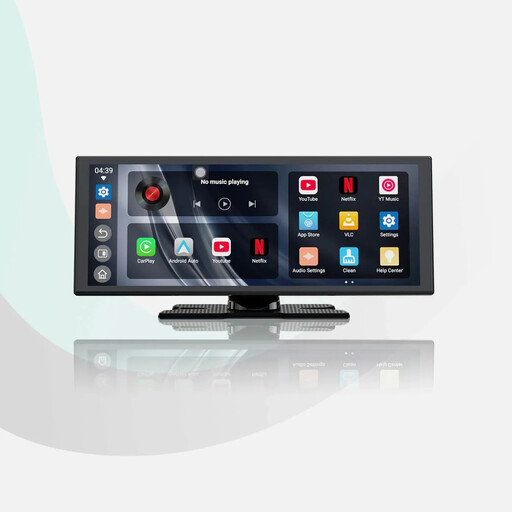
Why It Stands Out: The ScreenFlow is more than just a screen; it's a complete multimedia hub. Running on Android 13, it comes with built-in apps like Netflix and YouTube (for use when parked, of course). Its large 11.4-inch HD display offers excellent clarity for navigation and media. A standout feature is Audio Mixing, which allows your music to continue playing at a lower volume while navigation prompts are spoken, avoiding jarring interruptions. It also includes a 1080P hardwired rear camera, turning it into a comprehensive safety and entertainment package.
Pros:
Who is it for? Ideal for drivers with older vehicles lacking any form of infotainment screen. It provides a massive leap in functionality, adding navigation, hands-free communication, media streaming and a reversing camera all in one unit.
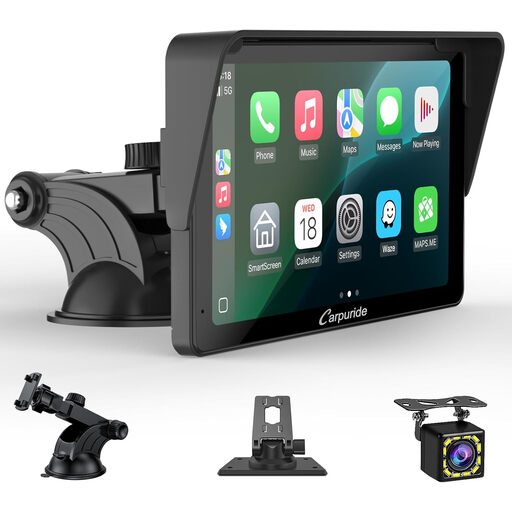
Why It Stands Out: The Carpuride V3R offers a fantastic all-in-one solution in a more compact form factor. The 7-inch HD touch screen is responsive and large enough for clear navigation without obstructing your view. It provides both wireless CarPlay and Android Auto, and like the OTTOCAST ScreenFlow, it comes bundled with a 720P reversing camera. Its inclusion of a noise-reduction chip aims to improve the clarity of hands-free calls, a thoughtful touch for daily commuters.
Pros:
Who is it for? This is a great choice for drivers who want a full-featured portable screen but prefer a less obtrusive size. It's a practical, all-around performer that adds modern connectivity and safety features to almost any vehicle.
If these selections don't quite match what you're searching for, or if you'd like to explore different screen sizes, features and price points, there are many other solutions available.
? Explore our full collection of in-car tech in the Play Box category
No. The products featured here are designed for easy, do-it-yourself installation. Wireless adapters simply plug into a USB port. Portable screens typically mount to the dash or windscreen and plug into your car's 12V power outlet (cigarette lighter).
Generally, yes. As long as your vehicle has a 12V power outlet to power the device, you can use a portable screen. Audio can then be routed to your car's stereo via the included AUX cable, an FM transmitter function or through the screen's own built-in speaker.