Who is each route for?

Households with a known list of casual games

If one computer will handle documents, streaming and games such as The Sims 3 or The Sims 4, check those games individually before deciding whether dedicated graphics are necessary. Electronic Arts publishes separate requirements for the two games; a familiar game title is not a substitute for checking the laptop’s exact hardware.

Buyers planning to add more demanding games

If the game list may grow and the computer must remain portable, compare dedicated-GPU laptops by their complete configurations. NVIDIA explains that graphics power affects both performance and heat, so the GPU name alone does not describe how two laptops will behave.

Gamers with a fixed place to play

If the computer rarely needs to move, a desktop is another route. Compare the tower together with the monitor, keyboard, mouse and desk space the setup requires, rather than treating the tower as a complete laptop replacement.

What should you check before choosing?

General-purpose laptop

Consider it when: your known game list has been checked against the exact laptop’s processor, integrated graphics and memory.

Trade-off: an integrated-GPU name or graphics API specification alone does not establish compatibility with a game or headroom for future titles.

Dedicated-GPU laptop

Consider it when: you need portability and plan to play a broader or more demanding selection of games.

Trade-off: graphics power produces heat that the laptop’s cooling system must manage, as NVIDIA explains.

Desktop PC

Consider it when: the computer can stay in a suitable fixed location.

Trade-off: a tower needs a separate display and input devices for a complete setup.

PriorityWhat to checkYour needs
Game requirements Compare the exact processor, graphics, RAM, operating system and free storage with each game publisher’s current recommended requirements. Check expansions and the installation route too: EA says The Sims 3 installed from disc does not update past version 1.67. I want my intended games to work on this computer, including the versions and added content I plan to use.
Graphics Identify the actual integrated or dedicated GPU. For dedicated-GPU laptops, check the exact model’s published graphics-power figure and cooling information; NVIDIA says power affects performance and heat. If my game list may grow, I want to compare complete laptop configurations rather than assume every machine with the same GPU name is equivalent.
Memory and storage Check installed RAM, SSD capacity and remaining free space against your games and other uses. Electronic Arts recommends 8 GB RAM and 50 GB free space plus 1 GB for custom content and saves for The Sims 4 on PC. There should be room for my games, saved files and everyday household work without treating one game’s requirement as the whole purchase specification.
Screen and connections Compare the exact laptop’s display size, resolution, ports, networking and keyboard details. For a desktop, identify the monitor and input devices needed to use the tower. I will use the screen and controls for ordinary tasks as well as games, so the complete setup needs to suit both.
Portability Check laptop weight, dimensions, battery information and supplied charger for the exact configuration. If considering a desktop, check where the tower and separate equipment will go. Will I carry the computer often, or can it remain at one desk? That answer changes which setup is practical for me.

Buying mistakes to avoid

  • Choosing by the “gaming laptop” label

    A product line can contain different processors, graphics, memory and displays. ASUS, Acer and Lenovo publish specifications for particular models or configurations, not one specification shared by every laptop in a line.

    Record the exact model or part number, then compare its listed hardware with the current requirements of your intended games.

  • Comparing GPU names alone

    NVIDIA explains that laptop graphics power affects performance and heat. The same GPU name therefore does not establish a like-for-like comparison between laptop designs.

    Check the manufacturer’s graphics-power figure, cooling details, dimensions and charger for each exact model; do not assign one laptop another model’s power figure.

  • Using one old game’s minimum requirement as the target

    Electronic Arts distinguishes minimum from recommended requirements for The Sims 3 and The Sims 4. The Sims 4 recommendation also accounts for free space for custom content and saves.

    List every intended game and expansion, then use the relevant current recommended requirements to assess the processor, graphics, RAM and available storage.

  • Comparing a laptop with a tower alone

    A laptop has a built-in screen and controls; a desktop tower needs an external setup. A tower specification does not describe everything required to use it.

    Check which monitor and input devices you already have and whether there is a suitable permanent space for the computer.

    Allow for the space and any separate equipment the desktop setup requires.

Relevant brand and product-line references

These manufacturer examples show why specifications should be checked at model or configuration level; they are not a comparison of every product in each brand’s range.

ASUS

The TUF Gaming 16 line provides an example of a dedicated-GPU laptop with model-specific specifications.

  • ASUS lists an RTX 5050 Laptop GPU at 85 W, 16 GB DDR5, a 512 GB SSD and a 16-inch 1920 × 1200, 144 Hz display for its FX610JH configuration.
  • Those figures apply to FX610JH, not every TUF Gaming 16 variant; check the exact model and included accessories.

Acer

Nitro V 15 is a dedicated-GPU laptop line for buyers comparing published graphics-power and display details.

  • Acer describes configurations with up to an RTX 5060 Laptop GPU, up to 85 W MGP with Dynamic Boost and a 15.6-inch Full HD display up to 180 Hz.
  • These are Acer’s “up to” line specifications; an individual Nitro V 15 may have different components or figures.

Lenovo

The LOQ range includes laptops and towers, making it relevant when portability is part of the decision.

  • Lenovo lists a LOQ 15 configuration with an RTX 5060 Laptop GPU, 16 GB DDR5 and a 1 TB SSD; its LOQ Tower listings include configurations with RTX 5050 or RTX 5060 desktop graphics.
  • Those are listed configurations, not equivalent laptop and desktop performance results. Compare the exact products and the complete desktop setup.

Joybuy options for portable and fixed setups

These options cover dedicated-GPU laptops for a portable household computer and one desktop tower for a fixed setup. Check each candidate against your own games; the desktop also needs separate display and input equipment.
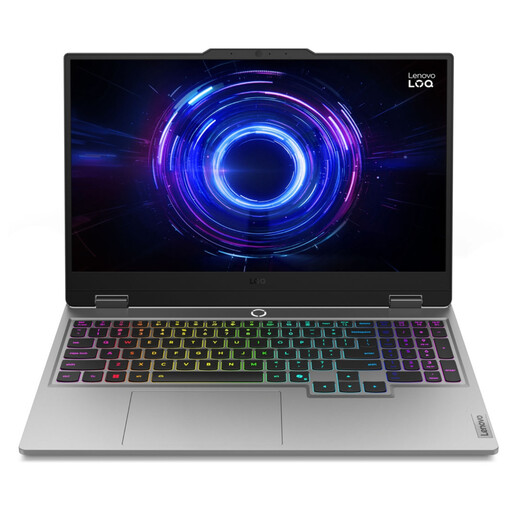
LOQ 15IRX10 laptop

LOQ 15IRX10 i5-13450HX, 24 GB, 1 TB, W11H

A dedicated-GPU laptop to consider if one portable computer will handle household tasks and your checked game list. The listing specifies an Intel Core i5-13450HX, RTX 5060 graphics, 24 GB RAM, a 1 TB SSD and a 15.6-inch FHD IPS display. Confirm the delivered model number and its GPU power before comparing it with another RTX 5060 laptop.

View on Joybuy

ASUS ROG Zephyrus G14 GA403WR-QS088W laptop

ASUS ROG Zephyrus G14 GA403WR-QS088W, Ryzen AI 9 HX 370, RTX 5070 Ti

This 14-inch dedicated-GPU laptop is an option when a smaller built-in screen matters alongside gaming and household use. Its listing specifies 32 GB memory, a 2 TB SSD, Windows 11 Home and a WQXGA+ display. Check the exact GPU power, weight and battery details if graphics-power or carrying comparisons will decide your choice.

View on Joybuy

Lenovo LOQ Essential 15ARP11 laptop

Lenovo LOQ Essential 15ARP11, Ryzen 7 170, RTX 5050, 16 GB, 1 TB

This laptop gives you a stated graphics-power figure to use when comparing dedicated-GPU configurations: its listing specifies a 65 W RTX 5050 Laptop GPU. It also lists a 15.6-inch 144 Hz FHD display, a UK keyboard and a 2.30 kg weight. The stated maximum memory for this configuration is 16 GB; check that against your intended games and multitasking.

View on Joybuy

HP 17-db1000na OMEN 17 laptop

HP 17-db1000na OMEN 17, Ryzen AI 7 350, RTX 5060

Consider the 17.3-inch FHD built-in screen if the laptop will often be used in one place but still needs to move. The listing specifies 16 GB RAM, a 1 TB SSD and Windows 11 Home; its approximate 2.5 kg weight matters if you will carry it frequently. Check the GPU power before making a like-for-like graphics comparison.

View on Joybuy

CyberPowerPC JOYB1013 desktop tower

CyberPowerPC JOYB1013, Ryzen 7 9800X3D, RTX 5080, 32 GB, 2 TB

This Windows 11 Home tower is a fixed-location alternative when you do not need laptop portability. Its listing specifies RTX 5080 graphics and a 2 TB NVMe SSD, with two HDMI and two DisplayPort outputs. It is supplied without a monitor, keyboard, mouse or headset, so plan the complete setup before choosing it.

View on Joybuy

Frequently asked questions

How can I check whether a laptop suits The Sims 4?

Compare its exact processor, graphics, RAM and free storage with Electronic Arts’ current PC requirements. EA’s recommended specification includes a four-core Intel Core i5 or AMD Ryzen 5, 8 GB RAM, GTX 650 or Radeon HD 7750-class graphics with 1 GB video RAM, and 50 GB free space plus 1 GB for custom content and saves. Check other intended games separately.

Will a disc installation of The Sims 3 receive the latest updates?

Not through the same update route. EA says a disc installation will not update past version 1.67 and directs players who want the latest version to install through the EA app. Check which version and installation method you intend to use.

Why check GPU power when comparing gaming laptops?

NVIDIA explains that graphics power affects laptop performance and heat, which the cooling system must manage. Look for the graphics-power figure published for each exact laptop configuration; a shared GPU name alone is not enough for a like-for-like comparison.

What should I check when the computer arrives?

Check that the delivered model and key details match your order before setting it up: processor, graphics, RAM, SSD, display or desktop connections, charger where applicable, keyboard layout and physical condition. For a tower, also confirm you have the separate screen and input devices needed to use it.