Households connecting wired rooms
You have Cat6 sockets in several rooms and want to connect fixed devices through a central patch area. Identify and test the runs before deciding how many switch ports you need.


Map and test the installed Cat6 runs before choosing equipment, then add a switch at the central patch area for the room sockets you want to use. Wired access points or mesh nodes with Ethernet backhaul can serve Wi-Fi elsewhere in the home; choose between them based on placement, power and management needs. Keep the supplied broadband hub unless you have a reason to replace its routing functions and have confirmed your provider's connection and home-phone requirements.
You have Cat6 sockets in several rooms and want to connect fixed devices through a central patch area. Identify and test the runs before deciding how many switch ports you need.
You want Wi-Fi points away from the broadband hub and have Ethernet runs that could connect them. Placement, the chosen system's wired-backhaul support and its power requirements shape the choice.
You want different routing features but need broadband and any provider-managed home-phone service to keep working. Check the provider's requirements before removing its hub.
Start with the room-to-panel map, then count the connections you will activate. Choose Wi-Fi equipment for the locations the cables can reach, and assess a gateway replacement separately.
| Concern | Buying checks | Who this matters to |
|---|---|---|
| Identifying usable runs | Match each room socket to its central termination and test the required runs for basic wiring faults before planning ports or Wi-Fi locations. | I need to know which cable reaches each room before I decide what to connect. Around 25% of consumers put identifying usable runs first. |
| Wi-Fi across rooms | Check where wired Wi-Fi points can go and whether the selected mesh units support Ethernet backhaul and the intended operating mode. | If walls or floors separate the rooms I use, I want Wi-Fi points in useful places without relying entirely on a wireless link between them; around 31% of consumers put whole-home Wi-Fi first. |
| Wired fixed devices | Count the router uplink and each room connection needed on the switch. If access points need Ethernet power, check the PoE standard and total power budget. | My TV, games console or workstation can use a room socket, so I want those connections ready at the patch area. Stable wired access comes first for around 25% of consumers. |
| Provider compatibility | Before replacing the hub, confirm the provider's WAN and authentication requirements and whether broadband-based voice depends on its equipment. | I want to change the router without interrupting broadband or a home-phone service. Around 19% of consumers make provider compatibility their primary concern. |
A patch panel presents cable terminations; it does not connect each socket to the network or establish that a run is correctly wired. Fluke Networks describes wire-map testing for faults including open circuits, shorts and crossed pairs.
Test the runs you plan to use, record which panel port reaches each room and label both ends before choosing switch capacity or access-point positions.
Unclear labelling or a faulty run may call for a cable tester, replacement patch leads or help diagnosing the cabling.
Mesh wiring depends on which device is routing. For Deco in router mode, TP-Link says satellite units belong on the main Deco's LAN side, or on a switch connected to that LAN side, to avoid a network loop.
Decide which device will act as the router, then follow the selected mesh system's wiring instructions for that mode. Do not give a satellite conflicting WAN and LAN paths.
A switch can have enough Ethernet ports yet lack the compatible powered ports or total power budget required by the intended access points. NETGEAR, for example, specifies four PoE+ ports and a 63 W total budget for its GS105P; those figures apply to that model.
Check each access point's supported Power over Ethernet (PoE) standard and power requirement against the exact switch or injector you plan to use.
If the power arrangement does not match, the installation may need a compatible injector, a local power supply or different switching hardware.
Router settings and support vary by provider. BT says its Digital Voice service requires the hub to be powered and connected to broadband; that condition matters if the household uses the service.
Ask your provider for the current third-party-router requirements and check any home-phone, telecare or alarm dependency before changing the gateway. Keep the supplied hub available for provider-led fault diagnosis.
You may need to reconnect or retain the supplied hub for troubleshooting or a provider-managed voice arrangement.
Its Deco range is relevant to wired-backhaul mesh, while Omada includes access points for planned Wi-Fi locations.
Its unmanaged switch examples illustrate central Ethernet distribution and the distinction between standard and PoE-capable models.
Its UniFi access-point range is relevant when you want Wi-Fi points at planned locations and a managed Wi-Fi setup.
These switches suit central distribution to tested room runs; the Deco system is a separate choice for multi-room Wi-Fi. Count switch connections and plan Wi-Fi node locations before deciding which equipment you need.
 No image available
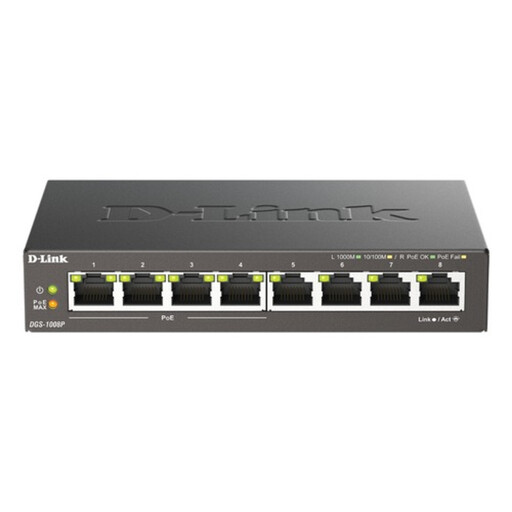
Consider this for a central patch area serving several tested room runs where compatible Ethernet-powered equipment is also planned.
Eight-port Gigabit, unmanaged desktop switch with PoE. Check the powered devices' PoE requirements and the switch's available power budget before relying on it for access points.
 No image available
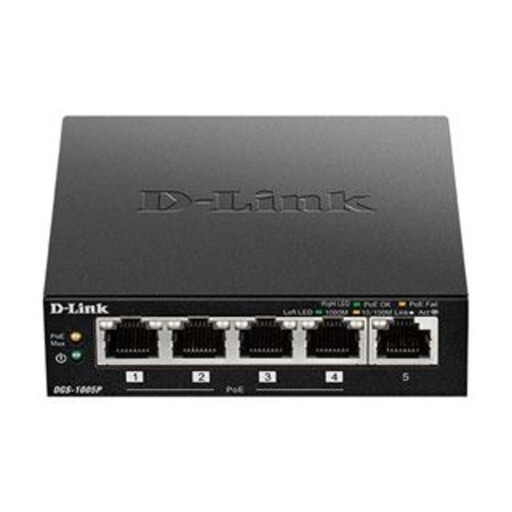
Consider this where fewer tested room runs need central connections and the planned powered devices are compatible with the switch.
Five-port desktop Gigabit PoE+ switch. Allow a port for the router uplink, and check each powered device's standard and power requirement against the switch's limits.
 No image available
Consider this for connecting several tested room runs to the router's LAN through the central patch area.
Eight-port Gigabit unmanaged desktop switch. If an access point needs power through its Ethernet cable, confirm how that power will be supplied.
No image available
Consider this when only a small number of tested room runs need a wired connection from the central patch area.
Five-port Gigabit unmanaged desktop switch. Count the router uplink among the required connections; check the power arrangement separately for any wired access point.
 No image available
Consider this for Wi-Fi at multiple locations in the home, provided the chosen node positions and wiring suit the intended setup.
Three-pack BE22 BE3600 mesh Wi-Fi 7 system. Confirm Ethernet-backhaul support and the approved wiring layout for this variant; if keeping the provider hub, check its access-point mode and any functions that mode changes.
Test between one room socket and the central termination at a time, then record and label the matching ports. A wire-map tester can identify basic faults; a successful basic test does not certify the run for a particular maximum speed.
For central distribution, connect the router's LAN side to a switch port and patch the room runs you want to activate into other ports. In an Openreach full-fibre installation, Openreach guidance places the powered optical network terminal on the router's WAN side; the room-distribution switch does not replace that connection.
Yes, if the selected mesh system supports the required wired layout and an access-point mode that works with your existing router. TP-Link says Deco access-point mode leaves IP-address assignment to the retained router; check the selected system's mode instructions and which router features are unavailable in that mode.
Not necessarily: the chosen access point may have a compatible injector or another supported power arrangement. If using a PoE switch, match the access point's power standard and requirement to the switch's powered ports and total budget, rather than judging by Ethernet port count alone.
Confirm your provider's WAN connection, authentication settings, third-party-equipment support and any home-phone dependency before buying a replacement. BT Business describes requirements for its applicable services, but those settings are not universal; BT also says its hub must remain powered and connected for BT Digital Voice.