What matters when choosing?
Start with how you will power the mouse and connect it to your computer. Then decide whether faster navigation, device switching or a different grip would make catalogue work easier to manage.
| Concern |
What to check |
Who this matters to |
| Charging access |
Check whether the mouse uses replaceable batteries or USB charging, and read the manufacturer’s battery-life conditions. |
If finding a charging source interrupts my catalogue work, I want to postpone or avoid that task. Around 33% of consumers would put avoiding routine charging first. |
| Navigation |
Look for a suitable scroll mode and confirm that any configurable controls work with your operating system. |
When I move through long product lists and fields, I want the controls to suit that repeated work. Around 27% of consumers would make faster navigation their primary concern. |
| Connections |
Confirm Bluetooth on each computer; if you need a receiver, check its type and the available USB port. |
I switch computers and need to know how the mouse will connect to each one without tying up a needed port. For around 20% of consumers, connection flexibility would come first. |
| Hand fit |
Consider grip shape, hand size and desk space; a trackball also requires a different way of moving the pointer. |
During long editing sessions, I need a shape that works with my hand and desk setup. Around 20% of consumers would prioritise comfort and fit. |
Joybuy mouse options for catalogue work
These options include rechargeable mice and Bluetooth or dual-mode mice for catalogue desks. Compare their power arrangements and connection methods against the computers you use; the listed models do not all address limited charging access in the same way.
 No image available
HP 700 Rechargeable Wireless Mouse
Consider this for catalogue work if a rechargeable mouse fits your access to USB charging.
Joybuy lists Bluetooth 5.2 and an HP dongle as connection options. Confirm that the connection and charging arrangements suit your computer.
View on Joybuy
 No image available
Logitech MX Master 3S Mouse, Black
Consider this model if its shape suits extended catalogue work and you want to compare its controls with a simpler mouse.
Check the connection method, power arrangement and compatibility for the Black variant before buying.
View on Joybuy
 No image available
HOFOTEK M311 2.4G+BT Mouse, White-Grey, 1xAA
This is an option if you want Bluetooth use and an AA battery instead of routine USB charging.
The title specifies 2.4G+BT connectivity and adjustable DPI. Check Bluetooth compatibility, the receiver arrangement and the expected battery-replacement interval.
View on Joybuy
 No image available
V7 MW500BT Bluetooth Vertical Mouse
Consider the vertical shape if it fits your hand and desk, while comparing its connection options for catalogue work.
The title specifies Bluetooth and 2.4 GHz modes, six buttons and adjustable sensitivity up to 1600 DPI. Check host compatibility, battery requirements and whether the different grip suits you.
View on Joybuy
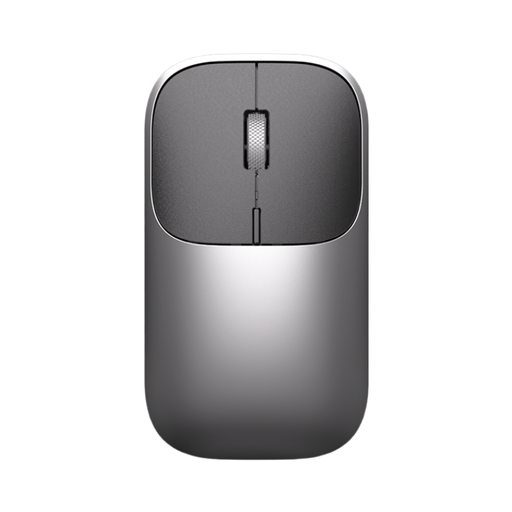 No image available
Ochama JZ001 Dual-Mode Mouse, Metallic Grey/Silver White
This is an option if you need to choose between Bluetooth and receiver-based use at a catalogue desk.
The title specifies Bluetooth 5.0, 2.4 GHz connectivity and adjustable DPI. Confirm the battery type and charging arrangement before choosing it for a setup with scarce plug sockets.
View on Joybuy
Frequently asked questions
Will a Bluetooth mouse help when plug sockets are scarce?
A replaceable-battery Bluetooth mouse can avoid routine USB charging and leave a computer’s USB port free. Confirm that the computer supports Bluetooth; a rechargeable Bluetooth mouse still needs a charging source.
When is a USB-receiver option useful for catalogue work?
A receiver option is useful when one of your computers needs that connection method. A dual-mode mouse lets you choose Bluetooth on a compatible computer and a receiver where appropriate, but receiver use requires a suitable available USB port; check whether the receiver is included.
Should I avoid a rechargeable mouse if wall sockets are limited?
Not necessarily: a rechargeable mouse can suit you if its controls or device-switching features are useful and you have a practical USB charging source. If avoiding charging is your main requirement, compare replaceable-battery models instead.
Is an ergonomic mouse enough for long catalogue-editing sessions?
No mouse shape addresses the whole workstation. Check hand fit and desk space alongside your screen and desk arrangement and work routines; for workplace display-screen use, follow your employer’s arrangements. The Health and Safety Executive also advises employers on training and information for display-screen-equipment users.
What should I do with an old mouse in the UK?
Use an appropriate electrical-waste collection route rather than treating the mouse as ordinary rubbish. GOV.UK says waste electrical products can be taken to a local household waste recycling centre; check its arrangements before visiting.


