Households keeping an existing TV
If your screen still suits you, an HDMI streaming device offers a way to change the app interface without replacing the display. Check the TV’s HDMI input and the apps available on the exact device.


Keep a television that still meets your screen and sound needs, and consider an HDMI streaming device if it has a usable input. Replace the TV when you also need a different screen or an integrated TV interface; an existing compatible set-top box may be enough without either purchase. Whichever route you choose, check the exact device’s current support for your catch-up apps, sign-in method, network connection and accessibility needs.
If your screen still suits you, an HDMI streaming device offers a way to change the app interface without replacing the display. Check the TV’s HDMI input and the apps available on the exact device.
If BBC iPlayer, ITVX, Channel 4 and 5 drive the decision, check each service separately. ITV Help and Channel 5 Help Centre describe platform and model conditions, and individual features can differ even where an app is available.
Subtitles, manageable sign-in, remote controls and sound-system connections can matter as much as the screen. Channel 4 describes platform differences in subtitle support, so check the features you will actually use.
Decide whether the current screen still works for you before choosing between an add-on device and a replacement TV. If you already have a set-top box, check its current apps before adding another device.
Consider it when: Your TV has a usable HDMI input and you mainly want a different streaming interface.
Trade-off: You still use the existing screen, and switching inputs or setting up another remote may become part of viewing.
Consider it when: You want an HDMI-connected platform with a feature such as wired networking; Google lists built-in Ethernet for Google TV Streamer.
Trade-off: A box needs space and power, while picture and audio formats remain limited by compatible equipment elsewhere in the setup.
Consider it when: The screen itself no longer meets your needs, or you want a new integrated TV interface.
Trade-off: Built-in apps still depend on the exact TV model and software; the word “smart” does not establish continuing broadcaster support.
Consider it when: A box already connected to your TV currently carries the catch-up services you need.
Trade-off: Support can change on older hardware; Channel 5 Help Centre says its app is no longer supported on Humax 4000T boxes.
| Concern | What to check when buying | Who this matters to |
|---|---|---|
| Broadcaster apps and features | Check BBC iPlayer, ITVX, Channel 4 and 5 against the exact model and software version. If ITV regional programmes matter, check that feature separately with ITV Help. | I want my main screen to open the broadcaster services and programmes I use, not merely a general streaming menu. Around 36% of consumers would put app and feature access first. |
| Keeping or replacing the screen | Confirm a usable HDMI input for an add-on device; assess the TV’s screen and audio arrangement before deciding to replace it. | If my present picture and sound suit the room, I would rather keep that television while changing how I stream. For around 29% of consumers, preserving the existing screen is the primary concern. |
| Accessibility and control | Check live and on-demand subtitles in the required apps, how accounts are signed in, and connections to any soundbar or AV receiver. | When several people share the TV, I need subtitles and controls they can use without a difficult setup. Ease of access and control comes first for around 21% of consumers. |
| Picture and network capability | Match the TV’s resolution and supported picture formats to the device; check Wi-Fi at the TV position or whether a wired connection is wanted. | If I am choosing equipment for a particular picture format or wired network connection, those capabilities shape my choice. Around 14% of consumers would prioritise picture and network capability. |
App support can depend on the model, platform and software version. ITV Help sets conditions for ITVX, while Channel 5 Help Centre lists older devices it no longer supports.
Check each required broadcaster’s current supported-device guidance for the exact product before buying, rather than relying on app icons in a listing.
Google TV Help says playback resolution is limited by both the display and the streamer. A 4K-capable device cannot make a 1080p screen display 4K.
Check the existing TV’s resolution and connections before choosing device features for picture or audio formats.
In the UK, TV Licensing says you need a TV Licence to watch or download BBC iPlayer, including on-demand programmes, and to watch live TV. The requirement depends on what you watch, not whether you use a TV, stick or box.
Check TV Licensing guidance against your household’s viewing activity; do not assume every catch-up service is treated identically.
ITV Help describes QR-code, numeric-code and remote sign-in options for ITVX. Channel 4 distinguishes subtitle availability by platform and between live and on-demand content.
Before choosing a device, check the sign-in method and the specific subtitle and remote features needed by the people who will use it.
A platform found in HDMI streaming devices and integrated TVs. ITV Help lists Amazon Fire for ITVX, and Channel 5 Help Centre lists Amazon Fire TV for 5.
A streaming-stick and Roku TV platform. ITV Help lists Roku routes for ITVX, and Channel 5 Help Centre lists Roku for 5.
An HDMI streaming-box and integrated-TV route. Channel 4 confirms its app for Google TV Streamer and Chromecast with Google TV.
A tvOS-based streaming-box route. ITV Help lists Apple TV for ITVX under a software-version condition, and Channel 5 Help Centre lists Apple TV for 5.
These choices cover Roku sticks for adding streaming to a suitable TV and smart TVs for replacing the screen. Choose the route that fits your existing display, then check the exact product’s current broadcaster-app support before purchase.
 No image available
Consider this stick if you want to keep a TV with a usable HDMI input. Its listed 4K capability will not raise the resolution of a lower-resolution screen.
Check the exact device and software version against the current UK support information for each broadcaster app you need.
 No image available
Consider this integrated-TV route if you also want to replace your screen. The listed 50-inch size, 4K QLED display, Freely and Fire TV distinguish it from an HDMI add-on.
Check that the screen fits its intended space and that the exact TV currently supports your required broadcaster apps.
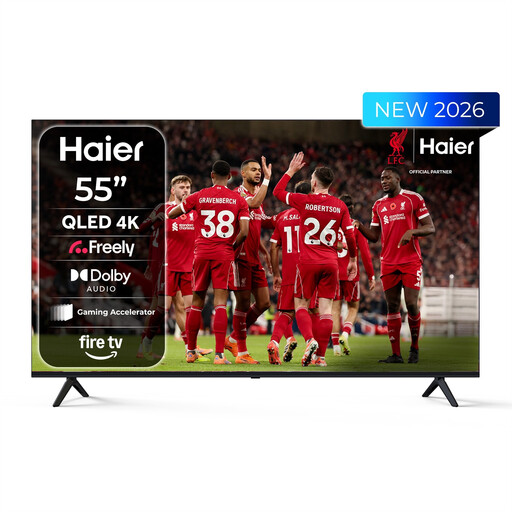 No image available
Consider this integrated-TV route if replacing the display is part of your plan. Its listed 55-inch 4K QLED screen, Freely and Fire TV make screen size and placement important checks.
Confirm the exact model’s current broadcaster apps and whether its stand or mounting arrangement suits the room.
 No image available
Consider this stick when you want to add streaming without replacing a suitable TV. The 4KPlus variant is distinct from the Roku Streaming Stick 4K listed above.
Confirm a usable HDMI input, the picture capabilities you intend to use and current support for your required broadcaster apps on the exact device.
 No image available
Consider this 32-inch TV if you need to replace a screen and want an integrated smart-TV route. Check its exact panel resolution before choosing it: the product title and description give conflicting resolution labels.
Also confirm current support for BBC iPlayer, ITVX, Channel 4 and 5 on this model and software version.
Yes, an HDMI streaming device is an option if the TV has a usable HDMI input and its screen still meets your needs. Google TV Help says the display limits playback resolution even when the streamer supports a higher one.
No: support for BBC iPlayer, ITVX, Channel 4 and 5 needs checking on the exact model and software version. ITV Help and Channel 5 Help Centre describe platform conditions and older-device exclusions; check each broadcaster’s current UK device guidance before buying.
No. Channel 4 lists several platforms supporting on-demand subtitles but says its live-content subtitle support excludes Samsung and Xbox. Check the particular broadcaster app and whether you need subtitles for live programmes, on-demand programmes or both.
Check the connections and supported audio formats across the streamer, TV and sound system before choosing. Google TV Help says higher-quality audio on Google TV Streamer requires compatible connected equipment; the connection requirements depend on how you attach the devices.
In the UK, TV Licensing says you need a TV Licence to watch or download BBC iPlayer, including on-demand programmes, and to watch live TV on any service. It says a licence is not required for watching only on-demand programmes on other services if you do not watch live TV; the type of device does not change those viewing conditions.