Fan-and-phone desk users
You want to recharge a USB-powered fan alongside a phone or small accessories without using a separate wall adapter for each device. Check your fan’s connector and rated input before choosing the station’s ports.


If your rechargeable fan and the other devices you charge use USB, a USB-only desktop station can bring their charging connections to one wall socket. Choose a hybrid USB-and-AC station when you also need sockets for plug-in equipment, or consider a higher-output charger when a laptop will charge alongside the fan. Check the fan’s input requirements, how the station shares power between ports and, for a hybrid unit, its suitability for your mains setup before buying.
You want to recharge a USB-powered fan alongside a phone or small accessories without using a separate wall adapter for each device. Check your fan’s connector and rated input before choosing the station’s ports.
You need USB charging for the fan but still use mains plugs for other equipment in the same area. A hybrid station can provide both types of connection, provided its plug and marked load rating suit the setup.
You plan to charge a fan alongside a laptop, tablet or phone. The mix of ports and the power available when they are occupied together matter more than port count alone.
Start with the fan’s charging input, then list what else must charge at the same time. That determines whether USB ports alone will do or whether you also need AC outlets or greater shared USB output.
| Concern | What to check | Who this matters to |
|---|---|---|
| Using one wall socket | Match the fan’s rated input and cable connector to the station’s USB ports; check that there are ports for the other devices charged alongside it. | If I charge my fan and a phone at the same desk, I want both connected without separate plug adapters. Around 50% of consumers would put this socket-saving need first. |
| Charging several USB devices | Check the USB-A and USB-C port mix and the maker’s power allocation when several ports are occupied. | For a shared charging spot, I need the fan and several smaller devices connected together, rather than simply the largest advertised wattage. Around 38% of consumers would prioritise this multi-device need. |
| Adding laptops or AC plugs | For laptops, check simultaneous USB output; for a hybrid station, check its mains plug and marked load rating. | If a laptop or plug-in adapter must share the fan’s charging area, I need connections suited to those devices without overloading an extension-style unit. This would be the primary concern for around 12% of consumers. |
More ports do not mean that every connected device receives the station’s maximum advertised output at once. Belkin also says cables are not included with its RockStar B2B139 ten-port station.
List the devices you will charge together, then check their connectors and the manufacturer’s multi-port power allocation.
If the required charging cables are not included, you will need compatible ones.
A USB-C connector identifies the connection, not the input rating or charging behaviour of your fan. A Joybuy fan listing describes USB Type-C charging for that particular model only.
Check your own fan’s label, manual or manufacturer specification, and use a cable suited to its charging connection.
Overloading an extension-style device can cause overheating. Electrical Safety First advises against plugging one extension lead into another.
Use one correctly rated extension device per wall socket and keep the connected load within its marked rating. If extension devices have become a permanent workaround, ask a registered electrician about additional fixed sockets.
A high-output station makes sense when devices such as laptops need to charge alongside the fan; a larger station rating does not change the fan’s own accepted input.
Choose capacity for the devices that will actually charge together, and check the output available from the ports you intend to use.
Its cited desktop models illustrate the choice between USB-only charging and a unit that also provides AC outlets.
Its Prime A2345 is relevant to a desk where a fan shares charging space with laptops, tablets and phones.
Its RockStar B2B139 addresses setups needing many USB charging positions in one location.
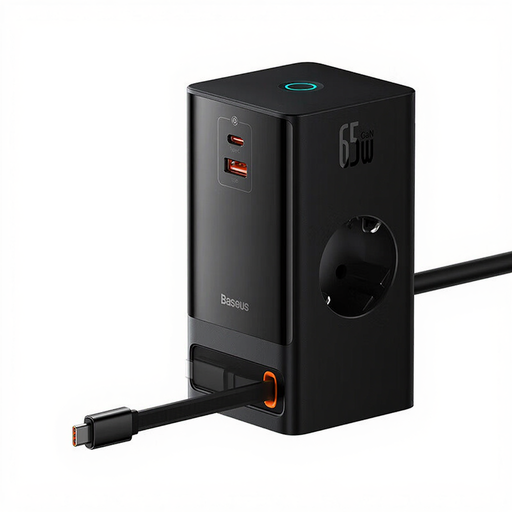
This hybrid Baseus unit is for a charging area that needs USB connections and AC outlets together. Its EU power cord makes confirming suitability for your UK mains setup essential before use.
 No image available
For a fan with a compatible USB input, this hybrid layout leaves AC outlets available for other plug-in equipment.
The listed variant has two AC outlets, one USB-A port, one USB-C port and a retractable USB-C cable. Check how output is shared when charging devices together, and confirm that its 1.5 m EU power cord is suitable for your UK mains setup before use.
Not necessarily. Match the fan’s connector and rated input to the station’s outputs, and check the cable you will use; USB Type-C charging on one fan does not establish the requirements of another.
Choose AC outlets if plug-in equipment needs to share the charging area with your fan. If everything you plan to charge uses compatible USB connections, a USB-only station avoids adding AC outlets you do not need.
No. Electrical Safety First advises using only one socket extension device per wall socket and not connecting extension leads in a chain. Keep the connected load within the device’s marked rating.
A higher station rating does not by itself change what the fan accepts. Check the fan’s rated input and the output of the port you will use, particularly when other devices will charge at the same time.
Check the contents for the exact model before buying. Belkin says cables are not included with its RockStar B2B139, so a multi-port layout does not necessarily come with leads for every device.