
24/7 Customer Support

Free returns

Same-day & Next-day Delivery

Quality Guaranteed

Unlock Your Welcome Offers: FREE Delivery | Up to 80% OFF | Free 30-day JoyPlus trial
Download the APP
Finding a tablet that fits your budget without feeling like a compromise can be a challenge. With so many options on the market, it’s easy to get lost in technical specifications and marketing jargon. Whether you need a device for work, study, entertainment or a first tablet for your child, you don’t need to spend a fortune to get a capable machine.
This guide is designed to help you navigate the world of affordable tablets. We’ll break down the key features to look for and highlight a few standout models that offer excellent value for different needs.
Before diving into specific products, let's cover a few practical points to consider when you're looking for a cheap Android tablet.
The screen is your main point of interaction, so its size and quality are crucial. A smaller 8-inch tablet is highly portable and often a good choice for a kids tablet or for reading on the go. A large screen tablet (11 inches or more) is better suited for watching films, multitasking for work or as a drawing tablet with screen. Look for at least an HD (1280x720) resolution, but a Full HD (1920x1080) or higher display will provide a noticeably sharper and more vibrant picture.
A tablet's performance is determined by its processor (CPU) and memory (RAM). For general browsing, streaming and light apps, 3GB to 4GB of RAM is usually sufficient. If you're a tablet for students who needs to multitask with several apps open, or you enjoy gaming, aiming for 6GB of RAM or more is a wise move. Also, check the operating system. An Android 15 tablet will offer the latest security updates, features and better app compatibility for the years to come.
Consider what you’ll primarily use the tablet for. If it’s for a child, look for models with durable cases and robust parental control software. For aspiring artists or note-takers, a tablet with stylus support is essential. Check for features like pressure sensitivity (measured in levels), which allows for more nuanced and natural-feeling drawing.
Here are our recommendations for affordable Android tablets that cater to specific needs, from a child's first device to a large-screen media hub.

Why It Stands Out: The Alldocube Kido is purpose-built for young users. It comes with a tough, bright blue protective case to guard against bumps and drops. The built-in Child Lock feature gives parents peace of mind, allowing them to manage content and set screen time limits easily. Running on Android 15, it’s up-to-date and secure.
Pros:
Who is it for? This is an excellent choice for parents looking for a durable and secure first kids tablet for entertainment and educational apps, without a hefty price tag. The early bird offer makes it particularly compelling value.
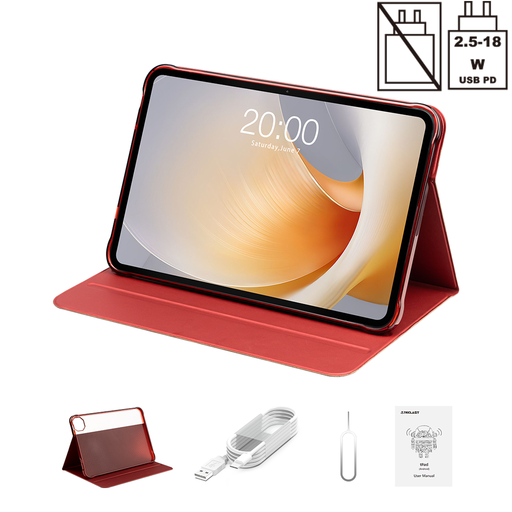
Why It Stands Out: If you want a cinematic experience on a budget, the TECLAST tablet T65 Plus is hard to overlook. Its massive 13.4-inch display is a standout feature, and the 120Hz refresh rate ensures exceptionally smooth scrolling and motion in videos. With a powerful Helio G99 processor, a huge 20GB of RAM (including virtual expansion) and 256GB of storage, this tablet is built for demanding media consumption and multitasking.
Pros:
Who is it for? This is the ideal large screen tablet for media lovers who want an immersive viewing experience for films and TV shows. It's also a great option for students and professionals who need a large digital canvas for productivity tasks.
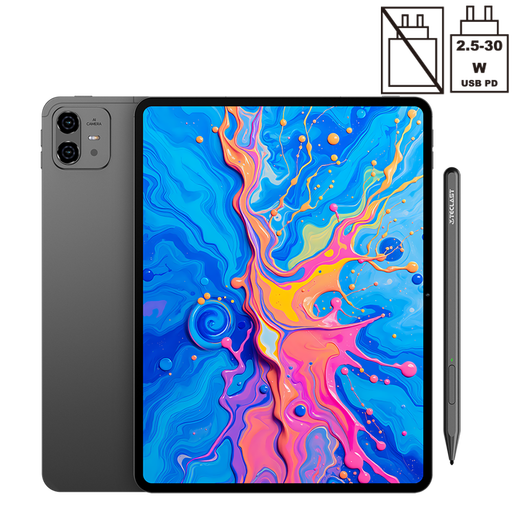
Why It Stands Out: The TECLAST ArtPad Pro is a fantastic entry point into the world of digital art. It’s a drawing tablet with screen that comes with a stylus supporting 4096 levels of pressure sensitivity, allowing for precise and varied brush strokes. The large 12.7-inch 2K display provides a sharp and spacious canvas. Powered by the capable Helio G99 processor and running Android 15, it has the performance to handle creative apps smoothly.
Pros:
Who is it for? This tablet with stylus is perfect for aspiring artists, hobbyists and students who want to draw, sketch or take handwritten notes digitally without investing in more expensive professional equipment.
If these specific models don't quite match what you're looking for, don't worry. The world of budget tablets is vast, with options to suit every need and price point. To see a wider selection of devices, feel free to browse our full collection.
Explore our complete range of the latest tablet models to find the perfect device for you.
Absolutely. Modern budget tablets have become surprisingly powerful. For everyday tasks like browsing the web, checking emails, watching videos on YouTube or Netflix and using social media apps, a well-chosen budget tablet UK model will perform very well. They are more than capable of handling the daily digital needs of most users.
When choosing a kids tablet, prioritise durability and safety. Look for models that come with a sturdy, shock-absorbent case. Software is equally important; ensure the tablet has comprehensive and easy-to-use parental controls to manage what your child can access and for how long. A screen size of 8 to 10 inches is generally a good balance between usability and portability for children.
Yes, you can. While professional digital artists might use high-end dedicated devices, a budget tablet that supports an active stylus is an excellent starting point for hobbyists, students and anyone looking to explore digital art. Look for a drawing tablet with screen that specifies its pressure sensitivity levels (e.g., 4096 levels), as this is key to achieving a natural drawing feel.