What matters when choosing?
Set your required browser and operating-system coverage before comparing laptop configurations. A single-screen workflow may be enough for quick layout checks; running a local stack or working across several panes changes which specifications deserve attention.
Mac with Safari
Choose when: Safari-on-macOS checks are part of the checkout test plan; Apple provides Safari developer tools on Mac.
Keep in mind: Safari access does not replace checks in other relevant browsers or on real phones. Confirm the chosen Mac’s display limits against your monitor setup.
Windows or Linux laptop
Choose when: Your local tools or managed work environment require Windows or Linux. Dell UK lists Windows and Ubuntu options for the Latitude 5450.
Keep in mind: Confirm the operating system and memory of the exact configuration. Desktop emulation still cannot establish how the checkout behaves in every other browser or on a real device.
| Concern |
What to check |
Who this matters to |
| Browser and device coverage |
List the browsers in your test plan and arrange access to real devices for critical checkout journeys. Include a Mac if Safari-on-macOS testing is required. |
If I need to catch checkout behaviour that differs between browsers or on a phone, I cannot rely on a desktop viewport check alone. Around 44% of consumers would put browser and real-device coverage first. |
| Screen workspace |
Check the exact laptop’s display outputs and whether your monitor, cable, dock and charging arrangement work together. |
When I compare the checkout with code, network activity and logs at my desk, I need room to keep those views usable. Screen workspace would be the primary concern for around 33% of consumers. |
| Local development workload |
Match the operating system, memory and storage configuration to the editors, local servers, containers or test runners you actually use. |
If my checkout tests run alongside a local application and several development tools, I need a configuration that fits that workload. Around 23% of consumers would prioritise local-tool requirements. |
MacBook Air options for Safari testing
These MacBook Air configurations are relevant when Safari on macOS is part of your home-office checkout test plan. Choose the screen size and stated storage capacity that fit your workspace and files; arrange other-browser and real-device testing separately.
 No image available
Apple 15-inch MacBook Air (2026), M5, 16GB, 1TB SSD, Silver
A Mac option for Safari-on-macOS checks when you want the stated 15-inch built-in screen for your desk workflow.
The listing specifies 16GB memory and a 1TB SSD. If you use an external monitor, confirm the display limits and compatibility with your cable or dock for this exact setup.
Joybuy
 No image available
Apple 13-inch MacBook Air (2026), M5, 16GB, 1TB SSD, Sky Blue
A Mac option for Safari-on-macOS checks if you prefer a 13-inch built-in screen and plan your working space accordingly.
The listing specifies 16GB memory and a 1TB SSD. Check the exact external-display limits and your monitor or dock compatibility if you will work at a desk.
Joybuy
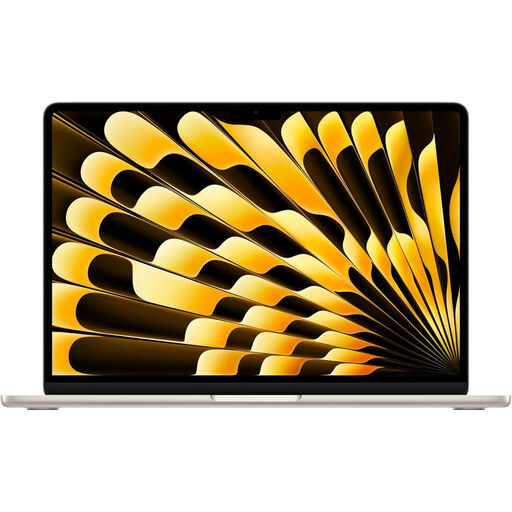 No image available
Apple 15-inch MacBook Air (2026), M5, 16GB, 512GB SSD, Starlight
A Mac option for Safari-on-macOS checks when a stated 15-inch built-in screen suits your home-office workspace.
The listing specifies 16GB memory and a 512GB SSD. Check that capacity against your local files and confirm the external-display setup if you need one.
Joybuy
Checkout-testing questions
Can device emulation replace testing checkout on a real phone?
No. Chrome for Developers says device mode does not run your page on a mobile device. Use it to inspect layouts and simulate conditions quickly, then validate important checkout journeys on the real devices and browsers in your test plan.
Do I need a Mac to test a checkout page?
A Mac is the direct route if your scope includes Safari-on-macOS checks; Apple provides Safari developer tools on Mac. If it does not, choose an operating system that supports the browsers and local tools your own test plan requires.
What should I check before using a home-office monitor?
Check the exact laptop’s display outputs, supported external-display arrangement and compatibility with your monitor, cable, dock and charging setup. Apple’s UK MacBook Air specifications list support for up to two external displays, but that does not establish compatibility with every desk arrangement.
Does buying a laptop make my checkout PCI DSS compliant?
No. A laptop purchase does not establish the compliance status of your checkout or payment-data handling. GOV.UK Pay describes the certification of its own service; check the requirements that apply to your payment provider and implementation before handling live card data.
When should I repeat browser checks?
Repeat priority checkout checks after meaningful browser, operating-system or checkout-integration changes. Stripe says it does not support browsers that no longer receive security updates, so keep the supported-browser requirements of your payment integration in view.


