Choose around the child’s main use: a restricted watch or first phone for family contact, a supervised tablet for apps and media, or a console when gaming comes first. If several people will share a device, check how child and adult accounts are separated; whichever route you choose, confirm whether communication, downloads and spending need separate controls, and whether mobile service or a subscription is required.
Who is each device route for?
Parents choosing a first contact device
If reaching a child away from home matters more than open app and web access, compare restricted phones and communication watches with a supervised smartphone. Check who can contact the child and what mobile service the device needs.
Parents setting up a supervised personal screen
A personal tablet or phone can suit a child using apps, reading and video at home. Apple, Google and Amazon offer different child-account or profile controls, so check the exact device and the settings for downloads, content and time limits.
Families sharing devices or gaming at home
A shared tablet calls for separate, secured adult and child profiles. For a games console, check whether playtime and communication rules apply to the child’s account or to everyone using the console.
What matters when choosing?
Start with the activity that would decide the purchase if needs conflict: contact, a personal screen, gaming or household sharing. Then check the relevant account and privacy settings on the particular device rather than assuming that a parental-control label covers them all.
| Concern | What to check | Who this matters to |
|---|
| Contact away from home |
Check permitted contacts and how calling works; confirm any required mobile service. |
If I mainly need to reach my child when they are out, a restricted contact device may matter more than apps. Around 27% of consumers put independent family contact first. |
| Personal apps and media |
Check child-account support and whether downloads, content and time limits have separate settings. |
For everyday reading, video and apps, I want a screen my child can use under their own account. Roughly 27% of consumers prioritise a supervised personal screen. |
| Gaming |
Check age ratings, online communication and whether restrictions apply per account or across the console. |
If gaming is the main activity, I need rules that also cover online play and the store. Around 20% of consumers place gaming and entertainment first. |
| Household sharing |
Confirm multi-user support and protect adult profiles with a screen lock. |
When the tablet belongs to the household, I need my child’s access kept separate from adult accounts. Approximately 13% of consumers make safe device sharing their primary concern. |
| Privacy and account access |
Review location and app permissions; check who can change settings or add users. |
I want to understand what information the device shares and whether my child can reach an unrestricted profile. Around 13% of consumers put privacy and account control first. |
What is easy to overlook?
-
Assuming one parental-control setting covers everything
Controls may sit in the child account, the device, the app store and communication settings. Nintendo UK Support, for example, distinguishes Switch console restrictions from some Nintendo Account controls.
Before choosing a device, locate its settings for downloads, communication, location and account recovery, and check which adult account manages each one.
-
Giving a child access through an unsecured adult profile
Google Kids Space Help says Family Link settings for a child account do not apply to other tablet profiles. Switching profiles can therefore expose access that the child profile was intended to restrict.
Use a separate child account or profile, secure adult profiles and check whether the child can add or switch to an unmanaged user.
-
Choosing a communication device without checking its service
Calling and family controls can depend on a provider’s service. Xplora says XploraOne needs a subscription for parental controls and mobile connectivity; that condition should not be assumed for other watches.
For the exact model, confirm the required SIM or service, network coverage, control features and cancellation terms.
A required connectivity or parental-control subscription remains an ongoing commitment while the service is used.
-
Treating a school rule as a rule about home ownership
Department for Education guidance concerns school-day mobile-phone policies in England, not a UK-wide restriction on families owning a device for home use.
Choose for the child’s use outside school, then check their school’s policy on carrying, storing and using phones or watches during the school day.
Relevant brands and control systems
Apple
An iPhone or iPad route built around a child’s own Apple Account, Family Sharing and Screen Time.
- Apple Support says Ask to Buy can handle eligible download and purchase requests, while Screen Time offers communication limits for defined contacts.
- Ask to Buy needs Family Sharing and a separate child Apple Account; it is not a control supplied by a shared adult sign-in.
Google
Family Link supports supervised Google Accounts on applicable Android devices; Google Kids Space is an option on compatible tablets.
- Google documents controls for account settings, Play approvals and app choices, with other capabilities dependent on the device.
- On a shared tablet, Family Link settings for the child do not govern other profiles. Secure adult profiles and confirm compatibility before choosing a model.
Amazon
Amazon Kids child profiles and Parent Dashboard are relevant to families considering a compatible Fire tablet.
- Amazon says Parent Dashboard offers daily limits, category restrictions, bedtime and age filters.
- Check the controls and content arrangement for the exact Fire tablet and child profile under consideration.
Xplora
A restricted communication route for families interested in managed contacts rather than a general-purpose smartphone.
- Xplora describes XploraOne as a device whose contacts, calls and location settings are managed through its app.
- Xplora says parental controls and mobile connectivity for XploraOne require a subscription. Check service terms for the particular device.
Nintendo
A console route for households primarily choosing a device for games.
- Nintendo UK Support documents Switch controls covering playtime, age ratings and communication restrictions.
- Switch console-level parental controls apply to everyone using that console, while some account and store decisions need separate settings.
Joybuy products to consider
These choices cover supervised tablet use at home and a wearable for families considering calls and location features. Confirm each model’s account controls and service requirements before relying on it for your child.
 No image available
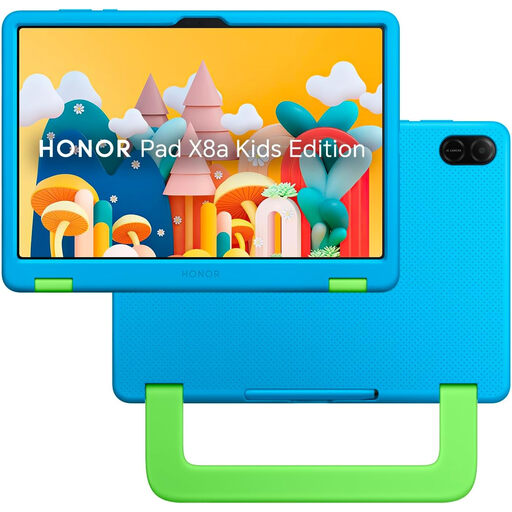
HONOR X8A Kids 11-inch Wi-Fi Tablet, 128GB, Space Grey
Consider this Wi-Fi tablet for a child’s apps and media at home if its account controls meet your supervision needs.
The named variant has an 11-inch screen and 128GB storage. Confirm how its child account and parental controls work on this model before relying on them.
View on Joybuy
 No image available
Alldocube Kido 8-inch Android 15 Tablet, 3GB+32GB, Blue Case
For apps and video on a child’s own tablet, check whether this model’s child lock provides the access rules your household needs.
The product name specifies an 8-inch screen, Android 15, 3GB RAM, 32GB storage and a blue protective case. It also states that no charging adapter is included.
View on Joybuy
 No image available
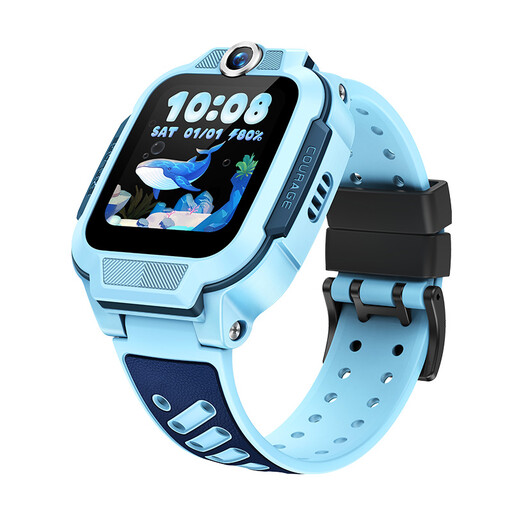
imoo Z3 4G Kids Smartwatch, Blue, 1 Pack
For a child who needs a wearable for calls and location features, consider this watch only after checking its contact controls and mobile service with the provider.
The product name specifies 4G, VoLTE calling, Triple-GNSS positioning and an 8GB storage variant. Confirm UK network compatibility, the required SIM or subscription and coverage before relying on it away from home.
View on Joybuy
Frequently asked questions
Does a school phone policy rule out buying a phone or smartwatch for home use?
No: Department for Education guidance addresses school-day mobile-phone policies in England, not whether a family can own a device for use outside school. Check the child’s individual school policy before planning to rely on a phone or watch during the school day.
Will parental controls work as soon as I switch on the device?
Set up the relevant child and adult accounts before handing over the device. Apple’s Ask to Buy requires Family Sharing and a child Apple Account; Google Family Link uses a supervised child account, and Nintendo places some console and account controls in separate settings.
Can adults and children safely share one tablet?
A shared tablet can keep access separate if the exact model supports multiple users and adult profiles are secured. Google Kids Space Help warns that a child’s Family Link settings do not apply to other profiles, so protect adult sign-ins and check whether the child can add users.
Should I switch on location sharing for my child’s device?
Decide whether location sharing serves your family’s communication needs, then review who can see it and which account can change it. The UK Information Commissioner’s Office includes geolocation and default settings among the considerations in its Children’s code for online services likely to be accessed by children; that does not mean every family needs a tracking device.
What service does a communication watch or restricted first phone need?
Check the exact device’s mobile-network compatibility, coverage and required SIM or subscription before choosing it for contact away from home. Xplora says XploraOne needs a subscription for both mobile connectivity and parental controls, but requirements differ between products.


