Families choosing a first smartphone or tablet
Choose the device and its child-account setup together. Apple, Google and Amazon tie different permissions and controls to their own family accounts or child profiles.


Start with the family controls that fit the child’s actual device and account: Apple, Google, Amazon and Microsoft offer different tools for their respective platforms. Home-broadband filtering adds a layer for devices using that connection, but does not cover use elsewhere; consider a paid service when compatible built-in tools leave a specific cross-device need unmet. As Internet Matters advises, controls support rather than replace family conversations and supervision.
Choose the device and its child-account setup together. Apple, Google and Amazon tie different permissions and controls to their own family accounts or child profiles.
Check what each device’s built-in controls cover, then decide whether home-broadband settings or a compatible cross-platform service addresses a remaining need.
Decide which boundaries matter for apps, browsing, time and communication. If you use activity or location monitoring, explain to the child what is visible and review the arrangement as they grow.
Choose the device and account route first, then add controls for places or activities that route does not cover.
Choose when: The child’s main device fits an Apple, Google, Amazon or Microsoft family setup.
Bear in mind: Accounts, supported devices and browsers determine which settings apply.
Add when: Several devices use the same home connection and household-wide website restrictions would be useful.
Bear in mind: Broadband settings do not follow a child onto mobile data or another network.
Consider when: A mixed-device household needs a particular dashboard, report or monitoring feature beyond its built-in tools.
Bear in mind: Check that the specific feature works on every relevant device before subscribing.
| Priority | What to check | Your needs |
|---|---|---|
| Device and account fit | Check the child-account or profile requirements, the adult’s family-group role, and support for the device’s operating system and browser. | I want controls that apply to the device, apps and services my child will actually use. |
| Content and purchases | Check app approvals, age settings and web filters for the chosen platform. Confirm which app store or billing system purchase permissions cover. | Before independent use, I want to set appropriate boundaries for downloads, browsing and purchases. |
| Home and away | Check what the broadband provider can restrict on the home connection, then configure device, account or app settings for use on other connections. | My child may use mobile data or another Wi-Fi network, so home filtering cannot be the only layer. |
| Monitoring and privacy | Check feature-by-feature device compatibility, required permissions and how activity or location information is shown. Explain active monitoring to the child. | If I need information across devices, I also want clear boundaries around what I can see and when I review it. |
Child-specific controls may depend on a family account, operating system or supported browser; hardware alone does not establish how those controls will work.
Before choosing a device, list the accounts, apps, browsers and connections the child will use, then check the corresponding family-control requirements.
Internet Matters distinguishes network, device and app controls. Broadband restrictions apply to devices using the relevant home connection, not every connection a child may use.
Set up child-account and app controls separately if the device will also be used on mobile data or other Wi-Fi networks.
Qustodio and Norton describe features whose availability depends on the platform. A service’s advertised tools may not all work on the child’s particular device.
Check the exact operating system, companion-app and browser requirements for the features you need, along with the renewal terms, before subscribing.
Activity and location tools affect a child’s privacy. The Information Commissioner’s Office says services providing parental monitoring should make that monitoring apparent to children.
Explain which settings are active, what information is visible and when you will revisit the arrangement.
These are routes to assess against the child’s devices and accounts, not interchangeable controls for every platform.
Family Sharing and Screen Time are relevant when a child will use an iPhone or iPad with their own Apple Account.
Family Link is an account-based route for supervised Google use, including relevant Android and Chromebook setups.
Amazon Kids profiles and Parent Dashboard are relevant to a child-focused Fire tablet setup.
Family Safety is relevant where a child’s use centres on Windows, Xbox or supported Android apps and games.
A paid service to assess if separate platform controls leave a specific cross-device management need.
Norton Family is a paid option for households assessing parental controls alongside Norton software.
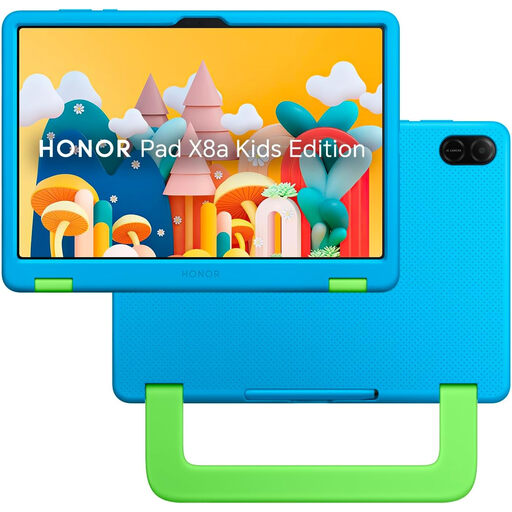
These tablets are options for the device part of a child’s first connected-device setup. Check their account and control requirements separately before deciding how to manage use at home and elsewhere.
 No image available
An 11-inch tablet to assess for a parent-configured child setup, with 128GB storage. The seller describes a Kids Mode interface and parental controls; confirm the required accounts, apps and available controls before relying on them.
 No image available
An 8-inch tablet with a protective case for a first-device setup. The seller describes a Child Lock feature; confirm its controls and setup requirements. The listing says a charging adapter is not included, so check that you have compatible charging equipment.
No. Apple Support says a child using an iPhone or iPad should have their own Apple Account in the Family Sharing group, so child-specific permissions and approvals can be applied without mixing them with an adult’s settings.
For the UK, Apple Support says a child under 13 needs a parent or guardian’s help and consent to create an Apple Account. Google says parental consent is required below the applicable country minimum age; check its current UK account conditions during setup.
No: home-broadband controls apply to devices using that broadband connection. Internet Matters recommends treating network, device and app controls as different layers, so configure the relevant device and account settings for use on other connections.
Consider one when built-in controls leave a specific need across compatible devices, such as combined reporting or a location feature. Qustodio and Norton advertise such tools, but feature availability varies by platform; check the exact devices and requirements before subscribing.
Explain what is monitored, why and when the arrangement will be reviewed. The Information Commissioner’s Office says services offering parental monitoring or location tracking should give children age-appropriate information and an obvious indication when it is active.