What to consider before buying
Nintendo Switch 2
Consider it when: handheld and TV play both matter and your child’s intended games are available on Switch 2.
Trade-off: Nintendo says parental restrictions apply to everyone using the console; GameChat has separate settings, and users under 16 need parental app setup to use it.
PlayStation 5
Consider it when: the games your child wants are available on PlayStation and its child-account controls suit your household.
Trade-off: PlayStation requires a family setup with the child added as a member for child-specific controls; check whether the chosen console has a disc drive and whether the game requires PlayStation Plus for online multiplayer.
Xbox Series S
Consider it when: your child’s games are available digitally on Xbox and Xbox family-group settings meet your needs.
Trade-off: Series S cannot play disc-based games; check the specific game’s online requirements, as Xbox describes different multiplayer arrangements for paid plans and free-to-play games.
Ofcom’s parent guidance discusses online contact and content concerns, while Internet Matters’ first-console guide covers communication, content and in-game spending. Check the intended games and the platform’s current settings before settling on a console.
| Concern |
What to check when buying |
Who this matters to |
| Online contact |
Review friend approvals, multiplayer and voice or text permissions for the child’s account; check any separate game or chat settings. |
If my child will play or chat online, I want to decide who can contact them before buying a headset; around 33% of consumers put online contact first. |
| Games and content |
Check the intended games’ UK age ratings and availability on the exact console, then review account age filters and game settings. |
If I am choosing games for a child, I want age ratings and account settings to fit the games they will play; around 27% of consumers prioritise age-appropriate content. |
| Ongoing costs |
Check whether each intended game needs a paid membership for online play, and review renewal terms and child-account spending controls. |
If I am budgeting beyond the console, I want to understand memberships and game purchases before setting up online play; around 20% of consumers put ongoing costs first. |
| Shared-device controls |
Check which restrictions follow the console and which apply to each signed-in child; consider access through other accounts. |
If several people will use one console, I want to know how restrictions affect each person; around 20% of consumers prioritise controls for shared use. |
Joybuy product options
These Joybuy listings include a retro handheld, Nintendo Switch models and a PlayStation 5 bundle. Check each intended game’s availability, online features and account controls before choosing a device.
 No image available
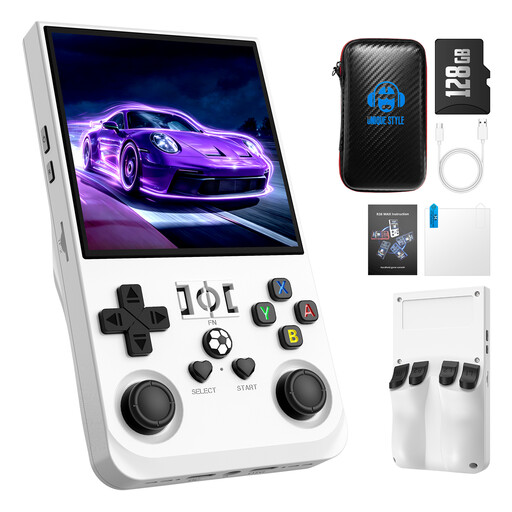
AISLPC R36MAX Retro Handheld Game Console, White
Consider it only if a portable retro-games device fits the intended play; check online access and account controls for any specific games before buying.
4.0-inch IPS display; 720 × 720 resolution; Linux system; 128GB storage; 4000mAh battery.
View on Joybuy
 No image available
Nintendo Switch 2 Console + Nintendo Switch Sports Resort
Consider this bundle if the intended games are available on Switch 2 and you want the option of handheld and TV play.
Nintendo says parental restrictions apply to everyone using the console. Users under 16 need parental app setup for GameChat; GameChat requires a Nintendo Switch Online membership.
View on Joybuy
 No image available
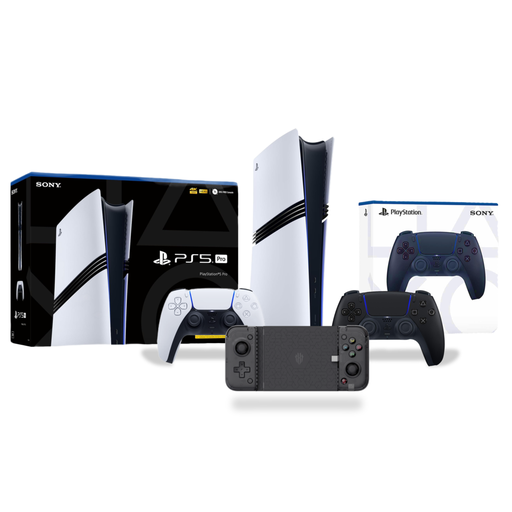
PlayStation 5 Pro Console + DualSense Wireless Midnight Controller + REDMAGIC Shadow Blade Gamepad Bundle
Consider this bundle if your child’s intended games are on PlayStation and the family-account controls fit your household.
PlayStation child-specific controls require a family setup with the child added as a member. Check whether the REDMAGIC gamepad is compatible with the intended supported iPhone or Android device.
View on Joybuy
 No image available
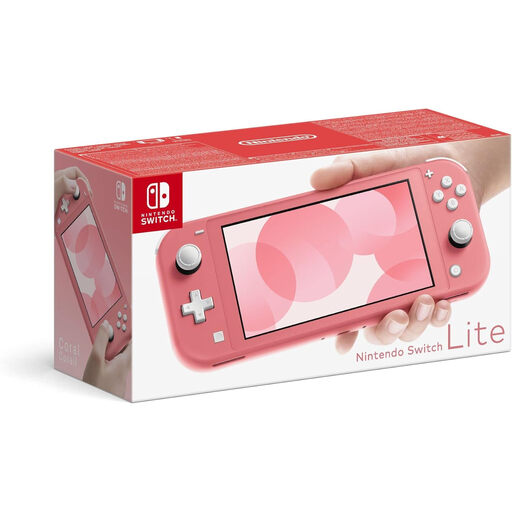
Nintendo Switch Lite, Coral
Consider this model if handheld-only play suits your child; it does not provide TV output.
Online play requires a Nintendo Switch Online subscription. This model has no TV output, kickstand or detachable controllers.
View on Joybuy
 No image available
Nintendo Switch 2 Console (UK Version)
Consider it if the intended games are available on Switch 2 and handheld and TV play are both useful for your household.
Nintendo says parental restrictions apply to everyone using the console. GameChat requires a Nintendo Switch Online membership; video chat requires a compatible camera sold separately.
View on Joybuy
Questions parents ask
Do I need to create a separate account for my child?
For PlayStation child-specific controls, create a family and add your child as a member; Xbox family settings also use a child account in a family group. Nintendo says Switch restrictions apply to the console rather than individually to each user, while supervising a child’s Switch 2 GameChat involves parental app setup.
Does buying a headset let my child voice-chat?
No; check the child account’s communication permissions and the game’s features first. Nintendo Switch 2 has a built-in GameChat microphone, but users under 16 need parental app setup, GameChat requires a Nintendo Switch Online membership, and video chat needs a compatible camera sold separately.
Will online play require a continuing payment?
It depends on the platform and game. Nintendo Switch Online is required for Switch 2 GameChat; PlayStation Plus is required for online multiplayer in games that require it. Xbox describes paid plans with online console multiplayer and says free-to-play multiplayer is open to every Xbox player, so check the chosen game before subscribing.
Is a PEGI rating enough to decide whether my child can play and chat online?
No. UK Government guidance describes age ratings for game content, but a rating does not replace checks of account permissions, communication settings and the game’s online features.
Do UK online-safety laws require parents to buy a particular console or headset?
The UK Government’s account of the Online Safety Act describes duties for relevant online service providers, not a requirement for parents to buy a particular console or headset. Check the controls and online features of the services your child will use.


