Families joining friends online
Check the exact games, versions and ways friends play before choosing a device. Xbox Support notes that cross-network play is available in some games, not as a universal feature.


Start with the specific games and friends your child wants to join, then check that the device, game and child account work together. Compare the available controls at platform and game level, how the device will be used, and any membership or accessory requirements; no device choice removes online risks.
Check the exact games, versions and ways friends play before choosing a device. Xbox Support notes that cross-network play is available in some games, not as a universal feature.
If you want to manage age, communication and playtime settings, plan to set up a child account and check the intended game’s own interactions as well.
When gaming will share a phone or tablet with other uses, compare the selected mobile ecosystem’s account, app and purchase controls.
Consider when: the child’s intended games and friends use a console platform, and you want its family-account controls.
Trade-off: multiplayer access and chat conditions vary by game and service; some console versions also cannot use discs.
Consider when: the intended games have suitable mobile versions and a portable device would be useful for other activities too.
Trade-off: Apple Screen Time and Google Family Link have different controls, and game accounts and payment routes may need separate checks.
Consider when: the child’s intended game needs or suits its PC version and an adult can manage the Windows and game accounts.
Trade-off: Windows settings do not establish control over every game service or browser, so check the game’s own requirements and communication options.
For a first supervised gaming setup, settle how the child will play with friends, which controls you need and where the device will be used before comparing models.
| Concern | What to check when buying | Who this matters to |
|---|---|---|
| Playing with friends | Check the exact game and version, supported devices, friend features and online-access terms. | I want my child to join the particular games and friends they have in mind; around 29% of consumers put game and friend compatibility first. |
| Age and communication controls | Check the game’s age rating and chat options, then set up the platform’s child account and communication controls. | I want age-appropriate access and manageable contact, while checking the game’s own settings too; around 29% of consumers put supervised contact and age suitability first. |
| Family routines and device use | Decide whether portable play, a shared screen or other computer uses matter, and check compatible games and available time settings. | I need the device to fit how our family uses it and manages playtime; around 24% of consumers put device and routine fit first. |
| Spending and ongoing access | Check the game’s membership terms, whether the console accepts physical games and which payment routes require adult approval. | I want to understand access costs and the purchases I can supervise before choosing; around 18% of consumers put spending and continuing costs first. |
Cross-network play is available in some games, not all, and online access conditions can differ between titles.
Before choosing hardware, confirm the exact game, supported devices, friend features and current access terms.
Some game services and billing routes operate separately from platform-level settings. Google’s stated purchase approvals, for example, apply to Google Play billing.
Review the platform account, game account, chat settings and payment route separately.
Xbox Series S and the specified PS5 Digital Edition versions do not have a disc drive, so they cannot play physical game discs.
Check the precise console version and how your family plans to obtain games.
Nintendo’s introductory membership-free period ended in March 2026. Nintendo says a Nintendo Switch Online membership is required for GameChat after that period.
Check whether your family wants GameChat and review its current membership and setup conditions before relying on it.
Switch consoles combine portable play with Nintendo’s console parental controls. Check the intended games and whether Switch 2 GameChat is wanted.
Consider PS5 options when the child’s intended games and friends use PlayStation and an adult can supervise a child account.
Xbox consoles offer family account tools, while Microsoft Family Safety also covers supported Windows settings.
iPhone and iPad are portable, multipurpose options when the intended games have suitable Apple-device versions.
Android phones and tablets can use a supervised Google child account and Family Link when the device and intended games are compatible.
These options cover Windows gaming desktops, a Nintendo Switch 2 bundle, an Android tablet and a PS5 Disc Edition. Check that the specific games and account controls suit your child before choosing.
 No image available
A Windows gaming desktop bundle to consider if you want a computer gaming setup with peripherals included.
AMD Ryzen 5 7500F; NVIDIA GeForce RTX 5060 8GB; 16GB DDR5; 1TB NVMe SSD; Windows 11 Home.
Includes a monitor, keyboard, mouse, headset and mousepad.
 No image available
A bundle to consider if the intended games are available on Switch 2 and portable or shared-screen play suits your family.
Nintendo says users under 16 need parental controls set up through its smart-device app before using GameChat. After the introductory period ended in March 2026, Nintendo says GameChat requires a Nintendo Switch Online membership.
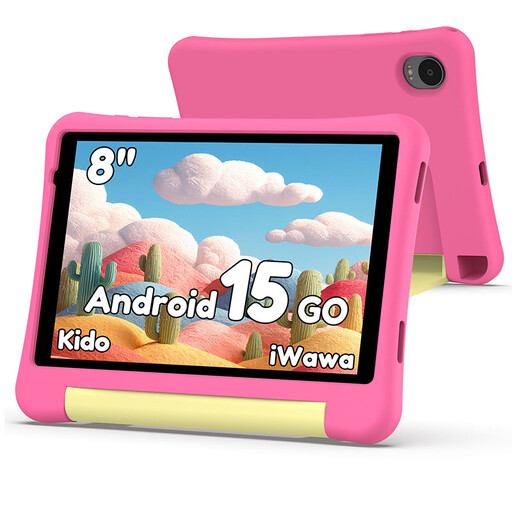 No image available
An Android tablet to consider if the intended games have suitable mobile versions and you want a child-focused device.
8-inch screen; Android 15; Child Lock; Unisoc T310; 3GB+32GB; 5G WiFi; 5000mAh; two speakers; 3.5 mm socket; front 2MP and rear 5MP cameras.
Includes a pink protective case. Adapter not included.
 No image available
A PlayStation option to consider if the child’s intended games and friends use that platform and physical-game support matters to your family.
Slim Disc Edition with an Ultra HD Blu-ray drive and DualSense controller. Sony parental controls require an adult to create a family and add the child as a family member.
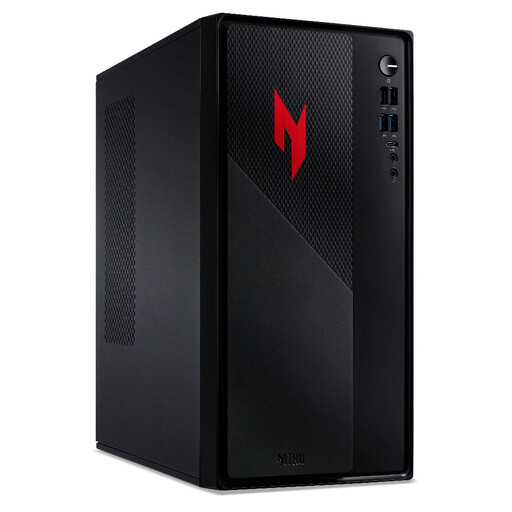 No image available
A Windows gaming desktop to consider if the child’s intended game suits its PC version and you plan to use Windows family settings.
Intel Core i5-13420H; 16GB RAM; 512GB SSD; GeForce RTX 5060; Windows 11.
Do not assume it will. Review the platform’s communication controls and the particular game’s chat, friend and reporting settings before allowing online play.
No single rule covers every game and platform. Nintendo says many Switch games require Nintendo Switch Online but some do not; check the specific game’s current terms. Sony lists online multiplayer as a PlayStation Plus benefit, so check the relevant game and service requirements before buying.
Create the applicable family and child accounts, set age and communication permissions, review time and purchase controls, and test the intended game’s settings. Keep adult account credentials and control passcodes separate from the child’s.
No. The Games Rating Authority says the UK age-enforceable rule concerns supplying physical PEGI 12, 16 and 18 games to someone below the stated age; it is not a console-purchase age limit. PEGI can help you assess game content, but it does not guarantee anything about online contact or game difficulty.
UK consumer law provides remedies for faulty goods. The explanatory notes to the Consumer Rights Act 2015 describe a minimum 30-day period for the short-term right to reject, subject to the Act’s conditions. Check the seller’s process without confusing a voluntary returns policy with statutory rights.